


Security News
New React Server Components Vulnerabilities: DoS and Source Code Exposure
New DoS and source code exposure bugs in React Server Components and Next.js: what’s affected and how to update safely.
By Sarah Gooding - Dec 12, 2025
linkproofer
Advanced tools

LinkProofer is a CLI application for proofing links in your project.
Store your links in js or ts files, and verify the links with the LinkProofer CLI script.
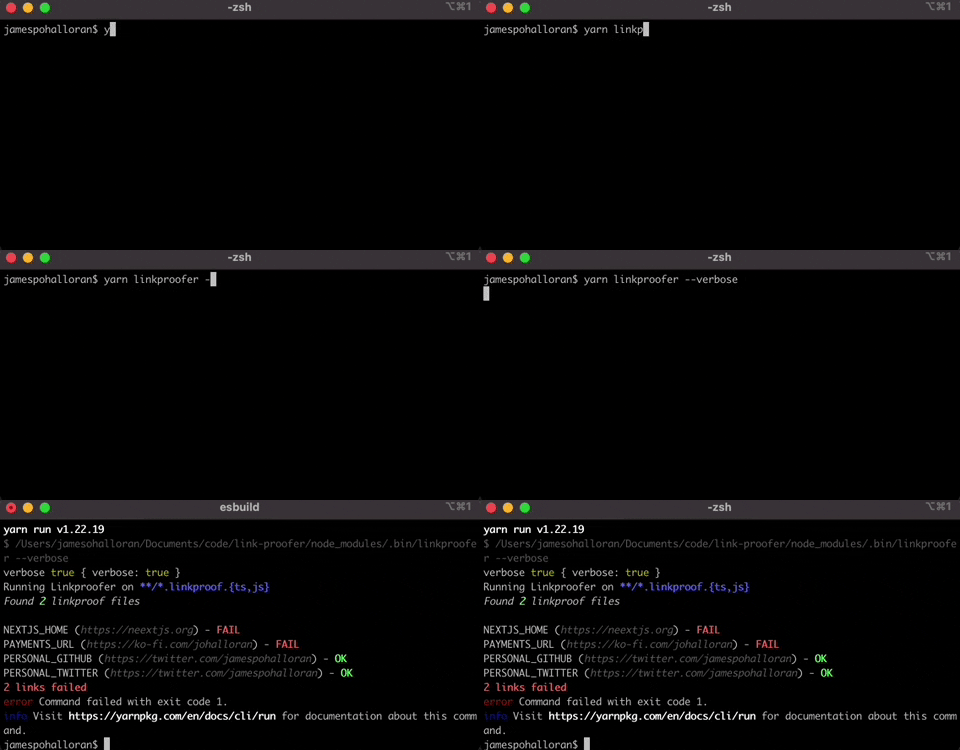
There are lots of link checkers out there, and many will scrape your site's html. HTML scraping solutions can fall short when...
Instead of scraping your site, LinkProofer will have you store your links in configured js or ts files, and check those links via the CLI, or through CI.
yarn install --dev linkproofer
or
npm install --save-dev linkproofer
Create a global.linkproof.ts or global.linkproof.js at the root of your project, with the following code:
const linkproof = {
  MY_PORTFOLIO_URL: "https://johalloran.dev",
};
export default linkproof;
Note ⚠️. The link object needs to be the default export for LinkProofer to work.
You can even use this URL in one of your pages if you want, to get an idea how LinkProofer is used:
// ...
<h1>
  Linking to <a href={links.MY_PORTFOLIO_URL}>My Portfolio!</a>
</h1>
Now at the root of your project, run:
npm run linkproofer
or
yarn linkproofer
You should see an audit of all your links (just MY_PORTFOLIO_URL in our case).
You can create any *.linkproof.<js | ts> file in your project, and the containing links will be validated anytime LinkProofer is run.
By default, LinkProofer will look in any \*_/_.linkproof.<js | ts> file in your project. You can customize this by passing a custom --files flag into the CLI
npm run linkproofer --files **/*/mylinksfile.ts
Linkproofer can be run in a GitHub action to validate all links are properly working.
Add the following action: .github/workflows/linkproof.yml
name: Check Links
on:
  pull_request:
    types: [opened, synchronize, reopened]
jobs:
  linkproofer:
    runs-on: ubuntu-latest

    strategy:
      matrix:
        node-version: [16.x]

    steps:
      - uses: actions/checkout@v3
      - name: Use Node.js ${{ matrix.node-version }}
        uses: actions/setup-node@v3
        with:
          node-version: ${{ matrix.node-version }}
      - name: yarn install
        run: |
          yarn install
        env:
          CI: true
      - name: linkproofer
        run: |
          yarn linkproofer
        env:
          CI: true
If you have deployment previews setup with a service like Netlify or Vercel, you can configure the LinkProofer baseURL to look for relative links in your deployment preview
Your GitHub action step will look something like:
- name: linkproofer
  run: |
    yarn linkproofer --baseURL https://portfolio-avatar-git-${{ github.head_ref }}-jamespohalloran.vercel.app
  env:
    CI: true
In the above example, https://portfolio-avatar-git and -jamespohalloran.vercel.app will need to be replaced with your Vercel/Netlify project's specific info.
You can use one of the following packages to wait for your deployment to finish, before checking relative links:
Usage: linkproofer [options]

Options:
  -V, --version                output the version number
  -f, --files <files>          Filepath pattern for files in which linkproofer should check for links
  -v, --verbose                Log out all checked links (not just the failures)
  -o, --outputDir <outputDir>  Directory to put the compiled output files. (Default dist). This directory should be added to your .gitignore
  -b, --baseURL <baseURL>      baseURL to use for relative links.
  -h, --help                   display help for command
FAQs
LinkProofer is a CLI application for proofing links in your project.
We found that linkproofer demonstrated a not healthy version release cadence and project activity because the last version was released a year ago. It has 1 open source maintainer collaborating on the project.
Did you know?

Socket for GitHub automatically highlights issues in each pull request and monitors the health of all your open source dependencies. Discover the contents of your packages and block harmful activity before you install or update your dependencies.
Security News
New DoS and source code exposure bugs in React Server Components and Next.js: what’s affected and how to update safely.

Security News
Socket CEO Feross Aboukhadijeh joins Software Engineering Daily to discuss modern software supply chain attacks and rising AI-driven security risks.

Security News
GitHub has revoked npm classic tokens for publishing; maintainers must migrate, but OpenJS warns OIDC trusted publishing still has risky gaps for critical projects.