


New Research: Supply Chain Attack on Axios Pulls Malicious Dependency from npm.Details
Socket
Book a DemoSign in
Socket

logboom

Package Overview
Dependencies
Maintainers
1
Versions
3
Alerts
File Explorer

Advanced tools

Socket logo

Install Socket

Detect and block malicious and high-risk dependencies

Install

logboom

clearcut simple node logging

latest
Source
npmnpm
Version
0.1.1
Version published
Weekly downloads
4
300%
Maintainers
1
Weekly downloads
 
Created
Source

logboom — Build Status

clearcut simple node logging

  • install logboom locallynpm install logboom

  • import and instantiate a logger

    import {FileLogger} from "logboom"
    
    const logger = new FileLogger({logfile: "example.log", level: "silly"})
    
  • do some logging

    logger.error(new Error("an error occurred"))
    logger.warn("heed my warning!")
    logger.info("something informative")
    logger.verbose("explaining what's happening verbosely")
    logger.debug("information to help diagnose bugs")
    logger.silly("obscenely fine-grained details")
    
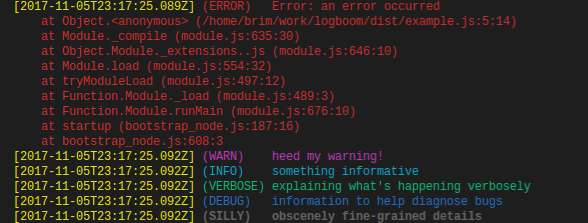
  • voila! color-coded console output

    logboom colored console output

  • you also get a color-free example.log text file

notes

  • the ConsoleLogger class writes to stdout and stderr

  • the FileLogger is really double-logger
    it extends the console logger and writes to the console — but also writes to a text file (with the colors stripped out)

  • alternatively, you can just use the ConsoleLogger, and then redirect the stdout/stderr output with unix stuff:
    node myapp 2>&1 | tee -a example.log
    if that's not your jam, just use the file logger

Keywords

logging

FAQs

Package last updated on 13 Nov 2017

Did you know?

Socket

Socket for GitHub automatically highlights issues in each pull request and monitors the health of all your open source dependencies. Discover the contents of your packages and block harmful activity before you install or update your dependencies.

Install

Related posts

