New Research: Supply Chain Attack on Axios Pulls Malicious Dependency from npm.Details →
Socket
Book a DemoSign in
Socket

logcon

Package Overview
Dependencies
Maintainers
1
Versions
6
Alerts
File Explorer

Advanced tools

Socket logo

Install Socket

Detect and block malicious and high-risk dependencies

Install

logcon

Logcon is an free to use JavaScript library that provides nice console.log output with icons, tables and colors!

latest
Source
npmnpm
Version
1.0.6
Version published
Maintainers
1
Created
Source

Logcon

Logcon is an free to use JavaScript library that provides nice console.log output with icons, tables and colors!

NPM: npm i logcon (NPM Package)

Contact Me: https://www.sectly.online/#contact

const logcon = require("logcon");

logcon.warn("This is a warning!");

logcon.error("This is a error!");

logcon.log("This is a log!");

logcon.debug("This is a debug!");

logcon.success("This is a success!");

logcon.stress("This is a stress!");

logcon.info("This is a info!");

logcon.output("This is a output!");
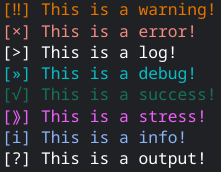
Preview Image

New Since 1.0.3: Tables And More API Functions!

Tables:

const logcon = require("logcon");

const header = ["Id:", "Name:", "Status:"];
const body = [
  ["#1", "Sectly", "Online", "Working On Stuff"], 
  ["#2", "Mike", "Idle"],
  ["#3", "Dan", "Offline"]
];
 
let newtable = new logcon.Table(header, body);
newtable.log(3); // Colors: 0 = Default, 1 = Red, 2 = Green, 3 = Yellow, 4 = Blue, 5 = Purple, 6 = Dark Blue, 7 = White, 8 = Whiteish. (Default = White)

newtable.setHeader(["Id:", "Name:", "Status:", "Extra:"]); // Set Header
newtable.appendBody(["#2", "Mike", "Idle"]); // Append Body
newtable.setBody([["#3", "Dan", "Offline"]]); // Set Body
const tableArray = newtable.array(); // Convert To Array
const tableString = newtable.string(); // Convert To String
newtable.log(); // Log In Console, Defaults To The Default Color With No Color Input
newtable.reset(); // Clear/Reset The Table

newtable.reset()
  .setHeader(["Id:", "Name:", "Status:"])
  .appendBody(["#1", "Sectly", "Online", "Working On Stuff"]);

let string = newtable.string();

console.log(string); // Or logcon.debug("Logcon Table:\n" + string);
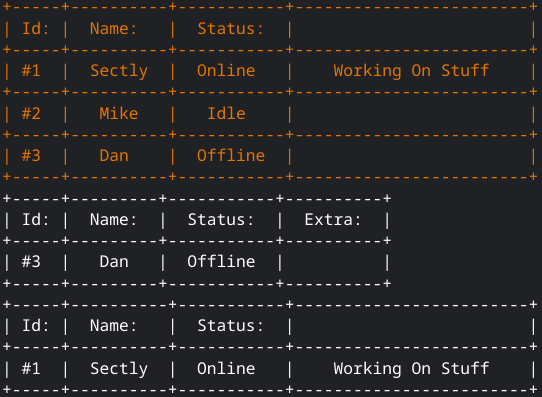
Preview Image

API Functions:

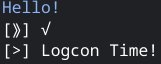
const logcon = require("logcon");

const color = logcon.color(4); // Colors: 0 = Default, 1 = Red, 2 = Green, 3 = Yellow, 4 = Blue, 5 = Purple, 6 = Dark Blue, 7 = White, 8 = Whiteish. (Default = White)
console.log(color + "Hello!" + logcon.color(7));

const icon = logcon.icon(4); // Icons: 0 = ×, 1 = √, 2 = ‼, 3 = i, 4 = ⟫, 5 = », 6 = >, 7 = ?, 8 = ›
console.log("[" + icon + "]", logcon.icon(1));

const logger = logcon.type(7); // Types: 1 = Error, 2 = Success, 3 = Warn, 4 = Info, 5 = Stress, 6 = Debug, 7 = Log, 8 = Output.

logger("Logcon Time!");

Preview Image

Keywords

console

FAQs

Package last updated on 13 Oct 2022

Did you know?

Socket

Socket for GitHub automatically highlights issues in each pull request and monitors the health of all your open source dependencies. Discover the contents of your packages and block harmful activity before you install or update your dependencies.

Install

Related posts