mathmesh:
Given a latex math string, returns its positions and indices (for BabylonJs) and vertices (for ThreeJs bufferGeometry), can also give 2D mesh for framework like Pixi js
note:
It doesn't support sqrt / nth root, please use ^(1/n) instead
To install:
npm install mathmesh
3D Usage:
to generate 3D mesh for your latex math:
import {mathmesh} from "mathmesh";
const mesh = mathmesh("\\int_{a}^{b}x^2 \\,dx");
console.log(mesh);
you will see:
{
    positions: [ x1, y1, z1, x2, y2, z2, .....],
    indicies: [ # # # # # .....],
    vertices: Float32Array()
}
For ThreeJs (@react-three/fiber):
import {mathmesh} from "mathmesh";
const vertices = mathmesh("\\int_{a}^{b}x^2 \\,dx").vertices;
return <bufferGeometry >
<bufferAttribute
attach='attributes-position'
array={vertices}
count={vertices.length / 3}
itemSize={3}
/>
</bufferGeometry>

For BabylonJs:
import {mathmesh} from "mathmesh";
const verts = mathmesh("\\int_{a}^{b}x^2 \\,dx");
const customMesh = new Mesh("myMathMesh", scene);
const vertexData = new VertexData();
vertexData.positions = verts.positions;
vertexData.indices = verts.indices;
vertexData.applyToMesh(customMesh);
const fontMaterial = new StandardMaterial("mathmeshMat", scene);
fontMaterial.backFaceCulling = false;
fontMaterial.emissiveColor = new Color3(0, 1, 0);
customMesh.material = fontMaterial;
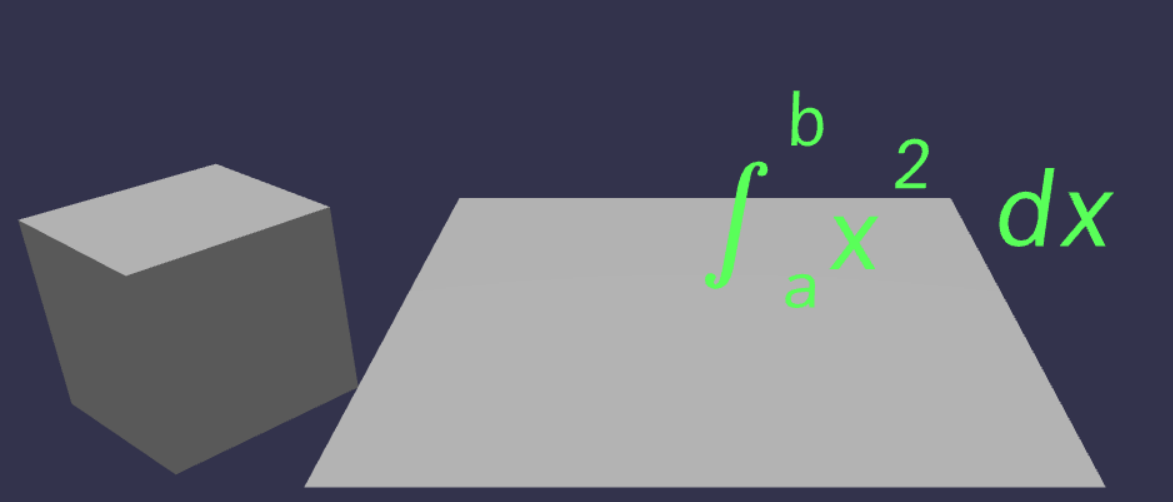
Here is a example that showcases Vite+React+Babylon+Ts+Mathmesh: https://github.com/cyavictor88/mathmesh-ts-babylon
It works in Vite React, but for npm run build to work, you might need to do NODE_OPTIONS=--max-old-space-size=4000 vite build
Also tried in NextJs, runs fine
2D Usage:
to generate 2D mesh for your latex math:
import {mathmesh2D} from "mathmesh";
const mesh = mathmesh2D("\\int_{a}^{b}x^2 \\,dx");
console.log(mesh);
you will see:
{
    positions: [ x1, y1, x2, y2, .....],
    indicies: [ # # # # # .....],
    vertices: Float32Array(),
    triangles: [
    [ [t1_x0,t1_y0], [t1_x1, t1_y1] ,[t1_x2, t1_y2] ],
    [ [t2_x0,t2_y0], [t2_x1, t2_y1] ,[t2_x2, t2_y2] ],
    ... ]
    aTextureCoord: number[];
    aVertexPosition: number[];
}
For 2D framework such as Pixi js:
Option 1 - render with aVertexPosition and aTextureCoord:
import {mathmesh2D} from "mathmesh";
const mesh2D = mathmesh2D("\\sum_{n=1}^{\\infty} 2^{-n} = 1")
const geometry = new PIXI.Geometry()
.addAttribute('aVertexPosition', mesh2D.aVertexPosition,2)
.addAttribute('aTextureCoord', mesh2D.aTextureCoord,2)
.addIndex(mesh2D.indices);
const greenColor = new PIXI.MeshMaterial(PIXI.Texture.WHITE, {
tint: 0x00ff00,
});
const pixiMesh = new PIXI.Mesh(geometry, greenColor);
app.stage.addChild(pixiMesh);
Options 2 - render with triangles:
import {mathmesh2D} from "mathmesh";
const mesh2D = mathmesh2D("\\sum_{n=1}^{\\infty} 2^{-n} = 1")
const mathmeshGraphics = new PIXI.Graphics();
mathmeshGraphics.beginFill(0x000000);
mesh2D.triangles.forEach( (tri: number[][]) => {
mathmeshGraphics.moveTo(tri[0][0], tri[0][1] );
mathmeshGraphics.lineTo(tri[1][0], tri[1][1] );
mathmeshGraphics.lineTo(tri[2][0], tri[2][1] );
mathmeshGraphics.lineTo(tri[0][0], tri[0][1] );
});
mathmeshGraphics.endFill();
app.stage.addChild(mathmeshGraphics);
Local testing using Node Canvas:
if you want build from source and to see how it draw out locally , you can simply:
- Clone this repo
- npm install
- npm run build
- remove "type":"module" in package.json
- npm run test
- open localhost:8081
- you should see a picture:

The code is a mess. I think only I can read it coherently(not anymore). I will try to improve and fix it.
Special Thanks
Won't able to do it without this amazing repo: https://github.com/fetisov/ttf2mesh





