A NativeScript plugin to create native Google sign-in button
Supports Nativescript 3.0.x and Android platform only.
Adapts the native Android
SignInButton
control
Installation
tns plugin add nativescript-plugin-google-signin-button
Screenshot
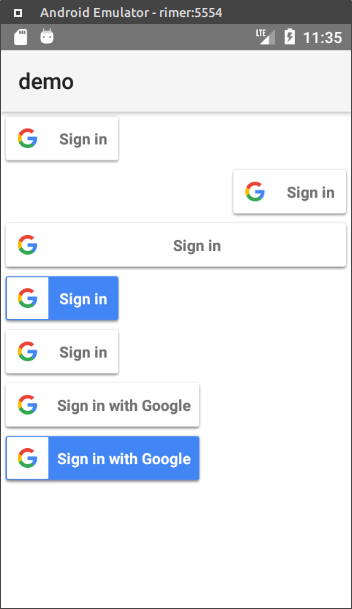
Usage
<Page xmlns="http://schemas.nativescript.org/tns.xsd" loaded="pageLoaded"
      xmlns:gsb="nativescript-plugin-google-signin-button">
    <ScrollView>
        <StackLayout>
            <gsb:GsbButton id="gsbButton" horizontalAlignment="left" tap="gsbTap"/>
            <gsb:GsbButton horizontalAlignment="right" tap="gsbTap"/>
            <gsb:GsbButton horizontalAlignment="stretch" tap="gsbTap"/>

            <gsb:GsbButton colorStyle="dark" horizontalAlignment="left" tap="gsbTap"/>
            <gsb:GsbButton colorStyle="light" horizontalAlignment="left" tap="gsbTap"/>
            <gsb:GsbButton sizeStyle="wide" horizontalAlignment="left" tap="gsbTap"/>
            <gsb:GsbButton colorStyle="dark" sizeStyle="wide" horizontalAlignment="left" tap="gsbTap"/>
        </StackLayout>
    </ScrollView>
</Page>
Attributes
- colorStyle - Button color scheme.
dark, light, auto (Google Play services will decide the color style
for sign-in button)
- sizeStyle - Button size.
standard, wide, icon (icon only shown)
License
MIT





