node-bins
Fast create global commands by nodejs.🥰
How to use
Install
npm install node-bins -g
Use
1、Create a folder, and run npm init or pnpm init or yarn init in this folder to create a 'package.json' file.
2、Create your command source code file (js, cjs, mjs, ts) under this folder, which contains all your command logic. Note that you need to write this code on the first line - '#!/usr/bin/env node'. For example
#!/usr/bin/env node

console.log('test node bins----1111')
3、Run create-bin in this folder. You can see
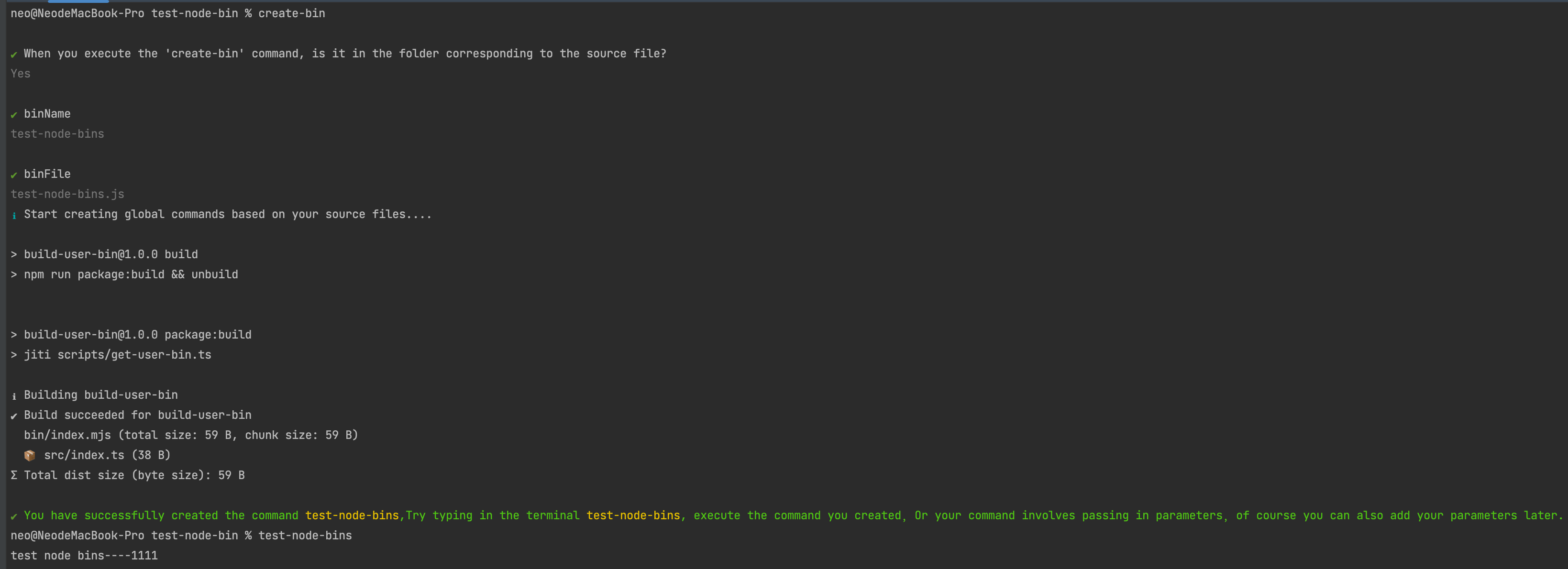
Yes! Your global nodejs command is create, you can run the command you created from anywhere !!! 🤪
You can unleash your creativity by writing cooler and more creative global script commands to operate your project and improve code efficiency.
This is a demo
node-bins-demo
Something new
Here are some built-in commands to choose from -
🎈 1. bins --help: Display Help Information.
🎈 2. bins --list: Check which commands are currently managed by 'node-bins'.
🎈 3. create-bin: Create a custom command for the corresponding file in the corresponding script folder.
🎈 4. delete-bin <deleteBinName>: Delete the custom commands you have already created in node-bins.





