
This project has been renamed Screwy
npm scripts gui (NSG)
A GUI interface for npm scripts.


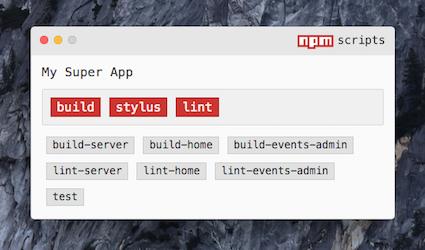
Tested on OS X Yosemite, OS X El Capitan, and Ubuntu
Install
Install as a Dev Dependency
npm i -D npm-scripts-gui
...Or Install Globally
npm i -g npm-scripts-gui
Installing as a dev dependency allows anyone who downloads your project to also get access to the gui... for free!
Instructions
Launching
To launch Npm Script GUI (NSG), you must be in a directory with a package.json file.
If Installed Globally
Then simply run:
npm-script-gui or the shorter nsg
If Installed as a Dev Dependency (Recommended)
You must create an npm script task in the package.json that runs the nsg command and then you would run npm run <command_name> from the terminal.
{
    "scripts": {
        "nsg": "nsg"
    }
}
Seeing Output
Whether NSG is installed globally or as a dependency, any text output associated with any npm script task will be printed to the command line where NSG was launched.
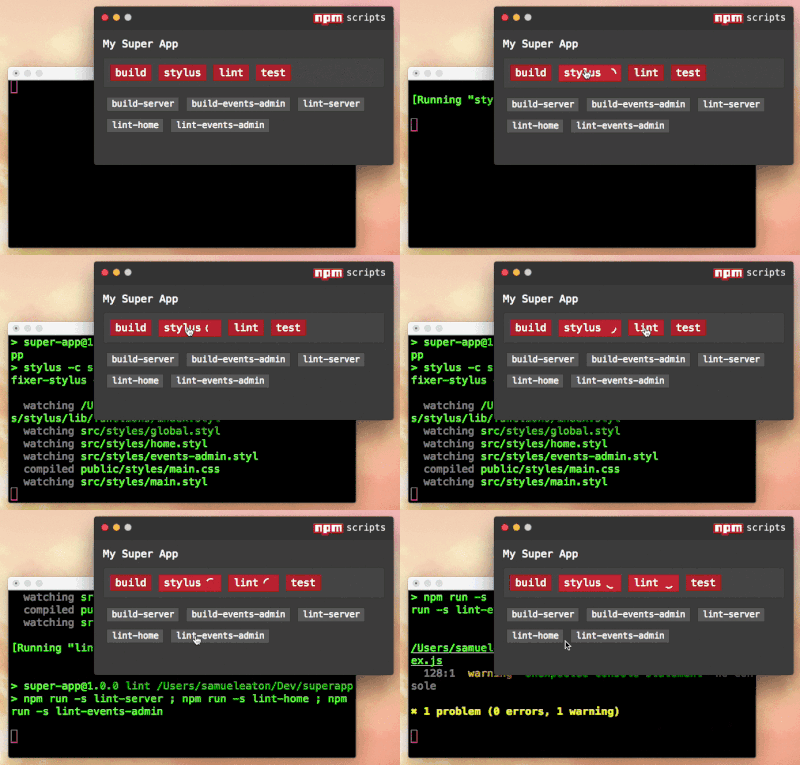
Quiting the App
To quit the app, it is safer to close the actual renderer window rather than quiting the process from the command line. If quiting from the command line, NSG may not do the check to make sure all processes are killed before closing.
Killing a Running Script
Processes will die automatically when they finish or when the app is closed, but there may be times when you want to manually kill a process. Simply double click the button.
You can also use the KILL command with file watching and hotkeys.
File Watching
You can tell NSG to watch files and how to respond to those changes. You need to create a watch block in the .nsgrc file. You can watch directories, files, and use the * and ** wildcards.
After specifying a path, you need to specify which npm script task to respond to the file change and how it should respond. There are 3 options regarding the type of action to perform:
START (default, may be excluded)KILLRESTART (if the task is running, this will kill it and start it)
NOTE: A whitespace is required after any of the keywords.
Example:
{
    "watch": {
        "src/scripts/*.js": "RESTART transpile-scripts",
        "./index.js": "RESTART start-server",
        "src/styles": "stylus"
    }
}
In the example, the first watcher will restart the transpile-scripts task when any .js files are changed at src/scripts. The second watcher will apparently restart the server when the index.js file is changed. The last watcher will run START stylus (START is default).
Hotkeys
Hotkey combinations are configurable in the .nsgrc file. These allow you to trigger any npm scripts without needing to even click on the button or even being focused on the GUI window.
Again, you can have the GUI window minimized and the hotkeys will still trigger button clicks, and output will be sent to the terminal.
Hotkeys are defined in the .nsgrc file. They require the name of the npm script as the key and the hotkey combination as the value.
Just as with file watching, the START, RESTART, and KILL commands may be used with the npm task name.
Note: As of v0.0.17, the order of the hotkey/npm command has switched to match the file watching format. The hotkey combo should now come first.
{
    "hotkeys": {
        "Control+Cmd+Alt+s": "start",
        "Control+Cmd+Alt+r": "RESTART start",
        "Control+Cmd+Alt+k": "KILL start"
    }
}
In the above example, assuming the start command's job is to spin up a server, then Control+Cmd+Alt+s would start the server if it wasn't on, Control+Cmd+Alt+r would restart it if it was running, and Control+Cmd+Alt+k would shut it down.
Multi-platform Compatibility
If you expect others to run NSG on a different platform than you are developing on, you will need to specify the platform to avoid conflicts.
For Mac, use: OSX or darwin
For Linux, use: linux
{
    "hotkeys": {
        "darwin": {
            "Control+Cmd+Alt+s": "start",
            "Control+Cmd+Alt+r": "RESTART start",
            "Control+Cmd+Alt+k": "KILL start"
        }
    }
}
More hotkey examples are in the Configurations section.
Configurations
NSG will automatically search for a .nsgrc in the same directory as the package.json. It should be in json format.
These are the available options:
- name, choose different name than defined in
package.json
- primary, the primary script buttons (red buttons) for scripts that will be ran more frequently
- exclude, scripts to NOT include in the GUI
- alwaysOnTop, whether the window is always in front of other windows
- theme, choose a light or dark theme for window
- watch, specify paths to watch and tasks to respond to file changes
- hotkeys, define hotkey combinations that will trigger npm scripts
- silent, suppress all of the npm's native error message and error log. (This is good for tests or linting, where you usually get error messages anyways.)
.nsgrc Example
{
    "name": "Qualtrics to SFDC",
    "primary": ["build", "run-production", "run-sandbox"],
    "exclude": ["scripts-gui", "prebuild"],
    "silent": ["lint", "test"]
    "alwaysOnTop": true,
    "theme": "dark",
    "watch": {
        "src/scripts/*.js": "RESTART production",
        "src/styles": "RESTART stylus"
    },
    "hotkeys": {
        "Control+Alt+b": "build",
        "Shift+Command+1": "run-production",
        "Shift+Command+2": "run-sandbox",
        "Control+Cmd+Alt+r": "RESTART run-production",
        "Control+Cmd+Alt+k": "KILL run-production"
    }
}
Any script not specified in primary or exclude will show up as a normal button.





