


Product
Socket for Jira Is Now Available
Socket for Jira lets teams turn alerts into Jira tickets with manual creation, automated ticketing rules, and two-way sync.
By Jeppe Hasseriis - Apr 20, 2026
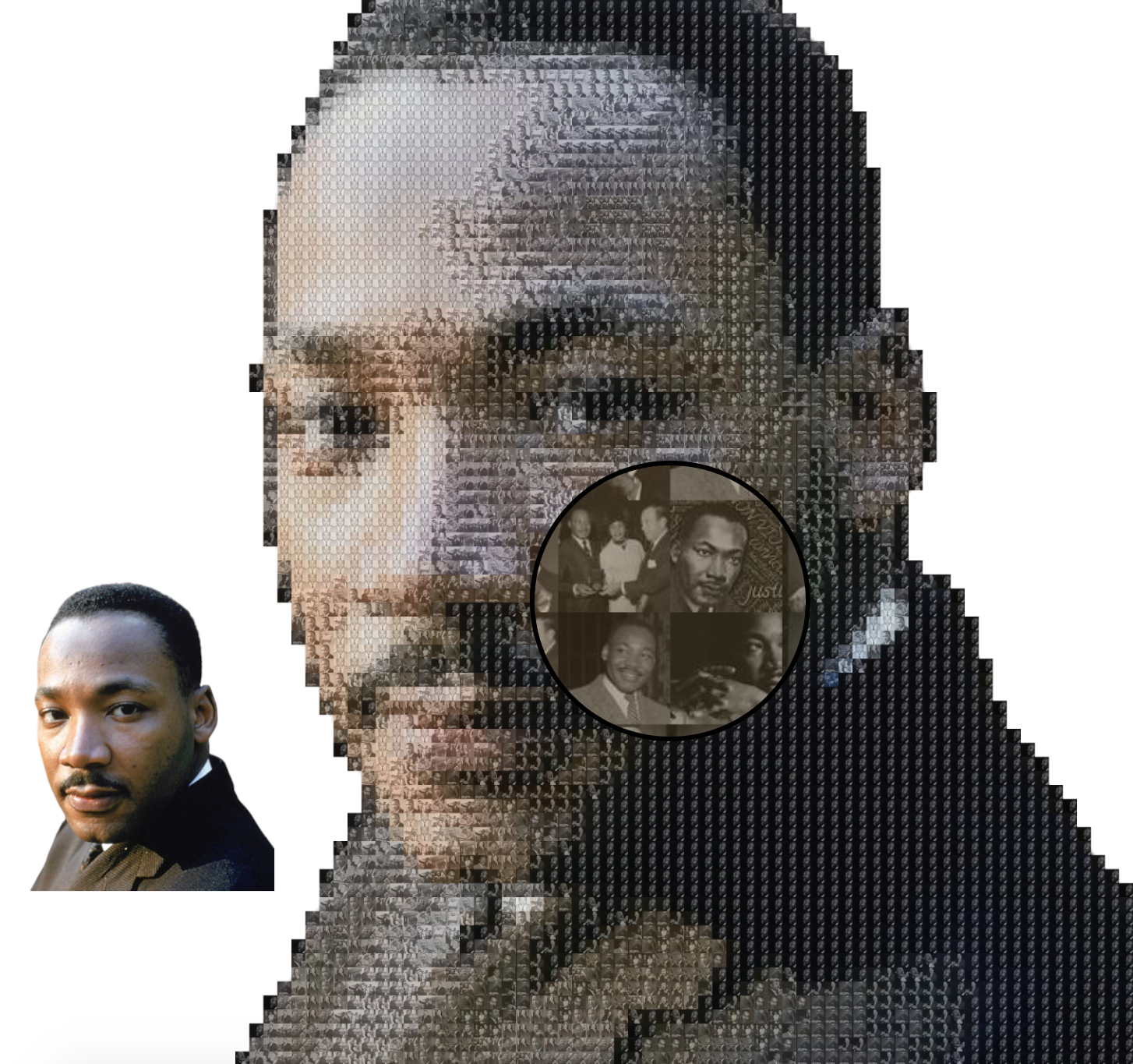
Create beautiful mosaics of an image from an original you specify, and are made up of many small images/photos you also provide!
$ npm install -s photosaic
import fs from 'fs'
import Photosaic from 'photosaic'

const mosaic = Photosaic(`./targetImgForMosaic.png`, [
  `./subImg1.png`,
  `./subImg2.png`,
  `./subImg3.png`,
])
const finalMosaicBuffer = await mosaic.build()
await fs.promises.writeFile(`./finalMosaic.png`, finalMosaicBuffer)
type PhotosaicImage = string | Buffer | Readable: main abstraction of an "image" used by Photosaic
string: the full file path of the image on the local file systemBuffer: a raw buffer of an imageReadable: a readable stream of an image to be piped to a writable streamPhotosaic(sourceImg, subImages, options?): factory function containing functionality to build mosaics
sourceImg: PhotosaicImage: The image of the final mosaic that will be createdsubImages: PhotosaicImage[]: The small, subImages that will be used to build the mosaicoptions?: additional options you can provide to customize the output mosaic created
options.gridNum?: number = 10: The final mosaic will be made up of a gridNum x gridNum grid of subImagesoptions.intensity?: number = 0.5: Number between 0-1 indicating the opacity of the shading on the subImages to help make the output image clearer. 0 is fully transparent shading (main image will be impossible to see), 1 is fully opaque (subImages will be impossible to make out). The default of 0.5 should be fine in most cases.options.outputType?: string = 'png': The output type of the final mosaic. To preserve transparency in the image, use the default, 'png'.options.outputWidth?: number = 400: Number of pixels the output mosaic's width will be (height will auto scale). The larger the width, the bigger the mosaic and the larger in size the final mosaic will be. The larger the output the longer it takes to generate a mosaicoptions.algo?: 'closestColor' | 'random' = 'closestColor': How the subImages will be dispersed throughout when building the mosaic.
'random' selects one of the subImages randomly each iteration to be inserted in that slice of the mosaic'closestColor' selects the subImage that is closest to the average color of the slice of the main image that the subImage is getting inserted to build the mosaic.options.algo differences

Assuming const photosaic = Photosaic(source, subImgs, opts), the methods below are exposed on photosaic
photosaic.build(): Promise<Buffer>: create a mosaic and return the result in a raw Bufferphotosaic.setSourceImage(newSrc: PhotosaicImage) => PhotosaicImage: reset source image created in mosaicphotosaic.setSubImages(subImgs: PhotosaicImage[]) => PhotosaicImage[]: reset subImages used to build mosaicphotosaic.addSubImage(img: PhotosaicImage): PhotosaicImage[]: add an image to the subImage list to build mosaicphotosaic.imgToStream(img: PhotosaicImage): Readable: convert a PhotosaicImage to a Readable streamphotosaic.imgToBuffer(img: PhotosaicImage): Promise<Buffer>: convert a PhotosaicImage to a raw BufferDepending on the options provided (specifically gridNum and outputWidth) and
the hardware you're running to build the mosaic, it could take several to tens of minutes
for photosaic.build() to complete. Therefore, photosaic has an EventEmitter, photosaic.emitter
you can listen for processing events to get the progress of the mosaic being built.
There will be a total of 2 * gridNum^2 iterations processed.
const photosaic = Photosaic(source, subImgs, opts)
photosaic.emitter.on('processing', (iteration) => {
  console.log(`Currently processing '${iteration}' subImage for the mosaic`)
})
await photosaic.build()

// Currently processing '1' subImage for the mosaic
// Currently processing '2' subImage for the mosaic
// Currently processing '3' subImage for the mosaic
// ...
You can use the following task to create a mosaic via the CLI with files on your local file system.
$ npm install -s photosaic
$ node ./node_modules/photosaic/dist/tasks/createMosaic.js -i ./pathToMosaicFile.js --dir ./path/to/sub/images -g 40 -w 1000
FAQs
Build beautiful mosaic images from input images and photos you provide.
We found that photosaic demonstrated a not healthy version release cadence and project activity because the last version was released a year ago. It has 1 open source maintainer collaborating on the project.
Did you know?

Socket for GitHub automatically highlights issues in each pull request and monitors the health of all your open source dependencies. Discover the contents of your packages and block harmful activity before you install or update your dependencies.
Product
Socket for Jira lets teams turn alerts into Jira tickets with manual creation, automated ticketing rules, and two-way sync.

Company News
Socket won two 2026 Reppy Awards from RepVue, ranking in the top 5% of all sales orgs. AE Alexandra Lister shares what it's like to grow a sales career here.

Security News
NIST will stop enriching most CVEs under a new risk-based model, narrowing the NVD's scope as vulnerability submissions continue to surge.