


Security News
CVE Volume Surges Past 48,000 in 2025 as WordPress Plugin Ecosystem Drives Growth
CVE disclosures hit a record 48,185 in 2025, driven largely by vulnerabilities in third-party WordPress plugins.
By Sarah Gooding - Jan 09, 2026

$ npm install -g pomo
$ pomojs --help
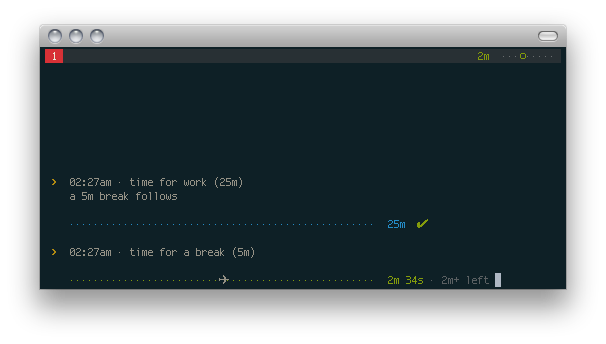


$ pomojs                              # Start a timer
$ pomojs "Conquer the world"          # Reason (great if you're logging)
$ pomojs -w 30                        # --work for 30 minutes
$ pomojs -b 12                        # --break for 12 minutes
$ pomojs --help
pomojs)pomojs --work 10 --break 2)gem install terminal-notifiersudo apt-get install libnotify-binsudo apt-get install espeaksee growl readme for growl requirements.
Just add this to ~.tmux.conf: (works almost exactly like in pomo.rb)
set-option -g status-right '#(cat ~/.pomo_stat)'
...then invoke it with pomojs -t.
Invoke it with pomojs -l ~/.pomo.log to log any pomodoros. Log file looks like
this:
[2013-06-17 mon]
6:14am - 6:44am = work on things (25m + 5m)
7:05am - 7:32am = do great stuff (25m + 2m, stopped)

[2013-06-18 tue]
6:14am - 6:44am = eat pizza (25m + 5m)
Add this to your shell config, so that the next time you can invoke pomojs
with preset settings:
# ~/.bash_profile
alias pomo="pomojs --log ~/.pomo.log --tmux"
Even add more presets:
# long-break pomodoro
alias longpomo="pomo -b 20"

# 10-minute pomodoro
alias minipomo="pomo -w 10"
You can use this syntax to save some keystrokes.
# pomojs <work> <break> <reason>
pomojs 25 2 Do things

# the same as:
pomojs --work 25 --break 2 Do things
Tomato icon by artbees. (via iconfinder.net)
(c) 2013, Rico Sta. Cruz. MIT
FAQs
Command-line timer, useful for Pomodoros.
We found that pomo demonstrated a not healthy version release cadence and project activity because the last version was released a year ago. It has 1 open source maintainer collaborating on the project.
Did you know?

Socket for GitHub automatically highlights issues in each pull request and monitors the health of all your open source dependencies. Discover the contents of your packages and block harmful activity before you install or update your dependencies.
Security News
CVE disclosures hit a record 48,185 in 2025, driven largely by vulnerabilities in third-party WordPress plugins.

Security News
Socket CEO Feross Aboukhadijeh joins Insecure Agents to discuss CVE remediation and why supply chain attacks require a different security approach.

Security News
Tailwind Labs laid off 75% of its engineering team after revenue dropped 80%, as LLMs redirect traffic away from documentation where developers discover paid products.