


Security News
The Hidden Blast Radius of the Axios Compromise
The Axios compromise shows how time-dependent dependency resolution makes exposure harder to detect and contain.
By Ahmad Nassri - Apr 01, 2026


npm install progressor --save
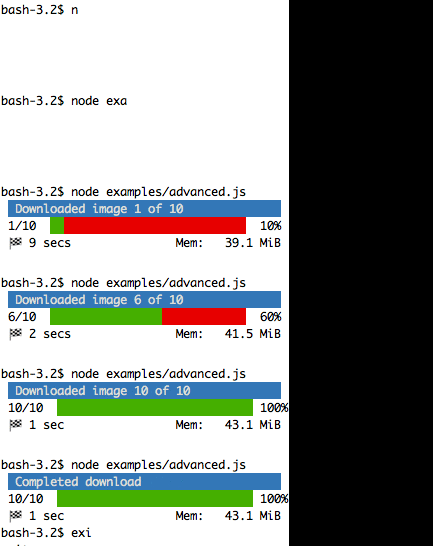
First we create an instance of Progressor,passing in the options (see below for a list of all options) as the first parameter, and passing in the total of steps as the second parameter. We tell the progress bar that we're ready to start and then we call advance when appropriate.
var Progressor = require('progressor');
var progressor = new Progressor({
  format: 'debug'
}, 10);

progressor.start();

var timer = setInterval(function () {
  progressor.advance();
  if(progressor.isComplete()) {
    progressor.finish();
    clearInterval(timer);
  }
}, 1000);
barWidth The width of the progress bar (defaults to 28)emptyBarChar Empty bar character (see formats below for more information)progressChar Progress character for the bar (see formats below for more information)redrawFreq Frequency to update the progress bar(defaults to 1. Useful is you have a lot of steps)overwrite Overwrite the console text on every refresh (defaults to true)barChar Bar character for the bar (see formats below for more information)beforeNewlines Insert a number of new lines before outputting the progress bar(defaults to null and called on start)afterNewlines Insert a number of new lines after outputting the progress bar (defaults to 1 and called on finish)format The chosen format(defaults to normal).stream The output stream (defaults to process.stdout)The built-in formats are the following:
If you don't set the number of steps for your progress bar, use the _nomax variants:
Instead of using a built-in format, you can set a custom format by passing the format into the options object:
  var progressor = new Progressor({
      format: "Progress: %percent%%. Filename %filename%"
  }, 10);
A progress bar format is a string that contains specific placeholders (a name enclosed with the % character); the placeholders are replaced based on the current progress of the bar. Here is a list of the built-in placeholders:
current: The current step;max: The maximum number of steps (or 0 if no max is defined);bar: The bar itself;percent: The percentage of completion (not available if no max is defined);elapsed: The time elapsed since the start of the progress bar;remaining: The remaining time to complete the task (not available if no max is defined);estimated: The estimated time to complete the task (not available if no max is defined);memory: The current memory usage;message: The current message attached to the progress bar.For instance, here is how you could set the format to be the same as the debug but without any fancy colours:
var progressor = new Progressor({
  format: " %current%/%max% [%bar%] %percent:3s%% %elapsed:6s%/%estimated:-6s% %memory:6s%",
  emptyBarChar: '-',
  progressChar: '>',
  barChar: '='
}, 10);
Or you could overwrite the debug format completely:
Progressor.addFormat('debug', " %current%/%max% [%bar%] %percent:3s%% %elapsed:6s%/%estimated:-6s% %memory:6s%");
This would output:
10/10 [============================] 100% 6 secs/5 secs 20.5 MiB
Notice the :6s part added to some placeholders? That's how you can tweak the appearance of the bar (formatting and alignment). The part after the colon (:) is used to set the sprintf format of the string.
The message placeholder is a bit special as you must set the value yourself:
bar.setMessage('Task in progress...');
bar.advance();
In the advanced example there is a good example of using custom messages.
Instead of setting the format for a given instance of a progress bar, you can also define global formats:
Progressor.addFormat('minimal', 'Progress: %percent%%');
var progressor = new Progressor({ format: 'minimal' }, 3);
This code defines a new minimal format that you can then use for your progress bars:
Progress: 0%
Progress: 33%
Progress: 100%
A format can contain any valid ANSI codes to set colors. For example, for the minimal example above, we could make the percent text red.
Progressor.addFormat('minimal', "Progress: \033[0;31m %percent%%\033[0m");
Or you could use (https://github.com/marak/colors.js/)[colors.js] to set some nice colours:
Progressor.addFormat('minimal', "Progress: (%remaining_steps% steps remaining): " + "%percent%%".red.bold);
This will output the percentage as bold and red.
If you want to display some information that depends on the progress bar display that are not available in the list of built-in placeholders, you can create your own. Let's see how you can create a remaining_steps placeholder that displays the number of remaining steps:
Progressor.setPlaceholderFormatDefinition('remaining_steps', function (bar) {
  return bar.max - bar.step;
});
The %message% placeholder allows you to specify a custom message to be displayed with the progress bar. But if you need more than one, just define your own:
var progressor = new Progressor({
  format: "Progress: %percent%%. Filename %filename%"
}, 10);

progressor.setMessage('Hello', 'filename');
Progressor is a clone of the excellent Symfony progress bar Thanks Symfony!
FAQs
Fancy console progress bars
We found that progressor demonstrated a not healthy version release cadence and project activity because the last version was released a year ago. It has 1 open source maintainer collaborating on the project.
Did you know?

Socket for GitHub automatically highlights issues in each pull request and monitors the health of all your open source dependencies. Discover the contents of your packages and block harmful activity before you install or update your dependencies.
Security News
The Axios compromise shows how time-dependent dependency resolution makes exposure harder to detect and contain.

Research
A supply chain attack on Axios introduced a malicious dependency, plain-crypto-js@4.2.1, published minutes earlier and absent from the project’s GitHub releases.

Research
Malicious versions of the Telnyx Python SDK on PyPI delivered credential-stealing malware via a multi-stage supply chain attack.