


Security News
The Hidden Blast Radius of the Axios Compromise
The Axios compromise shows how time-dependent dependency resolution makes exposure harder to detect and contain.
By Ahmad Nassri - Apr 01, 2026
project-badge
Advanced tools
Create fancy badges for your projects in plain JS.
Download badge.js, and start having fun with badges !
<html>
<body>
<script src="badge.js"></script>
<script>
var myBadge = new badge.Boolean({
text: 'cookies',
status: true,
statusText: 'baked !'
});
document.body.appendChild(myBadge.asDOMNode());
</script>
</body>
</html>
Et voilà, a shiny custom badge in just two lines of code and 3 config parameters.
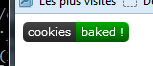
This module is available as an npm package npm install project-package
You should check out node-canvas which provides a compatible canvas API in node.
Actually, it's what's being used in node-project-badge to provide a CLI badge generator.
Progress:
var myBadge = new badge.Progress({
  text: 'baking',
  progress: 32,
});


Common usage: code coverage
var myBadge = new badge.Info({
  text: 'baking time',
  info: '12\'30'
});

Common usage: package verison, date of last build
var myBadge = new badge.Boolean({
  text: 'taste',
  status: true,
  successText: 'yummy',
  failureText: 'yuck !',
  unknownText: 'what ?'
});
myBadge.renderTo(ctx, 0, 0);
myBadge.status = false;
myBadge.renderTo(ctx, 120, 0);
myBadge.status = null;
myBadge.renderTo(ctx, 240, 0);

Common usage: build: passing/failure
Use this function to set global configuration settings. Available settings are:
'color-success': '#0a0'
'color-failure': '#a00'
'color-unknown': '#aaa'
'color-warning': '#880'
'color-info': '#3BC2EB'
'color-background': '#444'
'color-text': '#fff'

'font': '11px Verdana'      # the same font for all texts
'border-radius': 5          # like css border-radius
'padding': 5                # x padding for the text
'text-height': 14           # text position, y-axis

'width': 50                 # default width
'height': 20                # default height
A badge that can take two states (namely 'failure' and 'success') depending on the value of 'status'
text (String): the text shown on the left hand side of the badgestatus (true/false): defines the state the badge is insuccessText (String): text shown on the right side of the badge in case of successfailureText (String): text shown on the right side of the badge in case of failureunknownText (String): text shown on the right side of the badge in case the status is nullstatusText: (String): text shown on the right side of the badge regardless of the state
statusText has precedence over (failure|success)TextA badge that shows a single information as a key-value pair
text (String): the text shown on the left hand side of the badge (key)info (String): the text shown on the right hand side of the badge (value)A badge that shows a real value bounded between a minimum and a maximum.
The badge is color coded to indicate wether the value is in the "bad", "warning"
or "good" interval (defined by the bounds parameter).
text (String): the text shown on the left hand side of the badge (key)progress (Number): the real value to show ranging from 0 to 100progressText (String): the text shown on the right hand side of the badge (value)unit (String): a string appended to the progressText (default: '%')bounds (Array): two values that delimit the bad, warning and good zones (default: [40, 80])Base class for any badge class. You may create a badge of type badge directly but it won't generally be of great use.
It defines the badge public interface and handles the rendering pipeline.
The public API is defined by the parent class Badge and should not be overriden.
constructor(params: {key: value})badge.[param]// All badges drawn with this instance will now use the text 'build'
badge.text = 'build';
renderTo(ctx: RenderingContext [, x: Number] [, y: Number]) -> voidmeasure(ctx: RenderingContext) -> Dimentionstext and two margins and returns the configured heightDimentions = {w: Number, h: Number}The following methods are called in this order and may be overriden to implement custom graphics:
drawBorder(ctx: RenderingContext, dimentions: Dimentions) -> voiddrawBackground(ctx: DrawingContext, dimentions: Dimentions) -> voiddrawBackgroundEffects(ctx: DrawingContext, dimentions: Dimentions) -> voiddrawForeground(ctx: DrawingContext, dimentions: Dimentions) -> voiddrawForegroundEffects(ctx: DrawingContext, dimentions: Dimentions) -> voidTo implement custom measurments, override doMeasure
doMeasure(ctx: RenderingContext) -> DimentionsThe following parameters are assumed to be necessary for any class implementing a badge
text (String): default text shown in the badge, left aligned0.2.0 -- Mar 19, 2017
0.1.0 -- Oct 19, 2014
FAQs
Generate any kind of badge using the html5 canvas API.
We found that project-badge demonstrated a not healthy version release cadence and project activity because the last version was released a year ago. It has 1 open source maintainer collaborating on the project.
Did you know?

Socket for GitHub automatically highlights issues in each pull request and monitors the health of all your open source dependencies. Discover the contents of your packages and block harmful activity before you install or update your dependencies.
Security News
The Axios compromise shows how time-dependent dependency resolution makes exposure harder to detect and contain.

Research
A supply chain attack on Axios introduced a malicious dependency, plain-crypto-js@4.2.1, published minutes earlier and absent from the project’s GitHub releases.

Research
Malicious versions of the Telnyx Python SDK on PyPI delivered credential-stealing malware via a multi-stage supply chain attack.