Proxmox Api
 Typescript Api to manage proxmox servers.
Mapping 100% of available calls, contains all api documentation in typing file.
code size < 10Ko including docs
Usage
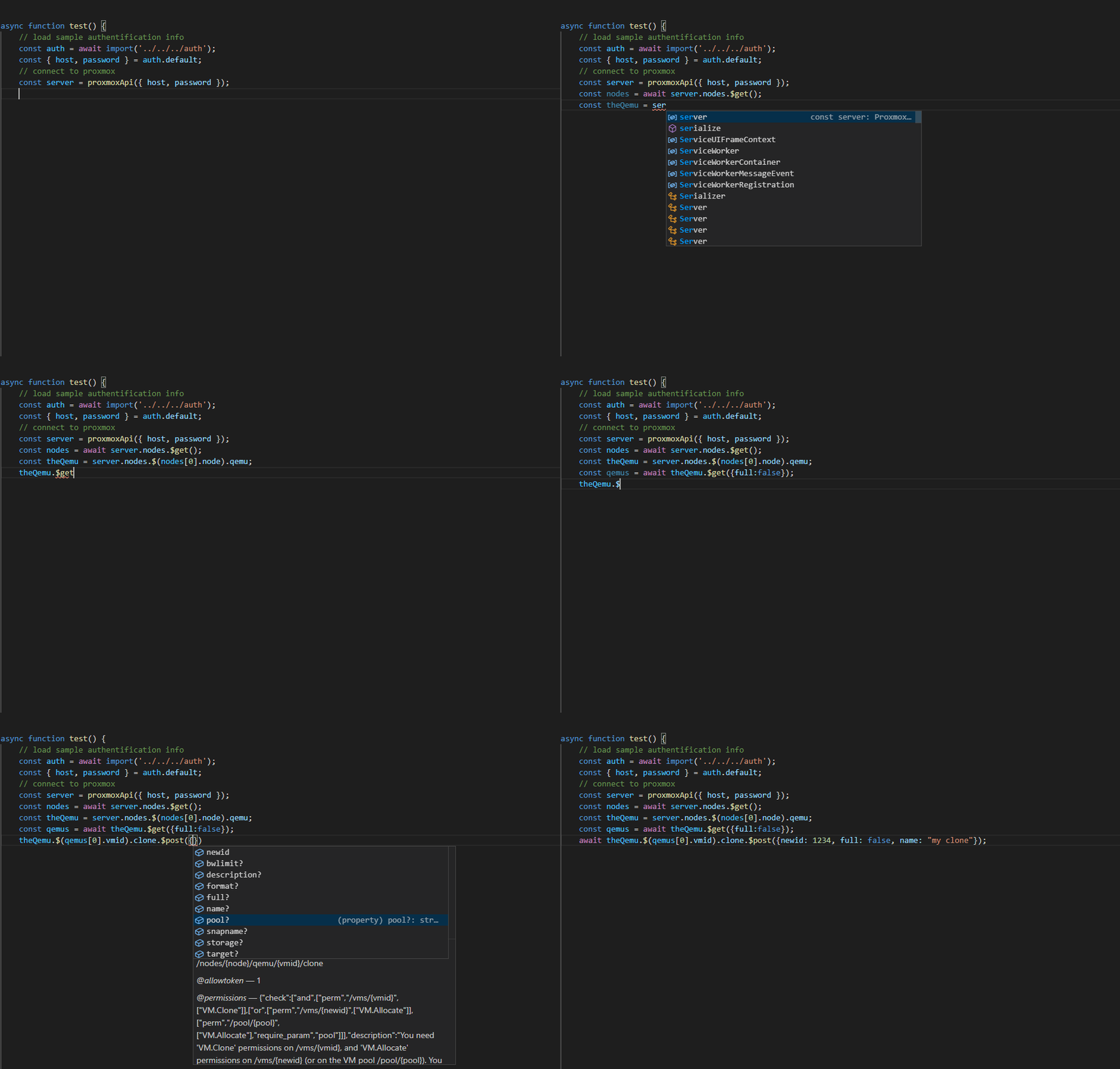
Overview
to use this API take the Path you want to call, and replace:
- the
/ by .
- the
${variable} by .(variable)
- append the http method you want to call with a $ at the end (
.$get(), .$post(), .$put() or .$delete())
that it.
Example
To call GET /cluster/acme/account/{name} you will call proxmox.cluster.acme.account.$(name).$get()
To call GET /api2/json/cluster/backup/{id}/included_volumes you will call proxmox.cluster.backup.{id}.included_volumes.$get()
To call GET /api2/json/nodes you will call proxmox.nodes.$get()
The provided typing will assist you within intelisense, so you do not need to read any external doc.
Code sample
 an hotplug usb service based on this API.
npm install proxmox-api
import proxmoxApi from "proxmox-api";
process.env.NODE_TLS_REJECT_UNAUTHORIZED = "0";
async function test() {
const proxmox = proxmoxApi({host: '127.0.0.1', password: 'password', username: 'user1@pam'});
const nodes = await proxmox.nodes.$get();
for (const node of nodes) {
const theNode = proxmox.nodes.$(node.node);
const qemus = await theNode.qemu.$get({full:true});
for (const qemu of qemus) {
const config = await theNode.qemu.$(qemu.vmid).config.$get();
console.log(`vm: ${config.name}, memory: ${config.memory}`);
}
}
}
test().catch(console.error);
Initialisation alternavives:
- keeping access to ProxmoxEngine object (that can be use to share a ticket, or to access it)
import proxmoxApi, { ProxmoxEngine } from "proxmox-api";
process.env.NODE_TLS_REJECT_UNAUTHORIZED = "0";
async function test() {
const engine = new ProxmoxEngine({host: '127.0.0.1', password: 'password', username: 'user1@pam'});
const proxmox = proxmoxApi(engine);
}
import proxmoxApi from "proxmox-api";
process.env.NODE_TLS_REJECT_UNAUTHORIZED = "0";
async function test() {
const proxmox = proxmoxApi({host: '127.0.0.1', tokenID: 'USER@REALM!TOKENID', tokenSecret: '12345678-1234-1234-1234-1234567890ab'});
}
Notes
- if the call path contains a hyphen, you will need to use the
['field'] syntax ex:
await theNode.qemu.$(vmid).agent['get-fsinfo'].$get()





