@[TOC](antd 动态增减多个表单项组件,附源码)
一些废话
之前有个需求是要两个动态增加的表单项,且每个表单项由3个组件构成。当时考虑抽出单独的组件实现,但因为上线时间关系,上线之后才完整的抽成组件。本组件用于复杂的动态增减表单项的自动取值,支持初始值的设置。成果在这里分享下。
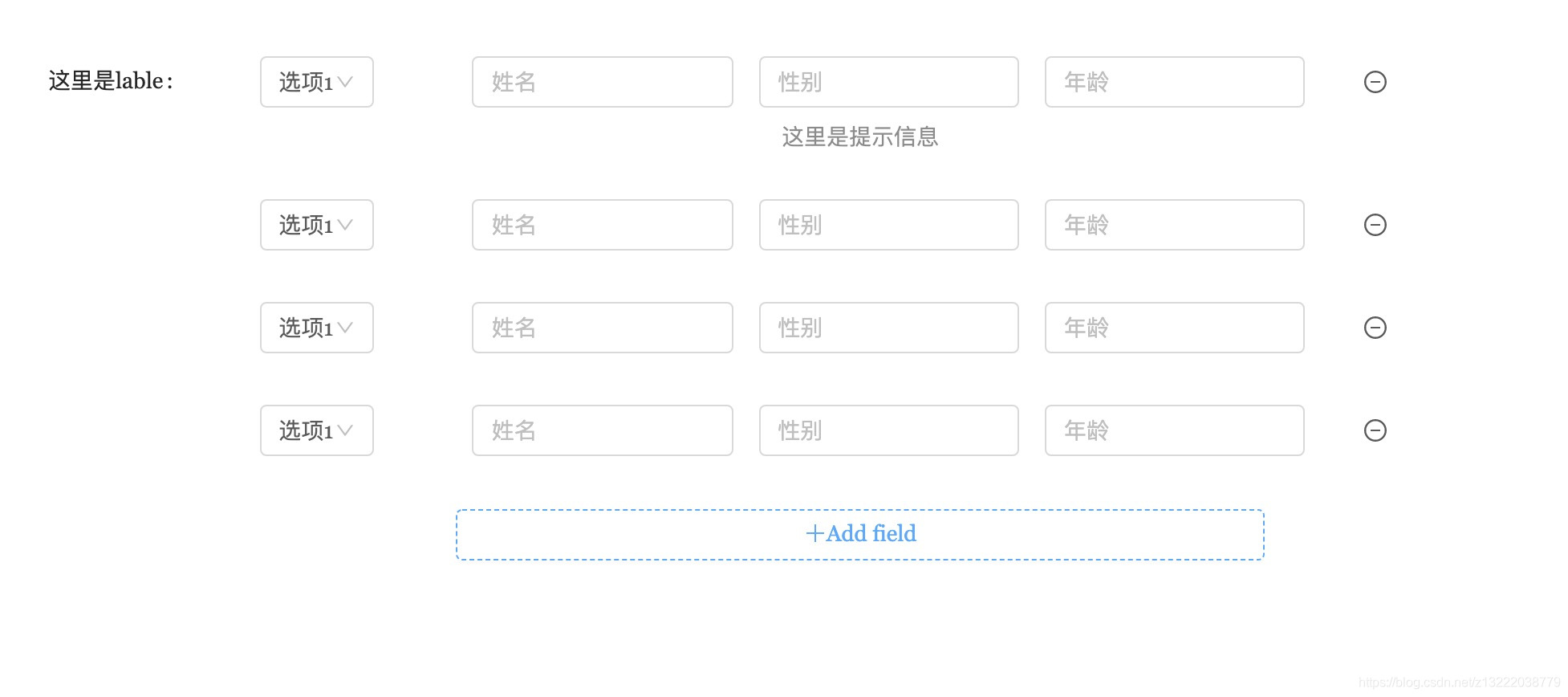 form取到的值示例:
keyname:[
{"sex": "option1", "name": "name", "age": "age", "phone": "123456"},
{"sex": "option1", "name": "name", "age": "age", "phone": "123456"},
{"sex": "option1", "name": "name", "age": "age", "phone": "123456"}
]
form取到的值示例:
keyname:[
{"sex": "option1", "name": "name", "age": "age", "phone": "123456"},
{"sex": "option1", "name": "name", "age": "age", "phone": "123456"},
{"sex": "option1", "name": "name", "age": "age", "phone": "123456"}
]
获取地址(成品+源码)
npm 获取方式(非源码):
npm install react-antd-dynamicformitem
项目仓库(源码与demo):github.
可以直接复制src 文件夹下文件放入项目,进行优化修改。
使用方法
v 1.1.1版本
import React, {PureComponent} from 'react';
import {Form, Input, Select} from 'antd';
import {DynamicFormItem, MyInput} from "react-antd-dynamicformitem"
const Option = Select.Option;
@Form.create({})
class FormTest extends PureComponent {
renderView= (params)=>{
return <MyInput
initialValue={params.key}
actions={[<Select onChange={(value) => { //返回需要渲染的每个标签
params.renderViewOnchange({"sex": value}, params.key)
}} value={params.key.item1}>
<Option value={"option1"}>选项1</Option>
<Option value={"option2"}>选项2</Option>
<Option value={"option3"}>选项3</Option>
<Option value={"option4"}>选项4</Option>
</Select>, <Input value={params.key.item2} onChange={(value) => {
params.renderViewOnchange({"name": value.target.value}, params.key)
}}/>, <Input value={params.key.item3} onChange={(value) => {
params.renderViewOnchange({"age": value.target.value}, params.key)
}}/>, <Input value={params.key.item4} onChange={(value) => {
params.renderViewOnchange({"phone": value.target.value}, params.key)
}}/>]}
/>
};
render() {
let {form} = this.props;
const okHandle = () => {
form.validateFields((err, fieldsValue) => {
if (err) return;
form.resetFields();
console.log("fieldsValue",fieldsValue);
});
};
const matchesKey = {"sex": "", "name": "", "age": "", "phone": ""};
const matchesRules = [];
return (<DynamicFormItem {...this.props.form} //传入form内容
lable={"lable"}//表单项的lable,只在第一行出现
newKey={matchesKey}//newKey为每一个表单项的初始值
keysName={"keyname"}//表单中值的名称(key),同getFieldDecorator中内容
extra={"同表单项的extra"}//同表单项的extra
renderViewData={matchesRules}//内容回填的内容(比如说更新数据时的初始值)
renderView={this.renderView}
/>);
}
}
export default FormTest;
v1.2.x版本(兼容之前版本,主要优化了renderView写法,支持替换增加表单项按钮样式与内容)
import React, {PureComponent} from 'react';
import {Form, Input, Select,Button} from 'antd';
import {MyInput,DynamicFormItem} from "react-antd-dynamicformitem"
const Option = Select.Option;
@Form.create({})
class FormTest extends PureComponent {
renderView = (params) =>
<MyInput>
<Select onChange={(value) => {
params.renderViewOnchange({"item1": value}, params.key)
}} value={params.key.item1}>
<Option value={"option1"}>选项1</Option>
<Option value={"option2"}>选项2</Option>
<Option value={"option3"}>选项3</Option>
<Option value={"option4"}>选项4</Option>
</Select>
<Input value={params.key.item2} placeholder="姓名" onChange={(value) => {
params.renderViewOnchange({"item2": value.target.value}, params.key)
}}/>
<Input placeholder="性别" value={params.key.item3} onChange={(value) => {
params.renderViewOnchange({"item3": value.target.value}, params.key)
}}/>
<Input placeholder="年龄" value={params.key.item4} onChange={(value) => {
params.renderViewOnchange({"item4": value.target.value}, params.key)
}}/>
</MyInput>
render() {
let {form} = this.props;
const matchesKey = {"item1": "option1", "item2": "", "item3": "", "item4": ""};
const matchesRules = [];
return (
<DynamicFormItem {...form}
lable={"这里是lable"}
newKey={matchesKey}
keysName={"matches"}
extra={"这里是提示信息"}
renderViewData={matchesRules}
addViewStyle={{color:"blue"}}
addView={<view><Icon type="plus"/>Add field</view>}
renderView={this.renderView}
/>
);
}
}
export default FormTest;
具体的值会自动填入form内容。
api 与 变量名解释
DynamicFormItem:
| {...form} | 传入所有form内容,方便组件包装值。 |
| lable | 同Form.Item 的lable,只在第一行显示,一般都是需要的。 |
| newKey | 新增的表单项的初始值,json对象,value可以没有,要有key。 |
| keysName | 表单取值的名称。 |
| extra | 同Form.Item 的extra,只在第一行显示,可选。 |
| renderViewData | 需要信息回填的值,可选。 |
| renderView | function 参数包含标签onChang事件renderViewOnchange 和当前表单项值。 具体的表单项内容,可以直接使用MyInput。也可以自己实现。 |
| addViewStyle (v1.2.x) | 新增按钮css样式 |
| addView (v1.2.x) | 新增按钮内容 |
MyInput:
| actions | 表单项的所有标签,暂时最多支持4个。标签要求:1.要有value属性,值为renderView方法参数 params.key["你当前的标签取值的key"]。2.onChange/onBlur事件:调用renderViewOnchange方法。具体用法参考示例 |
| v1.2.x说明:具体标签可以直接写在内部,标签要求不变。 | |
最后
如果有什么问题,欢迎评论,或者提issues.一起学习,共同进步。





