React Credit Cards




A slick credit card component for React.
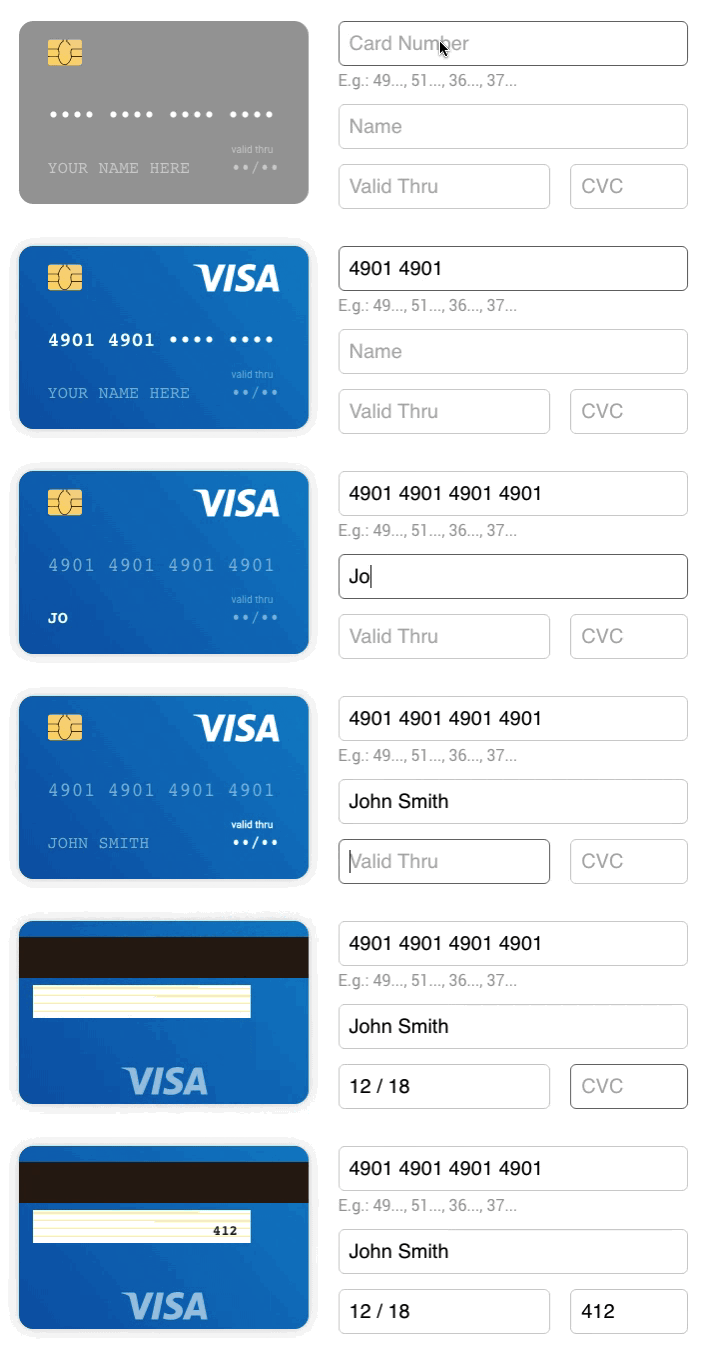
Demo
Install
npm install --save react-credit-cards
Usage
import React from 'react';
import Cards from 'react-credit-cards';

export default class PaymentForm extends React.Component {
  state = {
    cvc: '',
    expiry: '',
    focus: '',
    name: '',
    number: '',
  };

  handleInputFocus = (e) => {
    this.setState({ focus: e.target.name });
  }

  handleInputChange = (e) => {
    const { name, value } = e.target;

    this.setState({ [name]: value });
  }

  render() {
    return (
      <div id="PaymentForm">
        <Cards
          cvc={this.state.cvc}
          expiry={this.state.expiry}
          focused={this.state.focus}
          name={this.state.name}
          number={this.state.number}
        />
        <form>
        	<input
            type="tel"
            name="number"
            placeholder="Card Number"
            onChange={this.handleInputChange}
            onFocus={this.handleInputFocus}
          />
          ...
        </form>
      </div>
    );
  }
}
Don't forget to import the react-credit-cards/lib/styles.scss if you are using SASS in your project.
Or you can import the CSS:
import 'react-credit-cards/es/styles-compiled.css';
Features
- We support all credit card issuers available in Payment plus Hipercard (a brazilian credit card).
Props
name {string}: Name on card. *number {string|number}: Card number. *expiry {string|number}: Card expiry date. 10/20 or 012017 *cvc {string|number}: Card CVC/CVV. *focused {string}: Focused card field. name|number|expiry|cvclocale {object}: Localization text (e.g. { valid: 'valid thru' }).placeholders {object}: Placeholder text (e.g. { name: 'YOUR NAME HERE' }).preview {bool}: To use the card to show scrambled data (e.g. **** 4567).issuer {string}: Set the issuer for the preview mode (e.g. visa|mastercard|...)acceptedCards {array}: If you want to limit the accepted cards. (e.g. ['visa', 'mastercard']callback {func}: A callback function that will be called when the card number has changed with 2 paramaters: type ({ issuer: 'visa', maxLength: 19 }), isValid ({boolean})
* Required fields
SCSS options
Credit Card sizing
$rccs-card-ratio: Card ratio. Defaults to 1.5858$rccs-size: Card width. Defaults to 290px
Credit Card fonts
$rccs-name-font-size: Defaults to 17px$rccs-name-font-family: Defaults to Consolas, Courier, monospace$rccs-number-font-size: Defaults to 17px$rccs-number-font-family: Defaults to Consolas, Courier, monospace$rccs-valid-font-size: Defaults to 10px$rccs-expiry-font-size: Defaults to 16px$rccs-expiry-font-family: Defaults to Consolas, Courier, monospace$rccs-cvc-font-size: Defaults to 14px$rccs-cvc-font-family: Defaults to Consolas, Courier, monospace$rccs-cvc-color: Defaults to #222
Credit Card styling
$rccs-shadow: Defaults to 0 0 20px rgba(#000, 0.2)$rccs-light-text-color: Card text color for dark cards. Defaults to #fff$rccs-dark-text-color: Card text color for light cards. Defaults to #555$rccs-stripe-bg-color: Stripe background color in the back. Defaults to #2a1d16$rccs-signature-background: Signature background in the back. Defaults to repeating-linear-gradient(0.1deg, #fff 20%, #fff 40%, #fea 40%, #fea 44%, #fff 44%)$rccs-default-background: Default card background. Defaults to linear-gradient(25deg, #939393, #717171)$rccs-unknown-background: Unknown card background. Defaults to linear-gradient(25deg, #999, #999)$rccs-background-transition: Card background transition. Defaults to all 0.5s ease-out$rccs-animate-background: Card background animation. Defaults to true
Credit Card brands
$rccs-amex-background: Defaults to linear-gradient(25deg, #308c67, #a3f2cf)$rccs-dankort-background: Defaults to linear-gradient(25deg, #ccc, #999)$rccs-dinersclub-background: Defaults to linear-gradient(25deg, #fff, #eee)$rccs-discover-background: Defaults to linear-gradient(25deg, #fff, #eee)$rccs-mastercard-background: Defaults to linear-gradient(25deg, #e8e9e5, #fbfbfb)$rccs-visa-background: Defaults to linear-gradient(25deg, #0f509e, #1399cd)$rccs-elo-background: Defaults to linear-gradient(25deg, #211c18, #aaa7a2)$rccs-hipercard-background: Defaults to linear-gradient(25deg, #8b181b, #de1f27)
Development
Here's how you can get started developing locally:
$ git clone https://github.com/amarofashion/react-credit-cards.git
$ cd react-credit-cards
$ npm install
$ npm start
Now, if you go to http://localhost:3000 in your browser, you should see the demo page.
Contributing
Please read CONTRIBUTING.md for details on our code of conduct, and the process of contributing to the project.
Useful links
EBANK's test numbers
Adyen's test numbers
Worldpay's test card numbers
Brazilian cards patterns
LICENSE
This project is licensed under the MIT License.
Made with ❤️ at AMARO.





