🕐 React Cron Generator
A powerful, user-friendly React component for building cron expressions with support for both Unix and Quartz formats





Interactive Demo →
✨ Features
- 🎯 Dual Format Support - Works with both Unix (5 fields) and Quartz (7 fields) cron formats
- 🔄 Automatic Conversion - Seamlessly convert between Unix and Quartz formats
- ✅ Built-in Validation - Comprehensive cron expression validation
- 🌍 Internationalization - Full i18n support with custom translation functions
- ♿ Accessible - WCAG compliant with keyboard navigation and screen reader support
- 📱 Responsive - Mobile-friendly design that works on all devices
- 🎨 Customizable - Easy to style and configure
- 🔒 Type Safe - Full TypeScript support with comprehensive type definitions
- ⚡ Performance Optimized - Memoized computations and efficient re-renders
- 🛡️ Error Boundaries - Graceful error handling built-in
📦 Installation
npm install react-cron-generator
or
yarn add react-cron-generator
🚀 Quick Start
Basic Usage (Quartz Format)
import React, { useState } from 'react';
import Cron from 'react-cron-generator';
import 'react-cron-generator/build/cron-builder.css';

function App() {
  const [value, setValue] = useState('0 0 00 1/1 * ? *');

  return (
    <Cron
      onChange={(cronValue, humanReadable) => {
        setValue(cronValue);
        console.log('Cron:', cronValue);
        console.log('Human:', humanReadable);
      }}
      value={value}
      showResultText={true}
      showResultCron={true}
    />
  );
}
Unix Format
import React, { useState } from 'react';
import Cron from 'react-cron-generator';
import 'react-cron-generator/build/cron-builder.css';

function App() {
  const [value, setValue] = useState('*/5 * * * *');

  return (
    <Cron
      onChange={(cronValue, humanReadable) => {
        setValue(cronValue);
      }}
      value={value}
      showResultText={true}
      showResultCron={true}
      isUnix={true}  // Enable Unix format
    />
  );
}
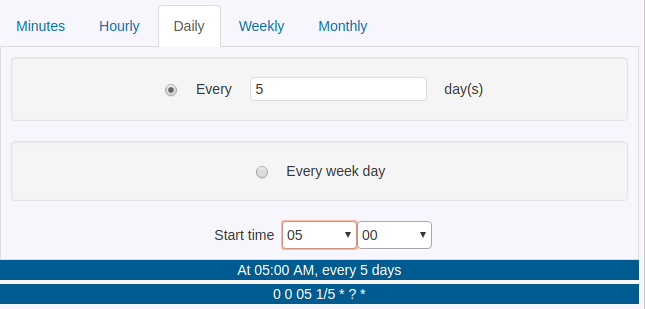
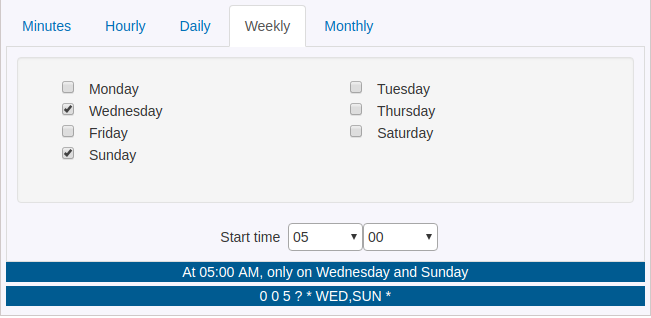
📸 Screenshots
📖 Documentation
Props
value | string | undefined | Initial cron expression (Unix: 5 fields, Quartz: 6 or 7 fields) |
onChange | (value: string, text: string) => void | Required | Callback fired when cron value changes. Receives cron expression and human-readable text |
onHeaderChange | (header: string) => void | undefined | Callback fired when the selected tab/header changes. Receives header value ('Minutes', 'Hourly', 'Daily', 'Weekly', 'Monthly', 'Custom'). Called on initial mount and whenever tabs changes |
showResultText | boolean | false | Display human-readable description below the builder |
showResultCron | boolean | false | Display the cron expression below the builder |
isUnix | boolean | false | Use Unix format (5 fields) instead of Quartz. Cannot be used with use6FieldQuartz |
use6FieldQuartz | boolean | false | Use 6-field Quartz format instead of 7-field. Cannot be used with isUnix |
translateFn | (key: string) => string | undefined | Custom translation function for i18n support |
locale | string | 'en' | Locale for cronstrue (human-readable text) |
options | { headers: HeaderType[] } | All headers | Customize which tabs are available |
disabled | boolean | false | Disable the entire component |
Format Comparison
| Format | minute hour day month day-of-week | second minute hour day month day-of-week | second minute hour day month day-of-week year |
| Example | */5 * * * * | 0 */5 * * * ? | 0 0/5 * * * ? * |
| Day of Week | 0-6 (Sunday=0) | 1-7 (Sunday=1) or SUN-SAT | 1-7 (Sunday=1) or SUN-SAT |
| Special Chars | * , - / | * , - / ? L W # | * , - / ? L W # |
| Used By | Linux/Unix cron, most cron implementations | Quartz Scheduler (legacy) | Quartz Scheduler, Spring Framework, Java apps |
6-Field Quartz Format Support
The component supports both 6-field and 7-field Quartz formats:
- 6-field format:
second minute hour day month day-of-week (e.g., 0 0 12 * * ?)
- 7-field format:
second minute hour day month day-of-week year (e.g., 0 0 12 * * ? *)
Format Behavior:
The use6FieldQuartz prop controls the output format:
<Cron
value="0 0 12 * * ?"
onChange={(value) => {
console.log(value);
}}
showResultText={true}
showResultCron={true}
/>
<Cron
value="0 0 12 * * ? *" // 7-field input
onChange={(value) => {
console.log(value); // "0 0 12 * * ?" - converted to 6-field
}}
showResultText={true}
showResultCron={true}
use6FieldQuartz={true} // Enable 6-field format
/>
Rules:
use6FieldQuartz={false} (default): Always outputs 7-field format, even if 6-field input is provideduse6FieldQuartz={true}: Always outputs 6-field format, even if 7-field input is provided- Cannot use both
isUnix={true} and use6FieldQuartz={true} together - this will throw an error
- Internally, the component always works with 7-field format for processing
🔧 Advanced Usage
Format Conversion
import {
unixToQuartz,
quartzToUnix,
detectCronFormat
} from 'react-cron-generator';
const quartzCron = unixToQuartz('*/5 * * * *');
console.log(quartzCron);
const unixCron = quartzToUnix('0 0/5 * * * ? *');
console.log(unixCron);
const format = detectCronFormat('*/5 * * * *');
console.log(format);
Validation
import { validateCron } from 'react-cron-generator';
const result = validateCron('*/5 * * * *');
console.log(result);
if (result.isValid) {
console.log('Valid cron expression!');
} else {
console.error('Invalid:', result.error);
}
Custom Tabs
import Cron, { HEADER } from 'react-cron-generator';

const options = {
  headers: [
    HEADER.MINUTES,
    HEADER.HOURLY,
    HEADER.DAILY,
    HEADER.WEEKLY,
    HEADER.MONTHLY,
    HEADER.CUSTOM
  ]
};

<Cron options={options} {...otherProps} />
Internationalization
import Cron from 'react-cron-generator';
const translations = {
'Every': 'Cada',
'minute(s)': 'minuto(s)',
};
function translateFn(key) {
return translations[key] || key;
}
<Cron
translateFn={translateFn}
locale="es"
{...otherProps}
/>
🎨 Styling
The component comes with default styles. Import the CSS file:
import 'react-cron-generator/build/cron-builder.css';
You can override styles by targeting the CSS classes:
.cron_builder {
}
.cron_builder .nav-link {
}
.cron_builder_bordering {
}
📚 API Reference
Exported Components
Cron - Main cron builder component (default export)
Exported Utilities
unixToQuartz(cron: string): string - Convert Unix to Quartz formatquartzToUnix(cron: string): string - Convert Quartz to Unix formatdetectCronFormat(cron: string): 'unix' | 'quartz' - Detect cron formatvalidateCron(cron: string): ValidationResult - Validate any cron format (auto-detects Unix or Quartz)HEADER - Constants for tab headerscronstrue - Human-readable cron descriptions (from cronstrue/i18n)
Exported Types
CronProps - Props for Cron componentCronFormat - 'unix' | 'quartz'CronValidationResult - Validation result interfaceTranslateFn - Translation function type- And many more...
🎯 Examples
Example 1: Every 5 Minutes
Unix: */5 * * * *
Quartz: 0 0/5 * * * ? *
Human: "Every 5 minutes"
Example 2: Every Day at 2:30 PM
Unix: 30 14 * * *
Quartz: 0 30 14 * * ? *
Human: "At 02:30 PM"
Example 3: Every Monday at 9:00 AM
Unix: 0 9 * * 1
Quartz: 0 0 9 ? * MON *
Human: "At 09:00 AM, only on Monday"
Example 4: First Day of Every Month
Unix: 0 0 1 * *
Quartz: 0 0 0 1 * ? *
Human: "At 12:00 AM, on day 1 of the month"
🔍 Browser Support
- Chrome (latest)
- Firefox (latest)
- Safari (latest)
- Edge (latest)
- Mobile browsers
🤝 Contributing
Contributions are welcome! Please feel free to submit a Pull Request.
- Fork the repository
- Create your feature branch (
git checkout -b feature/AmazingFeature)
- Commit your changes (
git commit -m 'Add some AmazingFeature')
- Push to the branch (
git push origin feature/AmazingFeature)
- Open a Pull Request
📝 License
This project is licensed under the ISC License - see the LICENSE file for details.
🙏 Acknowledgments
👨💻 Author
Sojin Antony
🌟 Show Your Support
Give a ⭐️ if this project helped you!
📊 Stats



🔗 Links
Made with ❤️ by Sojin Antony






