


Security News
The Hidden Blast Radius of the Axios Compromise
The Axios compromise shows how time-dependent dependency resolution makes exposure harder to detect and contain.
By Ahmad Nassri - Apr 01, 2026
react-dom-functions
Advanced tools
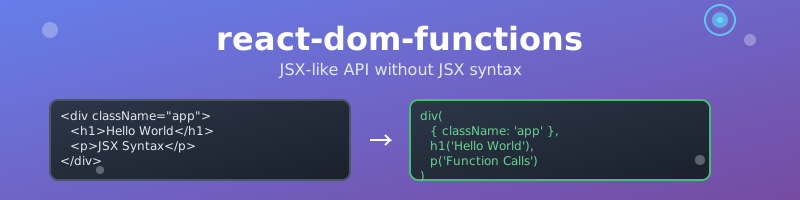
react-dom-functions offers a JSX-like API for React, allowing you to build React elements using simple function calls rather than JSX tags. This approach streamlines your code and eliminates the need for a build step or JSX transpilation, making it especially useful for environments where JSX is not available or desired. By providing a set of functions corresponding to standard HTML elements (such as div, span, button, etc.), you can construct your component trees in a more readable and maintainable way compared to using React.createElement directly. This results in cleaner code, improved type safety (especially with TypeScript), and a more ergonomic developer experience when working with React without JSX.
npm install react-dom-functions
Note: This library includes clsx as a dependency for advanced className handling. No additional installation is required.
import React from 'react';
import { div, h1, p, button, DOMFC } from 'react-dom-functions';

type AppProps = {
  initialCount?: number;
};

// Use DOMFC instead of React.FC for components that return DOM elements
const App: DOMFC<AppProps> = ({ initialCount = 0 }) => {
  const [count, setCount] = React.useState(initialCount);

  return div(
    { className: 'app' },
    h1('Hello World'),
    p('This is a paragraph'),
    button(
      {
        className: {
          btn: true,
          'btn-primary': true,
          'btn-active': count > 0,
        },
        onClick: () => setCount(count + 1),
      },
      `Count: ${count}`
    )
  );
};
Instead of using JSX syntax, you can create React elements using function calls:
import { div, h1, p, button, DOMFC } from 'react-dom-functions';

type MyComponentProps = {
  title: string;
  description: string;
};

// Use DOMFC instead of React.FC for components that return DOM elements
const MyComponent: DOMFC<MyComponentProps> = ({ title, description }) => {
  return div(
    { className: 'container' },
    h1({ className: 'title' }, title),
    p({ className: 'description' }, description),
    button(
      {
        className: 'btn',
        onClick: () => console.log('clicked'),
      },
      'Click me'
    )
  );
};
While JSX and TSX are popular for React development, using pure TypeScript with function calls offers several advantages:
The DOMFC type is a specialized React function component type designed for components that return DOM elements using the function-based API. Use DOMFC wherever you would normally use React.FC when building components with this library. It provides better type safety and IntelliSense support compared to the standard React.FC.
import { div, span, DOMFC } from 'react-dom-functions';

type CardProps = {
  title: string;
  content: string;
  variant?: 'primary' | 'secondary';
};

// DOMFC replaces React.FC for function-based DOM components
const Card: DOMFC<CardProps> = ({ title, content, variant = 'primary' }) => {
  return div(
    {
      className: {
        card: true,
        [`card--${variant}`]: true,
      },
    },
    span({ className: 'card__title' }, title),
    span({ className: 'card__content' }, content)
  );
};
The DOMFC type automatically includes support for children:
import { div, DOMFC } from 'react-dom-functions';

type ContainerProps = {
  padding?: 'small' | 'medium' | 'large';
};

// Use DOMFC instead of React.FC for better children support
const Container: DOMFC<ContainerProps> = ({ padding = 'medium', children }) => {
  return div(
    {
      className: {
        container: true,
        [`container--${padding}`]: true,
      },
    },
    children
  );
};
import { div, button, span, DOMFC } from 'react-dom-functions';

type ButtonProps = {
  variant: 'primary' | 'secondary' | 'danger';
  size?: 'small' | 'medium' | 'large';
  disabled?: boolean;
  onClick?: () => void;
};

// DOMFC provides better type safety than React.FC for DOM components
const Button: DOMFC<ButtonProps> = ({
  variant,
  size = 'medium',
  disabled = false,
  onClick,
  children,
}) => {
  return button(
    {
      className: {
        btn: true,
        [`btn--${variant}`]: true,
        [`btn--${size}`]: true,
        'btn--disabled': disabled,
      },
      disabled,
      onClick: disabled ? undefined : onClick,
    },
    children
  );
};
Replace React.FC with DOMFC in the following scenarios:
// ❌ Don't use React.FC with this library
const MyComponent: React.FC<MyProps> = ({ title }) => {
  return div({ className: 'container' }, title);
};

// ✅ Use DOMFC instead
const MyComponent: DOMFC<MyProps> = ({ title }) => {
  return div({ className: 'container' }, title);
};
Key Differences:
DOMFC is specifically designed for components that return DOM elementsDOMFC provides better type safety for the function-based APIDOMFC automatically includes proper children typingDOMFC matches the library's function-based approachAll HTML elements are available as functions. Each function accepts:
import { div, span, p, h1, h2, h3, h4, h5, h6 } from 'react-html-elements';

// With props and children
div({ className: 'container' }, 'Hello World');

// With multiple children
div(
  { className: 'container' },
  h1({ className: 'title' }, 'Title'),
  p({ className: 'text' }, 'Paragraph')
);

// Without props
div('Just text content');

// With multiple children without props
div(span('First child'), span('Second child'));
The className prop supports clsx syntax for conditional and dynamic class names. This allows you to create complex class combinations easily:
import { div, button, span } from 'react-dom-functions';

function DynamicComponent({ isActive, size, variant }) {
  return div(
    {
      className: {
        'base-class': true,
        active: isActive,
        disabled: !isActive,
        [`size-${size}`]: size,
        [`variant-${variant}`]: variant,
      },
    },
    button(
      {
        className: [
          'btn',
          'btn-primary',
          isActive && 'btn-active',
          size && `btn-${size}`,
        ],
      },
      'Click me'
    ),
    span(
      {
        className: clsx(
          'status',
          isActive ? 'status-active' : 'status-inactive',
          size && `status-${size}`
        ),
      },
      isActive ? 'Active' : 'Inactive'
    )
  );
}
Conditional classes:
div(
  {
    className: {
      base: true,
      active: isActive,
      disabled: isDisabled,
    },
  },
  'Content'
);
Array syntax:
div(
  {
    className: [
      'base-class',
      isActive && 'active-class',
      size && `size-${size}`,
    ],
  },
  'Content'
);
Direct clsx function:
import clsx from 'clsx';

div(
  {
    className: clsx(
      'base',
      isActive && 'active',
      size && `size-${size}`,
      variant && `variant-${variant}`
    ),
  },
  'Content'
);
Mixed syntax:
div(
  {
    className: [
      'base',
      { conditional: someCondition },
      otherCondition && 'other-class',
    ],
  },
  'Content'
);
Use the fragment function to create React fragments:
import { fragment, div, span } from 'react-dom-functions';

function MyComponent() {
  return fragment(div('First element'), div('Second element'));
}
import {
  form,
  input,
  button,
  label,
  textarea,
  select,
  option,
  div,
  DOMFC,
} from 'react-dom-functions';

type ContactFormProps = {
  onSubmit?: (data: { name: string; message: string }) => void;
};

const ContactForm: DOMFC<ContactFormProps> = ({ onSubmit }) => {
  const handleSubmit = (e: React.FormEvent) => {
    e.preventDefault();
    const formData = new FormData(e.target as HTMLFormElement);
    onSubmit?.({
      name: formData.get('name') as string,
      message: formData.get('message') as string,
    });
  };

  return form(
    { onSubmit: handleSubmit },
    div(
      { className: 'form-group' },
      label({ htmlFor: 'name' }, 'Name:'),
      input({
        id: 'name',
        name: 'name',
        type: 'text',
        placeholder: 'Enter your name',
      })
    ),
    div(
      { className: 'form-group' },
      label({ htmlFor: 'message' }, 'Message:'),
      textarea({
        id: 'message',
        name: 'message',
        rows: 4,
        placeholder: 'Enter your message',
      })
    ),
    button({ type: 'submit' }, 'Submit')
  );
};
import { ul, ol, li, DOMFC } from 'react-dom-functions';

type TodoListProps = {
  todos: string[];
  onTodoClick?: (todo: string, index: number) => void;
};

const TodoList: DOMFC<TodoListProps> = ({ todos, onTodoClick }) => {
  return ul(
    { className: 'todo-list' },
    ...todos.map((todo, index) =>
      li(
        {
          key: index,
          className: 'todo-item',
          onClick: () => onTodoClick?.(todo, index),
        },
        todo
      )
    )
  );
};
import { table, thead, tbody, tr, th, td, DOMFC } from 'react-dom-functions';

type Person = {
  name: string;
  age: number;
};

type DataTableProps = {
  data: Person[];
  onRowClick?: (person: Person, index: number) => void;
};

const DataTable: DOMFC<DataTableProps> = ({ data, onRowClick }) => {
  return table(
    { className: 'data-table' },
    thead(tr(th('Name'), th('Age'))),
    tbody(
      ...data.map((row, index) =>
        tr(
          {
            key: index,
            onClick: () => onRowClick?.(row, index),
            className: 'table-row',
          },
          td(row.name),
          td(row.age.toString())
        )
      )
    )
  );
};
import { svg, circle, rect, path, DOMFC } from 'react-dom-functions';

type SimpleIconProps = {
  size?: number;
  color?: string;
};

const SimpleIcon: DOMFC<SimpleIconProps> = ({ size = 100, color = 'blue' }) => {
  return svg(
    { width: size, height: size, viewBox: `0 0 ${size} ${size}` },
    circle({
      cx: size / 2,
      cy: size / 2,
      r: size * 0.4,
      fill: color,
    })
  );
};
title, base, link, meta, styleaddress, article, aside, footer, headerh1, h2, h3, h4, h5, h6, hgroupmain, nav, sectionblockquote, dd, div, dl, dtfigcaption, figure, hr, li, ol, p, pre, ula, abbr, b, bdi, bdo, br, cite, codedata, dfn, em, i, kbd, mark, qrb, rp, rt, rtc, ruby, s, sampsmall, span, strong, sub, sup, timeu, var_, wbrarea, audio, img, map, track, videoembed, iframe, object, param, picture, sourcecanvas, noscript, scriptdel, inscaption, col, colgroup, table, tbodytd, tfoot, th, thead, trbutton, datalist, fieldset, form, inputlabel, legend, meter, optgroup, optionoutput, progress, select, textareadetails, dialog, menu, menuitem, summaryslot, templatesvg, circle, rect, path, line, polygonpolyline, ellipse, g, text, tspanmath, mrow, mfrac, msqrt, mroot, msubmsup, msubsup, munder, mover, munderovermmultiscripts, mtable, mtr, mtd, mactionmerror, mpadded, mphantom, mspace, mstylems, mtext, mn, mo, miThis library is written in TypeScript and provides full type safety. All element functions are properly typed with React's element types.
Important: When creating function components with this library, use DOMFC instead of React.FC for better type safety and consistency with the function-based API.
This library is optimized for performance:
git checkout -b feature/amazing-feature)git commit -m 'Add some amazing feature')git push origin feature/amazing-feature)MIT
FAQs
A JSX-like API for React without JSX syntax
The npm package react-dom-functions receives a total of 0 weekly downloads. As such, react-dom-functions popularity was classified as not popular.
We found that react-dom-functions demonstrated a healthy version release cadence and project activity because the last version was released less than a year ago. It has 0 open source maintainers collaborating on the project.
Did you know?

Socket for GitHub automatically highlights issues in each pull request and monitors the health of all your open source dependencies. Discover the contents of your packages and block harmful activity before you install or update your dependencies.
Security News
The Axios compromise shows how time-dependent dependency resolution makes exposure harder to detect and contain.

Research
A supply chain attack on Axios introduced a malicious dependency, plain-crypto-js@4.2.1, published minutes earlier and absent from the project’s GitHub releases.

Research
Malicious versions of the Telnyx Python SDK on PyPI delivered credential-stealing malware via a multi-stage supply chain attack.