Security News
Attackers Are Hunting High-Impact Node.js Maintainers in a Coordinated Social Engineering Campaign
Multiple high-impact npm maintainers confirm they have been targeted in the same social engineering campaign that compromised Axios.
react-export-table
Advanced tools
A all in one solution for exporting array data as excel, pdf and copy to clipboard & print data!
@siamf/react-export@siamf/react-export instead.This package is no longer maintained. For the latest updates and improvements, migrate to:
A package for for exporting array data or table data as excel sheet, csv, pdf and tools for copied data to clipboard or printing data. By using this package you can you can export table data and print table data or copy to clipboard all in one place.
orientation props to ExportAsPdf component.orientation props to PrintDocument component.$ npm i react-export-table
import { ExportAsExcel, ExportAsPdf, ExportAsCsv, CopyToClipboard, CopyTextToClipboard, PrintDocument, ExcelToJsonConverter, FileUpload } from "react-export-table";
//Export as Excel Sheet
<ExportAsExcel
data={data}
headers={["Name", "Age", "Something"]}
>
{(props)=> (
<button {...props}>
Export as Excel
</button>
)}
</ExportAsExcel>
//Export as pdf
<ExportAsPdf
data={data}
headers={["CreatedBy", "Age", "Something Else"]}
headerStyles={{ fillColor: "red" }}
title="Sections List"
>
{(props)=> (
<button {...props}>
Export as PDF
</button>
)}
</ExportAsPdf>
//Export as CSV
<ExportAsCsv
data={data}
>
{(props)=> (
<button {...props}>Hello World</button>
)}
</ExportAsCsv>
//Copy to clipboard (Array or Table)
<CopyToClipboard
data={data}
headers={["CreatedBy", "Age", "Something Else"]}
>
{(props)=> (
<button {...props}>
Copy Document
</button>
)}
</CopyToClipboard>
//Copy to clipboard (text)
<CopyTextToClipboard text="Hello World">
{(props)=> (
<button {...props}>
Copy Text
</button>
)}
</CopyTextToClipboard>
//Print data
<PrintDocument
data={data}
headers={["CreatedBy", "Age", "Something Else"]}
>
{(props)=> (
<button {...props}>
Copy Text
</button>
)}
</PrintDocument>
//Excel to json converter or Read Excel File
<ExcelToJsonConverter>
{({
isDragging,
dragProps,
onFileUpload,
errors,
data,
fileInfo
}) => (
<div {...dragProps} onClick={onFileUpload}>
{errors}
</div>
)}
</ExcelToJsonConverter>
//File Upload
<FileUpload acceptType={[".pdf"]}>
{({
isDragging,
dragProps,
onFileUpload,
errors,
fileInfo
}) => (
<div className="border border-solid border-red-600 p-8" {...dragProps} onClick={onFileUpload}>
{errors}
</div>
)}
</FileUpload>
| Name | Types | Default |
|---|---|---|
| chilren | ReactNode (Required) | |
| data | Array (Required) | |
| headers | string[] (Required) | |
| name | string (Optional) | reactExportTable |
| minColumnWidth | number (Optional) | 15 |
| fileName | string (Optional) | reactExportTable |
| Name | Types | Default |
|---|---|---|
| chilren | ReactNode (Required) | |
| data | Array (Required) | |
| headers | string[] (Required) | |
| foot | string[] (Optional) | |
| title | string (Optional) | |
| fileName | string (Optional) | reactExportTable |
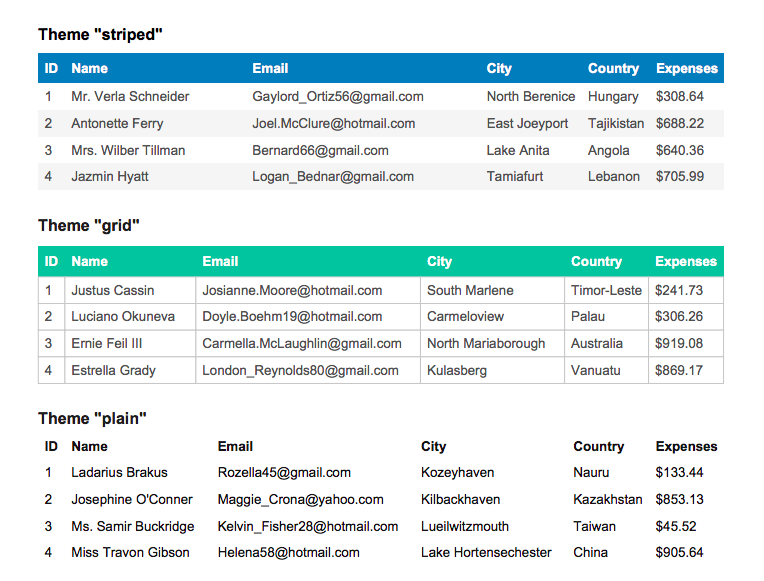
| theme | "striped" | "grid" | "plain" (Optional) | "grid" |
| styles | StylesDefs (Optional) | |
| headerStyles | StylesDefs (Optional) | |
| footerStyles | StylesDefs (Optional) | |
| margin | Margin (Optional) | |
| orientation | Orientation (Optional). Format is- "landscape" | "portrait" | "l" | "p" |
font: 'helvetica'|'times'|'courier' = 'helvetica'fontStyle: 'normal'|'bold'|'italic'|'bolditalic' = 'normal'overflow: 'linebreak'|'ellipsize'|'visible'|'hidden' = 'linebreak'fillColor: Color? = nulltextColor: Color? = 20cellWidth: 'auto'|'wrap'|number = 'auto'minCellWidth: number? = 10minCellHeight: number = 0halign: 'left'|'center'|'right' = 'left'valign: 'top'|'middle'|'bottom' = 'top'fontSize: number = 10cellPadding: Padding = 10lineColor: Color = 10lineWidth: border = 0 // If 0, no border is drawntop: numberright: numberbottom: numberleft: numberYou find this three type theme-
| Name | Types | Default |
|---|---|---|
| chilren | ReactNode (Required) | |
| data | Array (Required) | |
| fileName | String (Optional) | Custom CSV File Name |
| Name | Types | Default |
|---|---|---|
| chilren | ReactNode (Required) | |
| data | Array (Required) | |
| headers | string[] (Required) | |
| onCopied | Function (Optional) | When copy will be success |
| onFailed | Funtion (Optional) | When copy will be failed |
| Name | Types | Default |
|---|---|---|
| chilren | ReactNode (Required) | |
| text | string (Required) | |
| headers | string[] (Required) | |
| onCopied | Function (Optional) | When copy will be success |
| onFailed | Funtion (Optional) | When copy will be failed |
ExportAsPdf Component!| Name | Types | Description | Example |
|---|---|---|---|
| onRead | Function (Optional) | For getting json data | `onRead={(data:YourType)=> console.log(data)}` |
| inputProps | React.HTMLProps (Optional) | Input Props for input field | |
| onChange | Function (Optional) | `onChange={(file:File)=> console.log(file)}` |
| Name | Types | Description |
|---|---|---|
| dragProps | object | Native element props for drag and drop feature |
| isDragging | boolean | "true" if a file is being dragged |
| onFileUpload | function | Called when an element is clicks and triggers to open a file dialog |
| errors | string | Validation Error |
| data | Array | Read or Converted data |
| fileInfo | object | Selected file info |
| Name | Types | Description | Example |
|---|---|---|---|
| acceptType | Function (Required) | File Accept Type | `acceptType={[".pdf"]}` |
| inputProps | React.HTMLProps (Optional) | Input Props for input field | |
| onChange | Function (Optional) | `onChange={(file:File)=> console.log(file)}` | |
| size | File size for validation (Optional) | Size Need to be define in MB |
| Name | Types | Description |
|---|---|---|
| dragProps | object | Native element props for drag and drop feature |
| isDragging | boolean | "true" if a file is being dragged |
| onFileUpload | function | Called when an element is clicks and triggers to open a file dialog |
| errors | string | Validation Error |
| fileInfo | object | Selected file info |
In version 3 I added more headless on each component. I update only CopyTextToClipboard, CopyToClipboard, ExportAsCsv, ExportAsExcel, ExportAsPdf, PrintDocument component.
Update this
<AnyOfThoseComponent
data={data}
headers={["Name", "Age", "Something"]}
>
<button>
Export as Excel
</button>
</AnyOfThoseComponent>
to
<AnyOfThoseComponent
data={data}
headers={["Name", "Age", "Something"]}
>
{(props)=> (
<button {...props}>
Export as Excel
</button>
)}
</AnyOfThoseComponent>
FAQs
A all in one solution for exporting array data as excel, pdf and copy to clipboard & print data!
The npm package react-export-table receives a total of 182 weekly downloads. As such, react-export-table popularity was classified as not popular.
We found that react-export-table demonstrated a not healthy version release cadence and project activity because the last version was released a year ago. It has 1 open source maintainer collaborating on the project.
Did you know?

Socket for GitHub automatically highlights issues in each pull request and monitors the health of all your open source dependencies. Discover the contents of your packages and block harmful activity before you install or update your dependencies.

Security News
Multiple high-impact npm maintainers confirm they have been targeted in the same social engineering campaign that compromised Axios.

Security News
Axios compromise traced to social engineering, showing how attacks on maintainers can bypass controls and expose the broader software supply chain.

Security News
Node.js has paused its bug bounty program after funding ended, removing payouts for vulnerability reports but keeping its security process unchanged.