react-native-autocomplete
MLPAutoCompleteTextField
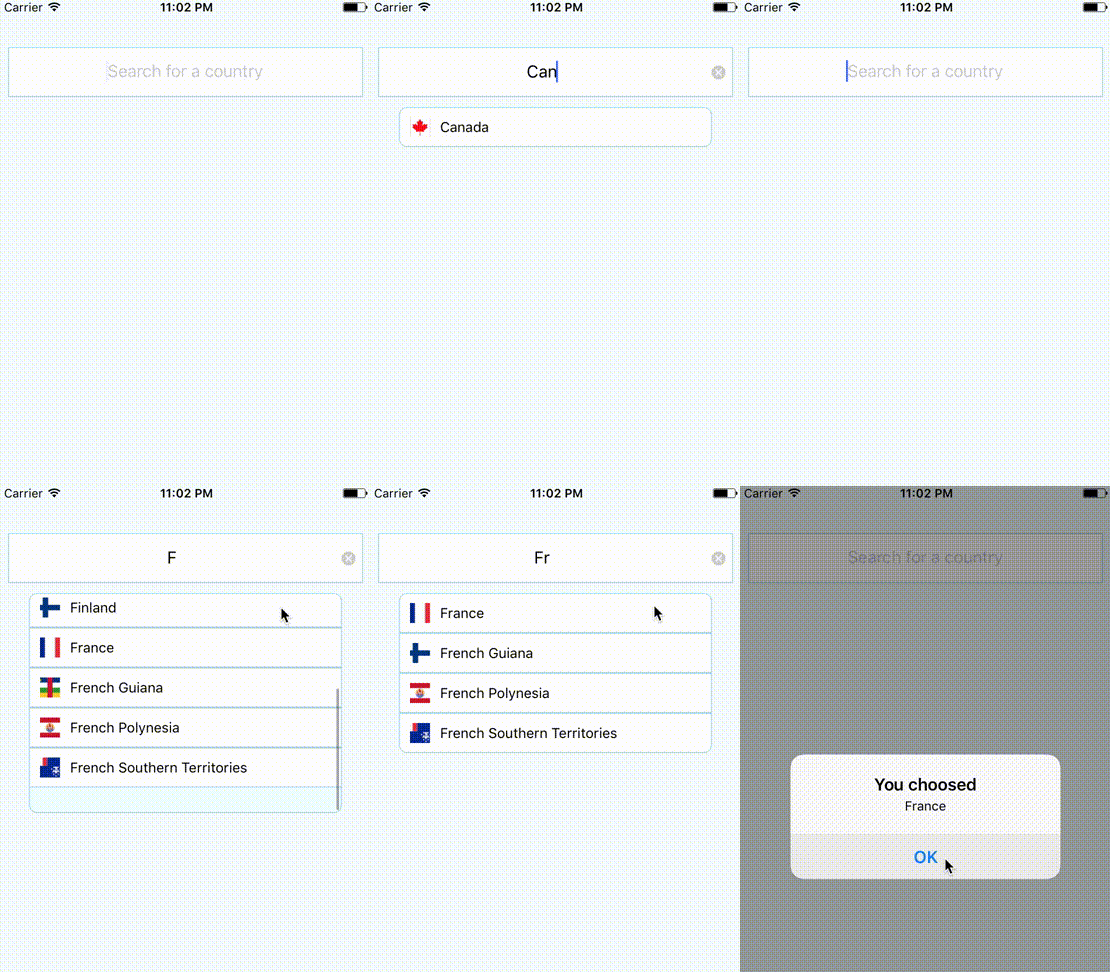
(iOS only) wrapper for React Native, supports React Native custom cells 🎨.
Installation
$ npm install react-native-autocomplete- Right click on Libraries, select Add files to "…" and select
node_modules/react-native-autocomplete/RCTAutoComplete.xcodeproj
- Select your project and under Build Phases -> Link Binary With
Libraries, press the + and select
libRCTAutoComplete.a.
Facebook documentation
Usage
For example download
Country list
import React, { Component } from "react";
import { AppRegistry, StyleSheet, Text, View, AlertIOS } from "react-native";

import AutoComplete from "react-native-autocomplete";
import Countries from "./countries.json";

const styles = StyleSheet.create({
  autocomplete: {
    alignSelf: "stretch",
    height: 50,
    margin: 10,
    marginTop: 50,
    backgroundColor: "#FFF",
    borderColor: "lightblue",
    borderWidth: 1
  },
  container: {
    flex: 1,
    backgroundColor: "#F5FCFF"
  }
});

class RCTAutoCompleteApp extends Component {
  state = { data: [] };

  constructor(props) {
    super(props);
    this.onTyping = this.onTyping.bind(this);
  }

  onTyping(text) {
    const countries = Countries.filter(country =>
      country.name.toLowerCase().startsWith(text.toLowerCase())
    ).map(country => country.name);

    this.setState({ data: countries });
  }

  onSelect(value) {
    AlertIOS.alert("You choosed", value);
  }

  render() {
    return (
      <View style={styles.container}>
        <AutoComplete
          style={styles.autocomplete}
          suggestions={this.state.data}
          onTyping={this.onTyping}
          onSelect={this.onSelect}
          placeholder="Search for a country"
          clearButtonMode="always"
          returnKeyType="go"
          textAlign="center"
          clearTextOnFocus
          autoCompleteTableTopOffset={10}
          autoCompleteTableLeftOffset={20}
          autoCompleteTableSizeOffset={-40}
          autoCompleteTableBorderColor="lightblue"
          autoCompleteTableBackgroundColor="azure"
          autoCompleteTableCornerRadius={8}
          autoCompleteTableBorderWidth={1}
          autoCompleteFontSize={15}
          autoCompleteRegularFontName="Helvetica Neue"
          autoCompleteBoldFontName="Helvetica Bold"
          autoCompleteTableCellTextColor={"dimgray"}
          autoCompleteRowHeight={40}
          autoCompleteFetchRequestDelay={100}
          maximumNumberOfAutoCompleteRows={6}
        />
      </View>
    );
  }
}

AppRegistry.registerComponent("RCTAutoCompleteApp", () => RCTAutoCompleteApp);
Custom Cell
You can use a React Native component to render the cells.
import React, { Component } from "react";
import {
  AppRegistry,
  StyleSheet,
  Text,
  View,
  Image,
  AlertIOS
} from "react-native";

import AutoComplete from "react-native-autocomplete";
import Countries from "./countries.json";

const flag = code =>
  `https://raw.githubusercontent.com/hjnilsson/country-flags/master/png250px/${
    code
  }.png`;

const styles = StyleSheet.create({
  autocomplete: {
    alignSelf: "stretch",
    height: 50,
    margin: 10,
    marginTop: 50,
    backgroundColor: "#FFF",
    borderColor: "lightblue",
    borderWidth: 1
  },
  cell: {
    flex: 1,
    borderWidth: 1,
    borderColor: "lightblue",
    flexDirection: "row",
    justifyContent: "center",
    alignItems: "center"
  },
  cellText: {
    flex: 1,
    marginLeft: 10
  },
  image: {
    width: 20,
    height: 20,
    marginLeft: 10
  },
  container: {
    flex: 1,
    backgroundColor: "#F5FCFF"
  }
});

const CustomCell = ({ data }) => (
  <View style={styles.cell}>
    <Image source={{ uri: flag(data.code) }} style={styles.image} />
    <Text style={styles.cellText}>{data.country}</Text>
  </View>
);

class RCTAutoCompleteApp extends Component {
  state = { data: [] };

  constructor(props) {
    super(props);
    this.onTyping = this.onTyping.bind(this);
  }

  onTyping(text) {
    const countries = Countries.filter(country =>
      country.name.toLowerCase().startsWith(text.toLowerCase())
    ).map(country => {
      return { country: country.name, code: country.code.toLowerCase() };
    });

    this.setState({ data: countries });
  }

  onSelect(json) {
    AlertIOS.alert("You choosed", json.country);
  }

  render() {
    return (
      <View style={styles.container}>
        <AutoComplete
          style={styles.autocomplete}
          cellComponent="CustomCell"
          suggestions={this.state.data}
          onTyping={this.onTyping}
          onSelect={this.onSelect}
          placeholder="Search for a country"
          clearButtonMode="always"
          returnKeyType="go"
          textAlign="center"
          clearTextOnFocus
          autoCompleteTableTopOffset={10}
          autoCompleteTableLeftOffset={20}
          autoCompleteTableSizeOffset={-40}
          autoCompleteTableBorderColor="lightblue"
          autoCompleteTableBackgroundColor="azure"
          autoCompleteTableCornerRadius={8}
          autoCompleteTableBorderWidth={1}
          autoCompleteRowHeight={40}
          autoCompleteFetchRequestDelay={100}
          maximumNumberOfAutoCompleteRows={6}
        />
      </View>
    );
  }
}

AppRegistry.registerComponent("CustomCell", () => CustomCell);
AppRegistry.registerComponent("RCTAutoCompleteApp", () => RCTAutoCompleteApp);
Events
| onTyping | Text is entered. The callback can be delayed with option autoCompleteFetchRequestDelay. |
| onSelect | A cell in the suggestions list is selected. |
| onFocus | Text input get focus. |
| onBlur | Text input lost focus. |
Other events from Text Input are avalaible.
Global options
| cellComponent | string | Name of a React Native component used to render cells. If null, use the default rendering. |
| suggestions | array | If using default cell rendering specify an Array of string, otherwise any object. |
| autoCompleteFetchRequestDelay | number | Delay in milliseconds before retrieving suggestions. |
| maximumNumberOfAutoCompleteRows | number | Number of suggestions displayed. |
| showTextFieldDropShadowWhenAutoCompleteTableIsOpen | bool | Display a drop shadow around the text field. |
| autoCompleteTableViewHidden | bool | If true, the suggestions list will be hidden. |
| autoCompleteTableBorderColor | color | Set suggestions list border color. |
| autoCompleteTableBorderWidth | number | Set suggestions list border color. |
| autoCompleteTableBackgroundColor | color | Set suggestions list border size. |
| autoCompleteTableCornerRadius | number | Set suggestions list background color. |
| autoCompleteTableTopOffset | number | Set the distance between the text field and the suggestions list. |
| autoCompleteTableLeftOffset | number | Set the left offset between the container and the suggestions list. |
| autoCompleteTableSizeOffset | number | Set the offset of the suggestions list size. Combined with autoCompleteTableLeftOffset, you can reduce the width of the suggestions list and to center it. Exemple: autoCompleteTableLeftOffset=20 autoCompleteTableSizeOffset=40 |
| autoCompleteRowHeight | number | Height of cells in the suggestions list. |
Default cell rendering options
| autoCompleteFontSize | number | Font Size used to display text. |
| autoCompleteRegularFontName | string | Font used to display text. |
| autoCompleteBoldFontName | string | Font used to display suggestion text. |
| autoCompleteTableCellTextColor | color | Text Color used to display text. |
| autoCompleteTableCellBackgroundColor | color | Background color of cells. |
| applyBoldEffectToAutoCompleteSuggestions | bool | If false, disable bold effect on suggestion text. |
| reverseAutoCompleteSuggestionsBoldEffect | bool | Reverse the bold effect. |
License
MIT © Nicolas Ulrich 2017





