Dev Lens

An elegant network monitoring tool for developers
Real-time monitoring of network requests and console logs with dark/light theme support
English | 简体中文
📦 Project Structure
- Root - Tauri desktop application
- sdk/ - React Native SDK (published to NPM as
react-native-dev-lens)
- example/ - Example React Native app for testing
✨ Features
- 🌐 Network Monitoring - Real-time capture of HTTP requests and WebSocket connections
- 📊 Detailed Information - View request/response headers, body, query params, cookies, etc.
- 🎨 Theme Switching - Support for dark/light mode with modern UI
- 🌍 Internationalization - English/Chinese language support
- 🔍 Smart Filtering - Filter by URL and request type
- 💻 Console Logs - Capture and display application logs (info/warn/error)
📸 Screenshots
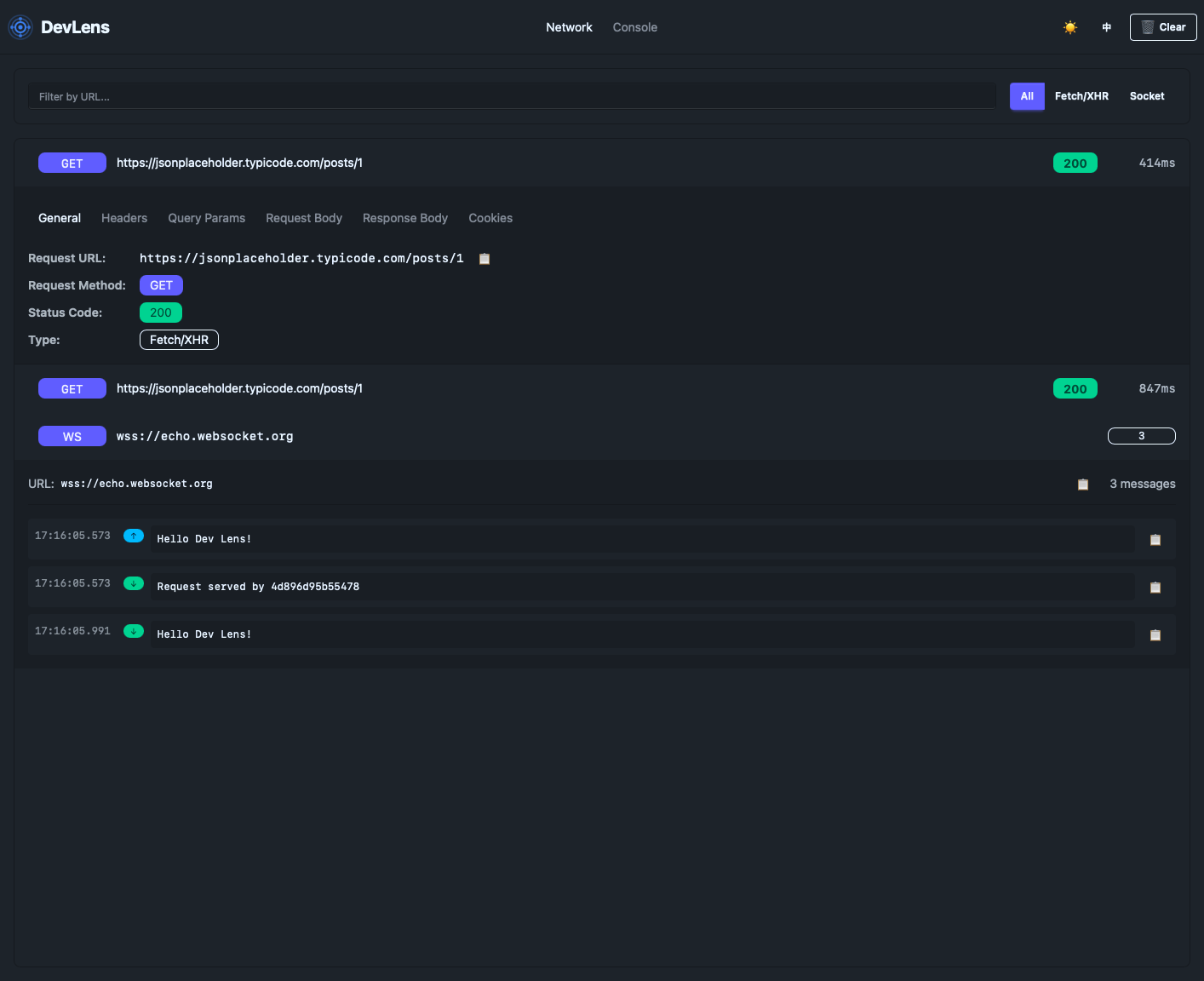
Dev Lens in action - Network monitoring with detailed request information
🚀 Quick Start
For Users (React Native Developers)
-
Download Dev Lens App
Download the latest release from GitHub Releases
macOS Users: If you see "App is damaged" error, run this command in Terminal:
xattr -cr /Applications/com.cola.dev-lens
-
Install SDK in your React Native project
npm install react-native-dev-lens
yarn add react-native-dev-lens
pnpm add react-native-dev-lens
-
Add one line to your app entry point (e.g., index.js or App.js)
import DevLens from "react-native-dev-lens";
new DevLens().init();
-
Open Dev Lens App
Launch the Dev Lens desktop app, and you'll see all network requests and console logs in real-time!
Configuration (Optional)
import DevLens from "react-native-dev-lens";
if (__DEV__) {
new DevLens().init();
}
const devLens = new DevLens({
enabled: __DEV__,
wsUrl: "ws://192.168.1.100:3927/ws",
});
devLens.init();
📦 What's Included
- Dev Lens App - Desktop application for macOS (Apple Silicon) and Windows
- react-native-dev-lens - NPM package for easy integration
💻 Supported Platforms
- macOS - Apple Silicon
- Windows - x64
🛠️ For Contributors
Prerequisites
- Node.js 18+
- Rust 1.70+
- pnpm
Development
pnpm install
pnpm tauri dev
pnpm tauri build
Project Structure
dev-lens/
├── src/                    # Frontend source code
│   ├── App.tsx            # Main application component
│   ├── i18n.ts            # Internationalization config
│   └── assets/            # Static assets
├── src-tauri/             # Tauri backend
│   ├── src/
│   │   └── lib.rs         # Rust backend with WebSocket server
│   └── icons/             # Application icons
├── sdk/                   # SDK for integration
│   └── index.js           # NPM package source
├── example/               # Example React Native app
│   ├── App.tsx            # Test app with demo buttons
│   └── README.md          # Example app documentation
└── public/                # Public assets
🔧 Technical Stack
- Frontend: React 19 + TypeScript
- Desktop Framework: Tauri 2.0
- UI Components: DaisyUI + Tailwind CSS
- Backend: Rust + Axum (WebSocket server on port 3927)
- Internationalization: i18next + react-i18next
- Build Tool: Vite
📡 How It Works
- Dev Lens app starts a WebSocket server on
0.0.0.0:3927 (accessible from network)
- The SDK intercepts
fetch requests and WebSocket connections
- The SDK intercepts console logs (log, warn, error, info)
- The SDK sends data to Dev Lens via WebSocket connection (with auto-reconnect)
- Dev Lens displays the data in real-time with a beautiful UI
Connection Options:
- Local/Simulator:
ws://127.0.0.1:3927/ws (default)
- Physical Device:
ws://YOUR_COMPUTER_IP:3927/ws (e.g., ws://192.168.1.100:3927/ws)
- Android Emulator:
ws://10.0.2.2:3927/ws
The server listens on all network interfaces, so you can connect from any device on the same network.
🎯 Use Cases
- Debug network requests during development
- View API response data and headers
- Track WebSocket connections
- Monitor application log output
- Check CORS configuration
- Inspect request/response timing
📝 WebSocket Protocol
Dev Lens uses WebSocket for real-time communication:
- Endpoint:
ws://127.0.0.1:3927/ws
- Message Format: JSON with
type field
type: "network" - Network request logstype: "console" - Console logstype: "websocket-update" - WebSocket connection updates
🌟 Why Dev Lens?
- Zero Configuration - Just one line of code to integrate
- Non-Intrusive - Doesn't affect your app's performance
- Beautiful UI - Modern design with dark/light theme
- Cross-Platform - Works on macOS (Apple Silicon) and Windows
- Open Source - Free and open source
📄 License
MIT License
🤝 Contributing
Issues and Pull Requests are welcome!
🔗 Links
Made with ❤️ by Dev Lens Team





