good-ui
good UI that supports react-native based android, ios and web
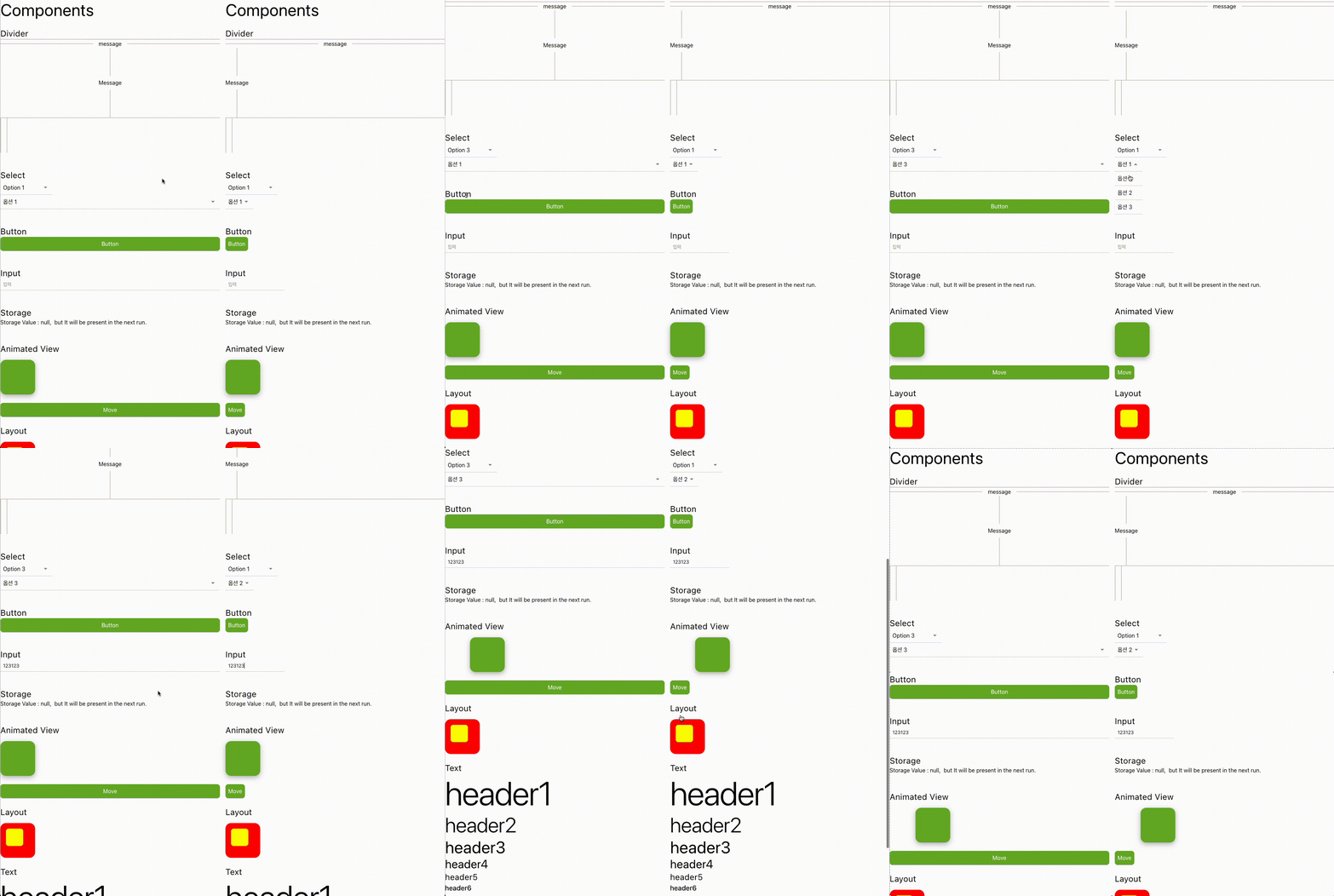
Requirement
yarn add react-native-reanimated
Installation
yarn add react-native-good-ui
Usage
import React, { useState } from 'react';
import { StyleSheet, ViewStyle } from 'react-native';
import {
  Button,
  Column,
  Divider,
  EdgeInsets,
  Input,
  Row,
  Select,
  Spacer,
  Text,
  ZIndex,
  storage,
} from 'react-native-good-ui';
import {
  useSharedValue,
  useAnimatedStyle,
  withSpring,
} from 'react-native-reanimated';

import type { AnimateStyle } from 'react-native-reanimated';

const storageKey = '@storage_test';

export default function App() {
  const [storageValue, setStorageValue] = useState('');

  React.useEffect(() => {
    const fetch = async () => {
      const aStorage = await storage.load(storageKey);

      if (aStorage) {
        setStorageValue(
          `Storage Value : ${aStorage}, but it will be removed  in the next run.`
        );
        await storage.remove(storageKey);
      } else {
        await storage.save(storageKey, 'hello world');
        setStorageValue(
          `Storage Value : null,  but It will be present in the next run.`
        );
      }
    };

    fetch().then();
  }, []);

  const offset = useSharedValue(0);

  const animatedStyles = useAnimatedStyle(() => {
    return {
      transform: [{ translateX: offset.value }],
    } as AnimateStyle<ViewStyle>;
  });

  const body = (
    <React.Fragment>
      <Text preset={'header3'}>Components</Text>

      <Spacer preset={'large'} />

      <Text preset={'header5'}>Divider</Text>

      <Divider />
      <Divider text={'message'} textEdgeInsets={'medium'} />

      <Column style={{ height: 200 }} alignItems={'center'}>
        <Divider
          direction={'vertical'}
          text={'Message'}
          textEdgeInsets={'small'}
        />
      </Column>
      <Divider direction={'vertical'} />

      <Spacer preset={'huge'} />

      <Text preset={'header5'}>Select</Text>
      <Select
        width={150}
        options={['Option 1', 'Option 2', 'Option 3']}
        style={{ zIndex: ZIndex.float + 1 }}
        onSelect={(option) => console.log(option)}
      />

      <Select
        options={['옵션 1', '옵션 2', '옵션 3']}
        onSelect={(option) => console.log(option)}
      />

      <Spacer preset={'huge'} />

      <Text preset={'header5'}>Button</Text>
      <Button text={'Button'} onPress={() => console.log('onPress')} />

      <Spacer preset={'huge'} />
      <Text preset={'header5'}>Input</Text>
      <Input placeholder={'입력'} />

      <Spacer preset={'huge'} />
      <Text preset={'header5'}>Storage</Text>
      <Text>{storageValue}</Text>

      <Spacer preset={'huge'} />

      <Text preset={'header5'}>Animated View</Text>
      <Spacer direction={'both'} preset={'medium'} />
      <Row
        animatable={true}
        elevation={24}
        round={'medium'}
        roundShape={'all'}
        style={[styles.box, animatedStyles]}
      />
      <Spacer preset={'large'} />
      <Button
        onPress={() => {
          offset.value = withSpring(Math.random() * 255);
        }}
        text={'Move'}
      />

      <Spacer preset={'large'} />

      <Text preset={'header5'}>Layout</Text>
      <Spacer preset={'medium'} />
      <Column
        style={styles.layout1}
        round={'medium'}
        edgeInsets={EdgeInsets.fromVH('medium', 'medium')}
      >
        <Column style={styles.layout2} round={'small'} />
      </Column>

      <Spacer preset={'large'} />

      <Text preset={'header5'}>Text</Text>
      <Text preset={'header1'}>header1</Text>
      <Text preset={'header2'}>header2</Text>
      <Text preset={'header3'}>header3</Text>
      <Text preset={'header4'}>header4</Text>
      <Text preset={'header5'}>header5</Text>
      <Text preset={'header6'}>header6</Text>
      <Text preset={'subtitle1'}>subtitle1</Text>
      <Text preset={'subtitle2'}>subtitle2</Text>
      <Text preset={'body1'}>body1</Text>
      <Text preset={'body2'}>body2</Text>
      <Text preset={'caption'}>caption</Text>
      <Text preset={'overline'}>overline</Text>
    </React.Fragment>
  );

  return (
    <Row>
      <Column style={styles.container} edgeInsets={EdgeInsets.right('medium')}>
        {body}
      </Column>
      <Column style={styles.container2}>{body}</Column>
    </Row>
  );
}

const styles = StyleSheet.create({
  container: {
    flex: 1,
    flexShrink: 1,
    alignItems: 'stretch',
    backgroundColor: 'white',
  },
  container2: {
    flex: 1,
    flexShrink: 1,
    alignItems: 'flex-start',
    backgroundColor: 'white',
  },
  box: {
    width: 100,
    height: 100,
    backgroundColor: '#6DB32A',
    justifyContent: 'center',
    alignItems: 'center',
  },
  layout1: {
    backgroundColor: 'red',
    width: 100,
    height: 100,
  },
  layout2: {
    backgroundColor: 'yellow',
    width: 50,
    height: 50,
  },
});
Contributing
See the contributing guide to learn how to contribute to the repository and the development workflow.
License
MIT
Made with create-react-native-library





