




Security News
The Hidden Blast Radius of the Axios Compromise
The Axios compromise shows how time-dependent dependency resolution makes exposure harder to detect and contain.
By Ahmad Nassri - Apr 01, 2026
react-native-image-filter-kit
Advanced tools






Various image filters for iOS & Android.
iOS & Android:
Image and ImageBackground componentsreact-native:
supported versions:
| react-native | min Android SDK | min iOS version |
|---|---|---|
| >=0.64.0 | 21 | 9.0 |
| >=0.57.1 <0.64.0 | 17 | 9.0 |
with react-native ">=0.64.0"1. Install latest version from npm
2. Install pods
|
with react-native ">=0.61.0 <0.64.0"1. Install v0.7.3 from npm
2. Install pods
3. Enable renderscript
|
with react-native ">=0.60.0 <0.61.0"1. Install v0.5.18 from npm
2. Install pods
3. Enable renderscript
|
with react-native ">=0.58.0 <0.60.0"1. Install v0.4.14 from npm
2-a. Link native modules
2-b. Install podsIf you use Cocoapods add the following line to your Podfile:
2-c. Manual installationInstall manually if 3. Enable renderscript
|
with react-native ">=0.57.1 <0.58.0"1. Install v0.3.9 from npm
2-a. Link native modules
2-b. Install podsIf you use Cocoapods add the following line to your Podfile:
2-c. Manual installationInstall manually if 3. Final stepOpen |
The purpose of this module is to support most of the native image filters on each platform and to provide a common interface for these filters. If the filter exists only on one platform, then its counterpart will be implemented using renderscript on Android and cikernel on iOS. If you need only color matrix filters - better use a lightweight predecessor of this module.
import { Image } from 'react-native'
import {
  SoftLightBlend,
  Emboss,
  Earlybird,
  Invert,
  RadialGradient
} from 'react-native-image-filter-kit'

const result = (
  <Earlybird
    image={
      <SoftLightBlend
        resizeCanvasTo={'dstImage'}
        dstTransform={{
          scale: 'CONTAIN'
        }}
        dstImage={
          <Emboss
            image={
              <Image
                style={{ width: 320, height: 320 }}
                source={require('./parrot.png')}
                resizeMode={'contain'}
              />
            }
          />
        }
        srcTransform={{
          anchor: { x: 0.5, y: 1 },
          translate: { x: 0.5, y: 1 }
        }}
        srcImage={
          <Invert
            image={
              <RadialGradient
                colors={['rgba(0, 0, 255, 1)', '#00ff00', 'red']}
                stops={[0.25, 0.75, 1]}
                center={{ x: '50w', y: '100h' }}
              />
            }
          />
        }
      />
    }
  />
)
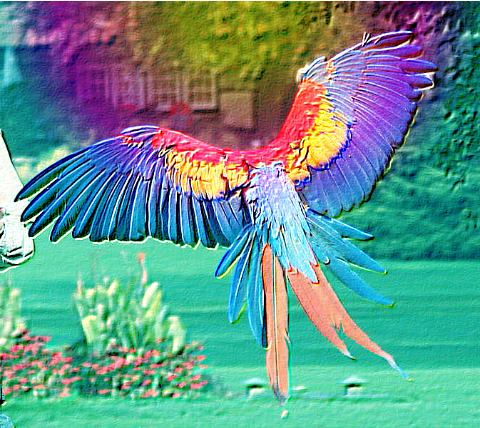
| original image | result |
|---|---|
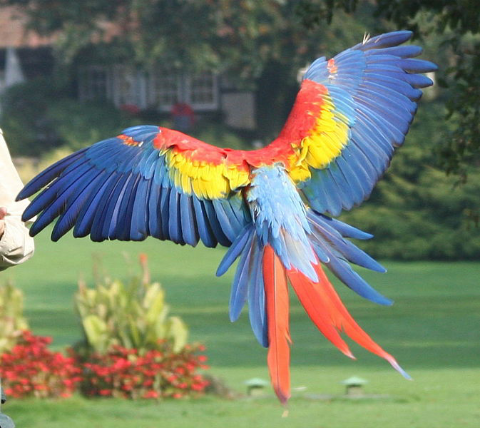 | 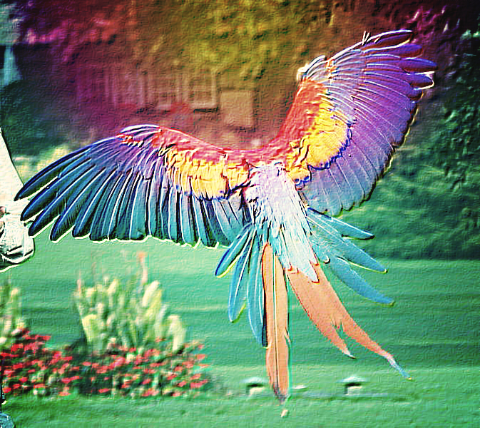 |
|
|
|
| ||||||||
|---|---|---|---|---|---|---|---|---|---|---|---|
|
|
blurRadius Image prop will not work in conjunction with this library, instead of it just use BoxBlur filter
When running on pre-Lollipop (SDK < 21) Android devices you may experience TooManyBitmapsException, which results in image is not being rendered (this can be logged with onFilteringError prop). It looks like this is a relatively rare case which arises on low-end devices when filtering wallpaper-sized images (like 1920 × 1080 pixels). The common workarounds are:
using smaller images
using ColorMatrix filter with concatColorMatrices instead of wrapping the image with multiple color matrix based filters
adding android:largeHeap="true" to android/app/src/main/AndroidManifest.xml
replacing standard MainReactPackage with alternative one provided by this module:
... + import iyegoroff.imagefilterkit.MainReactPackageWithFrescoCache;

      public class MainApplication extends Application implements ReactApplication {

      ...
          List<ReactPackage> packages = new PackageList(this).getPackages();
          // Packages that cannot be autolinked yet can be added manually here, for example:
          // packages.add(new MyReactNativePackage());
    -     return packages;
    +     return MainReactPackageWithFrescoCache.inject(packages);
        }
      ...
    ```
    After this change `ImageFilter` will not throw `TooManyBitmapsException` immediately and will clear Fresco image caches, trim bitmap pool memory and try to filter the image again several times until succeed or reach the limit of retries, specified by [clearCachesMaxRetries](docs/types.md#ImageFilter) prop.
If you are using react-native-asset with "<=0.4.14" version of this library - switch to iyegoroff/react-native-asset#with-key. In order to prevent unlinking of .cikernel files provided by react-native-image-filter-kit use react-native-asset the following way: npx iyegoroff/react-native-asset#with-key -a YOUR-OWN-ASSETS -k YOUR-APP-ID
EdgeDetection, Emboss and FuzzyGlass filters are taken from android-graphics-demo project by @chiukiskia sourcesFAQs
Various image filters for iOS & Android
The npm package react-native-image-filter-kit receives a total of 1,229 weekly downloads. As such, react-native-image-filter-kit popularity was classified as popular.
We found that react-native-image-filter-kit demonstrated a not healthy version release cadence and project activity because the last version was released a year ago. It has 1 open source maintainer collaborating on the project.
Did you know?

Socket for GitHub automatically highlights issues in each pull request and monitors the health of all your open source dependencies. Discover the contents of your packages and block harmful activity before you install or update your dependencies.
Security News
The Axios compromise shows how time-dependent dependency resolution makes exposure harder to detect and contain.

Research
A supply chain attack on Axios introduced a malicious dependency, plain-crypto-js@4.2.1, published minutes earlier and absent from the project’s GitHub releases.

Research
Malicious versions of the Telnyx Python SDK on PyPI delivered credential-stealing malware via a multi-stage supply chain attack.