react-native-markdown-view

A straight-forward React Native component for rendering Markdown as native views.
This library is backed by simple-markdown.
Library Goals
Compared to the current alternative Markdown components available for React Native this library has a strong focus on the following:
- Minimalistic React Native specific API i.e. Doesn't expose unnecessary details of
simple-markdown.
- Rendering correctness e.g. Tables cells align correctly thanks to react-native-tabular-grid
- Avoiding unnecessary dependencies e.g. No using
lodash simply for merge/map.
- Best effort default styling e.g. Use of translucent grey backgrounds should work well in either light or dark themed apps.
- Simple customisability/extensibility i.e. Support for providing your own styles and rules.
- Is written using modern ES6/7 React Native syntax.
Install
Install the node module:
yarn add react-native-markdown-view
or with npm:
npm install --save react-native-markdown-view
Usage
Import MarkdownView from react-native-markdown-view:
import { MarkdownView } from 'react-native-markdown-view'
In your Component's render() method you can then render markdown via JSX e.g.
<MarkdownView>
# MarkdownView{'\n'}
{'\n'}
**React Native** is even better with Markdown!{'\n'}
{'\n'}
{'\n'}
`react-native-markdown-view` is:{'\n'}
{'\n'}
* Easy to use{'\n'}
* Looks good by default{'\n'}
* Is __extensible__{'\n'}
</MarkdownView>
which renders like:
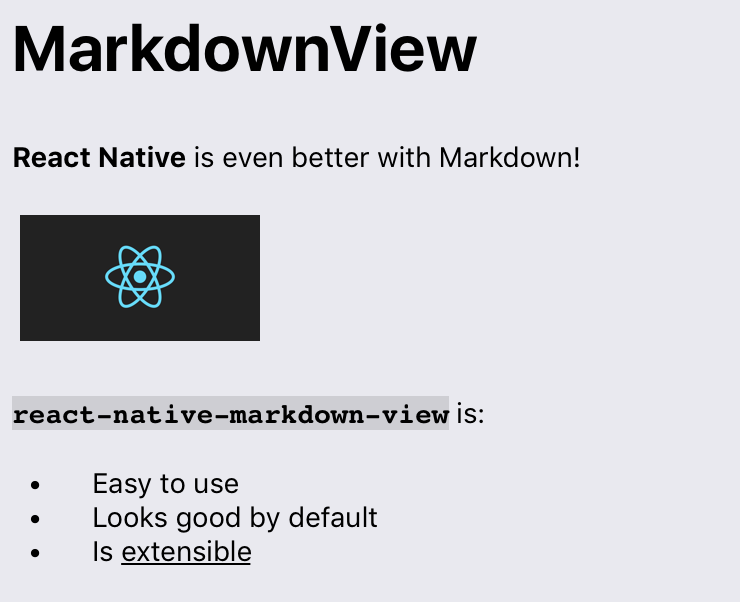
MarkdownView
A React Native component which renders Markdown as a hierarchy of React Native views.
Props
rules
An object overriding or providing additional rules for parsing and rendering Markdown. Keys
are rule names (you can define your own, or override existing rules), and values are an object
of the form:
  {
    match: (source, state, lookbehind) => RegExp,
    parse: (match, nestedParse, state) => Node
    render: (node, output, state, styles) => Component
  }
match: A function returning a RegExp to be executed against the MarkdownView's content.
source: Upcoming content of MarkdownView. i.e. A string beginning at the current position of parsing (source[0] is the next character).state: Matcher state object, you can attach your own state properties if desirable.lookbehind: The string most recently captured at this parsing level, to allow for look-behind parsing.
parse: A function that returns an AST 'node' object to pass to the rules' render method. If
the object returned has a 'type' key, rendering will be deferred to the rule matching
the value of 'type'.
match: Return value of match.exec() (match i.e. the rule property, not the parameter)nestedParse: (string, state) => object, call this to parse nested nodes.state: Parser state object, you can attach your own state properties if desirable.
render: A function that returns the rendered node (and its children). Typically you'll return
a React Native view component.
node: An AST node. Please refer to the Flow types in types.js.output: A function that can be used to render nested/children nodes. Typically you'll want
call output(node.children) and use that as the content of the component you're
returning.state: Renderer state object. You can attach your own state to this object and use it, for
example, to render nodes differently depending on their parents/ancestors.styles: An object containing React Native styles that you can use for rendering components.
Default rendering rules have keys:
heading, hr, codeBlock, blockQuote, list, table, newline, paragraph, link, image, em,
strong, u, del, inlineCode, br, text
Default parse-only rules (which defer rendering to another rule) have keys:
nptable, lheading, fence, def, escape, autolink, mailto, url, reflink, refimage,
styles
An object providing styles to be passed to a corresponding rule render method. Keys are
rule/node names and values are React Native style objects. If a style is defined here and a
default style exists, they will me merged, with style properties defined here taking
precedence.
Please refer to styles.js for a complete list of styles that can be overwritten.
e.g.
{
  tableHeaderCell: {
    color: '#f00'
  },
  paragraph: {
    marginLeft: 8
  }
}
onLinkPress
Callback function for when a link is pressed. The callback receives the URL of the link as a
string (first and only argument).





