react-native-reels-list
react-native-reels-list is a customizable React Native component designed to provide an intagram/tiktok like optimized video list experience. It offers a variety of features and options to ensure smooth and efficient video playback in your React Native applications.
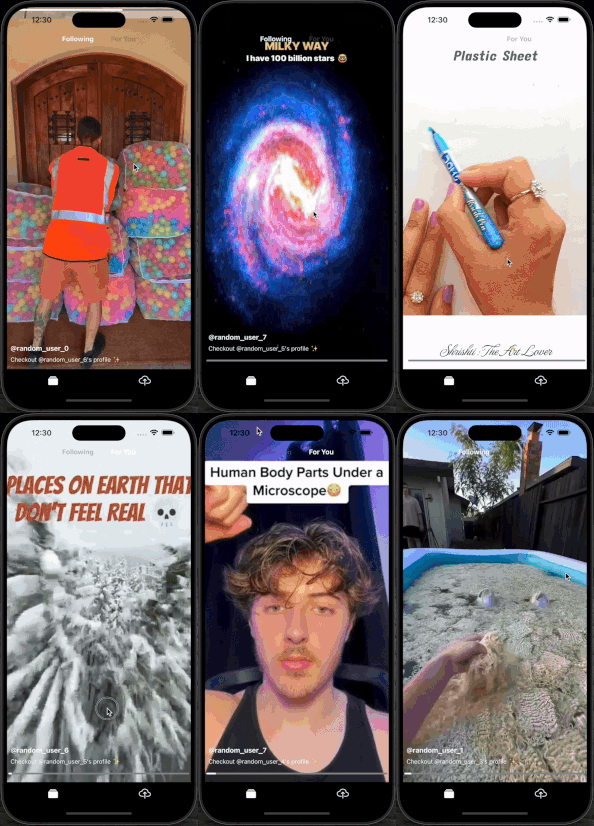
Features
- Optimized video list for smooth performance
- Customizable video height
- Tap to mute functionality
- Hold to pause functionality
- Seekbar support
- Loading indicator
- Custom overlay components
- Playback status updates
Installation
Install the package via npm:
npm install react-native-reels-list
or via yarn:
yarn add react-native-reels-list
Note: This package uses expo-av for video playback, expo-av is required to be installed in your project. Follow these installation instructions..
Usage
Here's an example of how to use the ReelsList component in your React Native application:
import { useCallback, useContext } from "react";
import { VIEWPORT_HEIGHT } from "@/constants";
import { useBottomTabBarHeight } from "@react-navigation/bottom-tabs";
import ReelsList, { VideoItemType } from "react-native-reels-list";
import { MuteContext } from "@/context";
import { AVPlaybackStatus } from "expo-av";
const videos = [
{ key: '1', uri: 'https://example.com/video1.mp4', thumbnail: 'https://example.com/thumbnail1.jpg', ...otherProperties},
{ key: '2', uri: 'https://example.com/video2.mp4', thumbnail: 'https://example.com/thumbnail4.jpg', ...otherProperties},
];
const App = () => {
const tabBarHeight = useBottomTabBarHeight();
const { isMuted, handleMuteToggle } = useContext(MuteContext);
const [currentVideoIndex, setCurrentVideoIndex] = useState(0);
const [status, setStatus] = useState<AVPlaybackStatus | null>(null);
const videoHeight = VIEWPORT_HEIGHT - tabBarHeight;
const onViewableItemsChanged = useCallback(
(info: {
viewableItems: ViewToken<VideoItemType>[];
changed: ViewToken<VideoItemType>[];
}) => {
setCurrentVideoIndex(
(prev) => info.changed.find((item) => item.isViewable)?.index ?? prev
);
},
[]
);
const handleGetItemLayout = useCallback(
(data: ArrayLike<VideoItemType> | null | undefined, index: number) => {
return {
length: videoHeight,
offset: videoHeight * index,
index,
};
},
[videoHeight]
);
const overlayComponent = useCallback(
({ item }: { item: VideoItemType, index:number }) => (
<View style={styles.overlay}>
<Link href={`/profile/${item.username}`} asChild>
<Pressable>
<Text>@{item.username}</Text>
</Pressable>
</Link>
</View>
),
[]
);
return (
<ReelsList
videoHeight={videoHeight}
currentVideoIndex={currentVideoIndex}
handleGetItemLayout={handleGetItemLayout}
onViewableItemsChanged={onViewableItemsChanged}
videos={videos}
isMuted={isMuted}
handleMuteToggle={handleMuteToggle}
showSeekbar={true}
showLoadingIndicator={true}
holdToPause={true}
overlayComponent={overlayComponent}
onCurrentPlaybackStatusUpdate={(status) => setStatus(status)}
refreshing={refreshing}
onRefresh={() => {
// Refresh the video list
}}
onEndReached={() => {
// Fetch more videos
}}
/>
);
};
export default FollowingTopTab;
const styles = StyleSheet.create({
container: {
flex: 1,
justifyContent: "center",
alignItems: "center",
},
overlay:{
position: "absolute",
bottom: 40,
left: 8,
zIndex: 2,
}
});
export default App;
Props
The ReelsList component accepts the following props:
currentVideoIndex | number | The index of the current video being played. | - | Yes |
handleGetItemLayout | function | Function to get the layout of each item in the list. | - | Yes |
onViewableItemsChanged | function | Callback function when viewable items change. | - | Yes |
videos | Array<{ key: string, uri: string, thumbnail: string, ...otherProperties }> | Array of video items to be displayed in the list. | - | Yes |
videoHeight | number | Height of each video in the list. | - | Yes |
isMuted | boolean | Flag to mute/unmute videos. | false | No |
handleMuteToggle | function | Callback function to handle mute toggle. | - | No |
showSeekbar | boolean | Flag to show/hide the seekbar. | false | No |
showLoadingIndicator | boolean | Flag to show/hide the loading indicator. | false | No |
useNativeControls | boolean | Flag to use native video controls. | false | No |
holdToPause | boolean | Flag to enable hold-to-pause functionality. | false | No |
bottomOffset | number | Offset from the bottom of the screen for the default seekbar and buffering indicator. | 0 | No |
overlayComponent | ({ item, index }) => ReactNode | Function to render a custom overlay component for each video. | - | No |
onCurrentPlaybackStatusUpdate | (status: AVPlaybackStatus) => void | A function to be called regularly with the AVPlaybackStatus of the currently playing video. Helps in tracking the playback status of the video for custom UI updates. | - | No |
Additionally, the component accepts all other FlatList props for added customizations.
Performance Metrics
| Two Video Lists (Two Top Tabs) | | | | | |
| Samsung Galaxy A22 (6 GB RAM) | 70% | 13% | 650 MB | 1-2 Seconds | 18 Seconds |
| Samsung Galaxy S22 Ultra (12 GB RAM) | 37% | 10% | 770 MB | 1-2 Seconds | 13 Seconds |
| Samsung Galaxy A21s (4 GB RAM) | 75% | 18% | 698 MB | 4-5 Seconds | 30-40 Seconds |
| One Video List (Single Top Tab) | | | | | |
| Samsung Galaxy A22 (6 GB RAM) | 48% | 12% | 515 MB | 1-2 Seconds | - |
| Samsung Galaxy S22 Ultra (12 GB RAM) | 32% | 10% | 635 MB | 1-2 Seconds | - |
| Samsung Galaxy A21s (4 GB RAM) | 71% | 16% | 532 MB | 4-5 Seconds | - |
*Note: The maximum CPU usage values represent occasional spikes and should not be a cause for concern.
Usage Tips
- If you are using multiple simultaneously running video lists, load the lists lazily for improved performance.
- On lower-end devices, if you encounter
java.lang.OutOfMemoryError, set android:largeHeap="true" in the Android manifest.
Contributing
Contributions are welcome! Please open an issue or submit a pull request for any improvements or bug fixes.
Author
Developed by Simranjit Singh.
Acknowledgments
Special thanks to all the contributors and the React Native community for their support and inspiration.





