New Research: Supply Chain Attack on Axios Pulls Malicious Dependency from npm.Details →
Socket
Book a DemoSign in
Socket

react-native-single-prompt

Package Overview
Dependencies
Maintainers
1
Versions
7
Alerts
File Explorer

Advanced tools

Socket logo

Install Socket

Detect and block malicious and high-risk dependencies

Install

react-native-single-prompt

React native prompt component

latest
Source
npmnpm
Version
2.0.1
Version published
Weekly downloads
7
250%
Maintainers
1
Weekly downloads
 
Created
Source

React-native-single-prompt

badge

Prompt component with single input field

import Prompt from 'react-native-single-prompt';
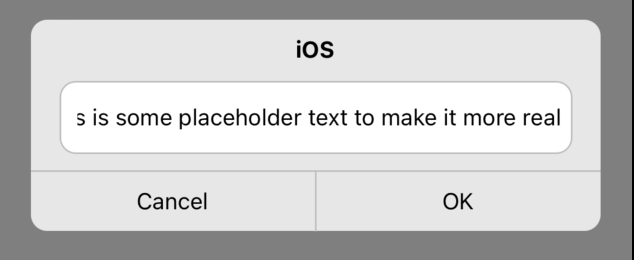
image image

Simulator Screen Recording - iPhone 13 - 2022-06-11 at 08 42 46 Simulator Screen Recording - iPhone 13 - 2022-06-11 at 11 32 20

Usage

  • Installation
yarn add react-native-single-prompt

or

npm i react-native-single-prompt
  • Code sample
    I highely advise controlling prompt with Modal from core react-native API
import Prompt from 'react-native-single-prompt';
import {Modal} from 'react-native';

const App = () => {
  const [isPromptActive, setIsPromptActive] = useState(false);

  return (
    <SafeAreaView style={{flex: 1}}>
      <Modal transparent={true} visible={isPromptActive} animationType="fade">
        <Prompt
          exit={() => setIsPromptActive(false)}
          callback={value => Alert.alert('Prompt confirmed', value)}
          name="iOS"
        />
      </Modal>
      <Button title="Activate prompt" onPress={() => setIsPromptActive(true)} />
    </SafeAreaView>
  );
};
  • Optional props
    backgroundOpacity={value: number}, value in range: <0;1>, default = 0.5

Keywords

react-native-prompt

FAQs

Package last updated on 28 Jun 2022

Did you know?

Socket

Socket for GitHub automatically highlights issues in each pull request and monitors the health of all your open source dependencies. Discover the contents of your packages and block harmful activity before you install or update your dependencies.

Install

Related posts



