React Picture Annotate
A simple and powerful React component for creating, editing, and managing bounding box annotations on images, built with Material-UI.
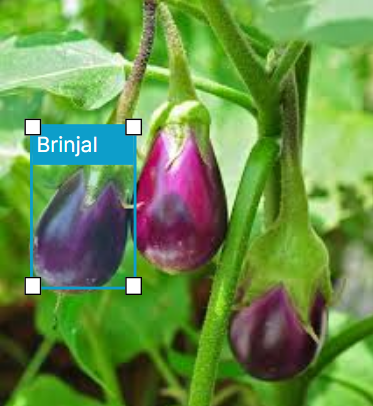
Features
- Draw, resize, and label bounding boxes.
- Assign class labels from list fetched from your model.
- Zoom and pan functionality for precise annotations.
- Undo/Redo support for annotation history.
- Built with Material-UI for a clean and responsive design.
Installation
npm install react-picture-annotate
Usage
import { useState } from 'react';
import { Annotator, Annotation } from 'react-picture-annotate';
const MyComponent = () => {
const [annotations, setAnnotations] = useState<Annotation[]>([]);
const classes = ['cat', 'dog', 'person'];
const imageUrl = '[https://i.imgur.com/3o1fB3M.jpeg](https://i.imgur.com/3o1fB3M.jpeg)';
const handleSave = (newAnnotations: Annotation[]) => {
console.log('Saved annotations:', newAnnotations);
setAnnotations(newAnnotations);
};
return (
<div style={{ width: '80%', margin: 'auto' }}>
<Annotator
imageUrl={imageUrl}
classes={classes}
onSave={handleSave}
onCancel={() => console.log('Annotation cancelled')}
/>
</div>
);
};
The onSave handler provides the annotation data in a generic pixel-based format. You can easily convert this data into any format you need, such as YOLO, within this function.
const handleSave = (annotations: Annotation[]) => {
const imageWidth = 1280;
const imageHeight = 720;
const yoloData = annotations.map(ann => {
const classId = classes.findIndex(c => c === ann.label);
const [x, y, w, h] = ann.box;
const x_center = (x + w / 2) / imageWidth;
const y_center = (y + h / 2) / imageHeight;
const width = w / imageWidth;
const height = h / imageHeight;
return `${classId} ${x_center} ${y_center} ${width} ${height}`;
}).join('\n');
console.log("Converted to YOLO format:", yoloData);
};
Props
imageUrl | string | The URL of the image to annotate. |
classes | string[] | An array of class names for the dropdown. |
onSave | (annotations: Annotation[]) => void | Callback function when the save button is clicked. |
onCancel | () => void | Callback function when the cancel button is clicked. |
Contributing & Support
Hey, I'm new to this. Found a bug or have a feature request? Please open an issue on the GitHub repository.
Contributions via Pull Requests are also welcome!





