react-tasks-calendar 



Calendar and tasks components for React
Getting started 🚀
If you are using yarn:
yarn add react-tasks-calendar styled-components
Or if you are using npm:
npm i react-tasks-calendar styled-components
Usage
Calendar component:
import Calendar from 'react-tasks-calendar';

function CalendarComponent() {
  function handleSelection(date) {
    alert(date);
  }

  return (
    <Calendar.Container onSelectionChanged={handleSelection}>
      <Calendar.Header text="Current period" />
      <Calendar.ColumnsContainer>
        <Calendar.Column weekDay="1" />
        <Calendar.Column weekDay="2" />
        <Calendar.Column weekDay="3" />
        <Calendar.Column weekDay="4" />
        <Calendar.Column weekDay="5" />
      </Calendar.ColumnsContainer>
      <Calendar.ItemsContainer
        startDate={new Date('2023-09-23')}
        endDate={new Date('2023-10-27')}
        fillEmptySlots={true}
      />
    </Calendar.Container>
  );
}
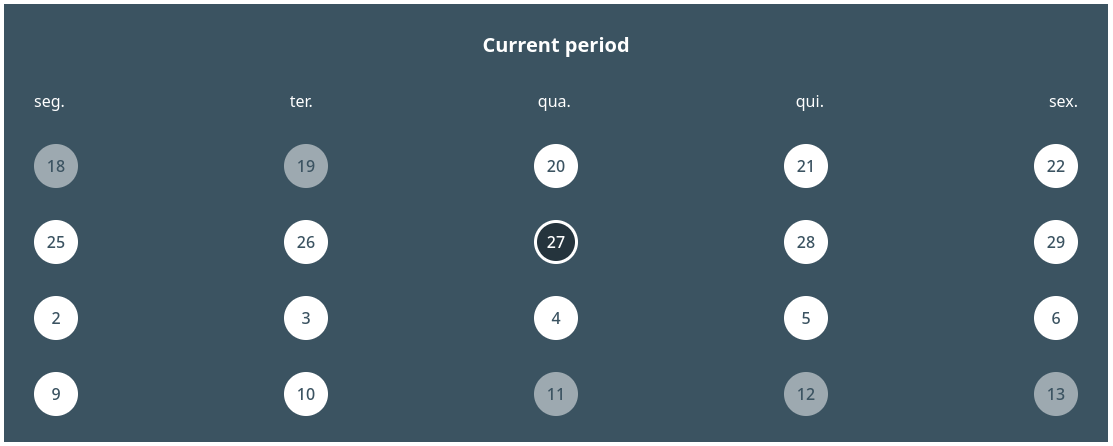
The code above will result in someting like:
Tasks list
import Task, { TasksContainer } from 'react-tasks-calendar';
import { FontAwesomeIcon } from '@fortawesome/react-fontawesome';
import {
  faCircleInfo,
  faSquareArrowUpRight,
  faPenSquare
} from '@fortawesome/free-solid-svg-icons';

function TasksList() {
  return (
    <TasksContainer>
      <Task.Container
        icon={() => (
          <FontAwesomeIcon
            icon={faCircleInfo}
            color="#ffffff"
            style={{ fontSize: '2.5rem' }}
          />
        )}
      >
        <Task.Content>
          <Task.Title>Task header</Task.Title>
          <Task.Message>Task content</Task.Message>
        </Task.Content>
        <Task.Actions>
          <Task.Action
            icon={() => (
              <FontAwesomeIcon
                icon={faPenSquare}
                color="#ffffff"
                style={{ fontSize: '2rem' }}
              />
            )}
            title="edit"
            onClick={() => alert('edit task')}
          />
          <Task.Action
            icon={() => (
              <FontAwesomeIcon
                icon={faSquareArrowUpRight}
                color="#ffffff"
                style={{ fontSize: '2rem' }}
              />
            )}
            title="Open"
            onClick={() => alert('open task')}
          />
        </Task.Actions>
      </Task.Container>
      <Task.Container>
        <Task.Content>
          <Task.Title>Task header</Task.Title>
          <Task.Message>Task content</Task.Message>
        </Task.Content>
        <Task.Actions>
          <Task.Action
            icon={() => (
              <FontAwesomeIcon
                icon={faSquareArrowUpRight}
                color="#ffffff"
                style={{ fontSize: '2rem' }}
              />
            )}
            title="Open"
            onClick={() => alert('open task')}
          />
        </Task.Actions>
      </Task.Container>
    </TasksContainer>
  );
}
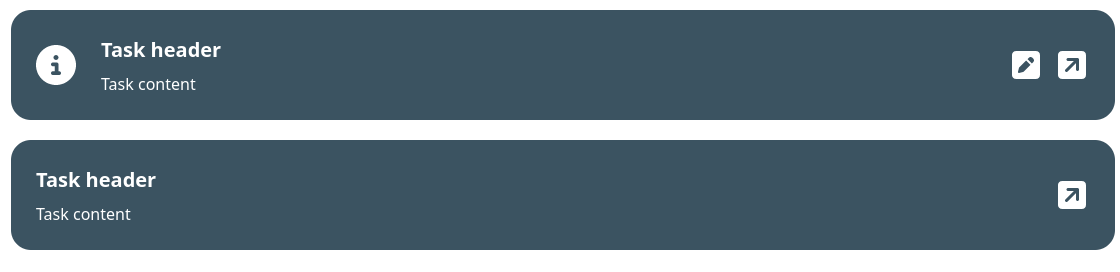
The code above will result in someting like:
Calendar API
Calendar.Container
| children | ReactNode | A node of components to be rendered inside the calendar |
| initialSelectedDate (optional) | Date | The initial date to be selected on the calendar |
| onSelectionChanged (optional) | (selectedDate: Date | null) => void | A callback to be called every time the selected date changes |
| text | string | A string to be rendered on the header |
Calendar.ColumnsContainer
| children | ReactNode | A ReactNode composed of Calendar.Column |
Calendar.Column
| weekDay | CalendarLabelsIndex | The index of the week day the column corresponds |
| renderText (optional) | (weekDay: CalendarLabelsIndex) => string | ReactElement | A function that renders the label of a column |
type CalendarLabelsIndex = '0' | '1' | '2' | '3' | '4' | '5' | '6';
Calendar.ItemsContainer
| startDate | Date | The start of the range of dates to be displayed |
| endDate | Date | The end of the range of dates to be displayed |
| fillEmptySlots (optional) | boolean | Defines if the calendar will render dates outside of the defined |
| renderItem (optional) | (itemData: CalendarItemProps, key: number | string) => ReactElement | A function responsible for rendering the items within the calendar |
Calendar.Item
| itemDate | Date | The date of the item |
| disabled | boolean | Defines if the user can interact with the item |
| status | 'normal' | 'pending' | 'alert' | 'done' | 'hidden' | The status of the item. This change the style according the status |
| renderText | (date: Date) => string | ReactElement | A function responsible for rendering the item text |
Tasks API
TasksContainer
| children | ReactNode | The tasks to be rendered on the list |
Task.Container
| children | ReactNode | A node of components to be rendered inside the task component |
| icon (optional) | ElementType | A icon element to be rendered on the left corner of the task |
Task.Content
| children | ReactNode | A node of components to be rendered as the task content |
Task.Title
| children | ReactNode | The content to be rendered inside the title of the task |
Task.Message
| children | ReactNode | The content to be rendered inside the message of the task |
Task.Actions
| children | ReactNode | The actions of the task |
Task.Action
This component also inherits from ButtonHTMLAttributes<HTMLButtonElement>
| icon | ElementType | A icon to bee rendered inside the action button |





