


A React Twitter oAUth Sign-in / Log-in Component for React
Installation
npm install react-twitter-auth-light
Usage
<TwitterLogin
  loginUrl="http://localhost:4000/api/v1/auth/twitter"
  onFailure={this.onFailed}
  onSuccess={this.onSuccess}
  requestTokenUrl="http://localhost:4000/api/v1/auth/twitter/reverse"
/>
Custom content that overrides default content:
<TwitterLogin
  loginUrl="http://localhost:4000/api/v1/auth/twitter"
  onFailure={this.onFailed}
  onSuccess={this.onSuccess}
  requestTokenUrl="http://localhost:4000/api/v1/auth/twitter/reverse"
  showIcon={true}
  customHeaders={customHeader}
>
  <b>Custom</b> Twitter <i>Login</i> content
</TwitterLogin>
Custom content and handling by callbacks:
  const [twitterData, setTwitterData] = useState({});

  const fetchTwitterRequestToken = () => {
    return new Promise((resolve, reject) => {
      authApi.socialLoginRequest().then((data) => {
        const { oauth_token } = data;
        setTwitterData(data);
        resolve({ oauth_token })
      }, reject)
    });
  };

  const fetchTwitterOauthToken = (oauth_verifier, oauth_token) => {
    return new Promise((resolve) => {
      const twitter_data = {
        ...twitterData,
        oauth_token,
        oauth_verifier
      };
      authApi.socialLogin(twitter_data).then(resolve, reject);
    });
  };
<TwitterLogin
  fetchRequestToken={fetchTwitterRequestToken}
  fetchOauthToken={fetchTwitterOauthToken}
  onFailure={this.onFailed}
  onSuccess={this.onSuccess}
  tag="span"
>
  <button>login with twitter</button>
</TwitterLogin>
Options
| tag | string | button | tag that should be used to create element that will be used as loging element |
| text | string | Sign in with Twitter | text that will be shown in component |
| loginUrl | string | | URL that will be used to finish 3rd step of authentication process |
| requestTokenUrl | string | | URL that will be used to get request token |
| onFailure | function | | function that will be called if user cannot be authenticated |
| onSuccess | function | | function that will be called if user is successfully authenticated |
| disabled | boolean | false | disable component |
| style | object | | style object |
| className | string | | class name for component |
| dialogWidth | number | 600 | dialog width |
| dialogHeight | number | 400 | dialog height |
| credentials | string | same-origin | indicates whether the user agent should send cookies from the other domain in the case of cross-origin requests. Possible values: omit, same-origin, include |
| customHeaders | object | {} | custom headers should be object with fields that needs to be sent to user server. Field name will be used as header key and field value as header value. Because of bug in fetch implementation all keys will be lowercase. |
| children | node | | this props can be used in order to override default component content |
| forceLogin | bool | false | force user to authenticate with Twitter username and password |
| screenName | string | | prefills the username input box of the OAuth login screen with the given value |
| fetchMethod | string | POST | fetch method GET or POST or PUT |
| fetchRequestToken | function | | callback to handle requesting token by yourself |
| fetchOauthToken | function | | callback to handle login by yourself |
Examples
Full example can be found in example folder.
You can find tutorial that explains in details how to implement Twitter authentication with RESTful backend here.
Workflow
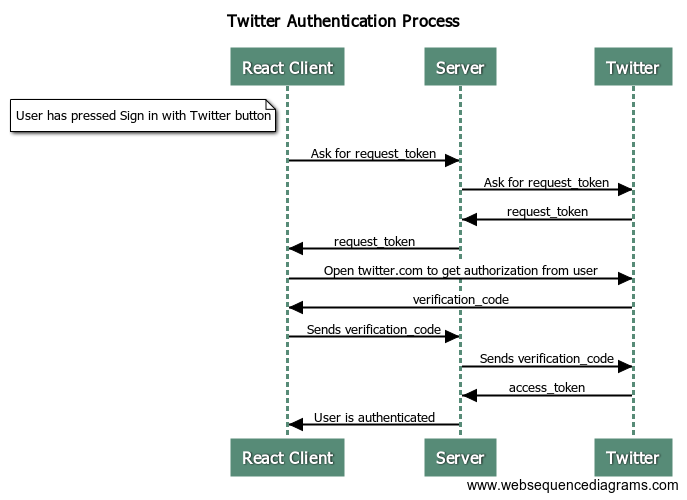
The detailed explanation of the whole process can be found in Twitter documentation. In picture below you can find out all the steps that are needed.
License
react-twitter-auth is released under MIT License.





