react-use-compare-debugger
This React hook enables you to compare two different sets of props/state between re-renders. It's designed to aid with debugging to help determine why React components are re-rendering by offering a redux style console output.
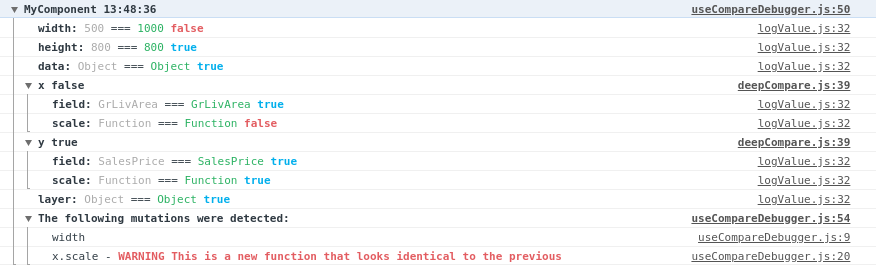
It logs the name of the property, followed by both the previous and current values. Finally it renders a flag indicating whether the two values are referentially equal which is important to prevent un-necessary React re-renders. It will try to warn you about any values that are strictly equal but referrentially different as this suggests a lack of memoization.
Installation
npm install --save-dev react-use-compare-debugger
Usage
To use simply call the useCompareDebugger hook from a component where you want to log changes. For example:
import useCompareDebugger from "react-use-compare-debugger";

const myHelloWorldComponent = (props) => {
    useCompareDebugger("myHelloWorldComponent", props, ["deepNestedObject"])

    return (<div>Hello World</div>);
}
You can also use it with hooks:
import useCompareDebugger from "react-use-compare-debugger";

const myHelloWorldComponent = () => {
    const result = myCustomHook();
    useCompareDebugger("myHelloWorldComponent", { result });

    return (<div>Hello World</div>);
}
Parameters
| component | String | ✔ | Should be the name of the component. This is used to group your logs together and help you know the source. |
| value | Object | ✔ | This is the object from this render, that you'd like to compare against the previous render. |
| ignoreKeys | Array | | An array of key names, used to ignore diving into deep/complex nested objects. |
Notes
There is a hard limit of 100 items deep with an array/object hierarchy to prevent accidental infinite recursion of self-referrential objects.
TODO: Add tests
Thanks
Thanks to LogRocket - this was inspired by their blog post https://blog.logrocket.com/how-to-get-previous-props-state-with-react-hooks/ and a need for some debugging.





