react-window-infinite-scroll
react-window-infinite-scroll is an infinite scroll library
specifically designed for react-window.
github link: https://github.com/dlguswo333/react-window-infinite-scroll
npm link: https://www.npmjs.com/package/react-window-infinite-scroll
Why react-window-infinite-scroll?
react-window-infinite-scroll is to reliably load more items even when the following conditions hold:
loadMoreItems callback might cancel fetching more items.- There are not enough initial items to fill the scrollable element, thereby no way to induce
onItemsRendered callback.
- Not only do you need to scroll infinitely to the end, but also to the top.
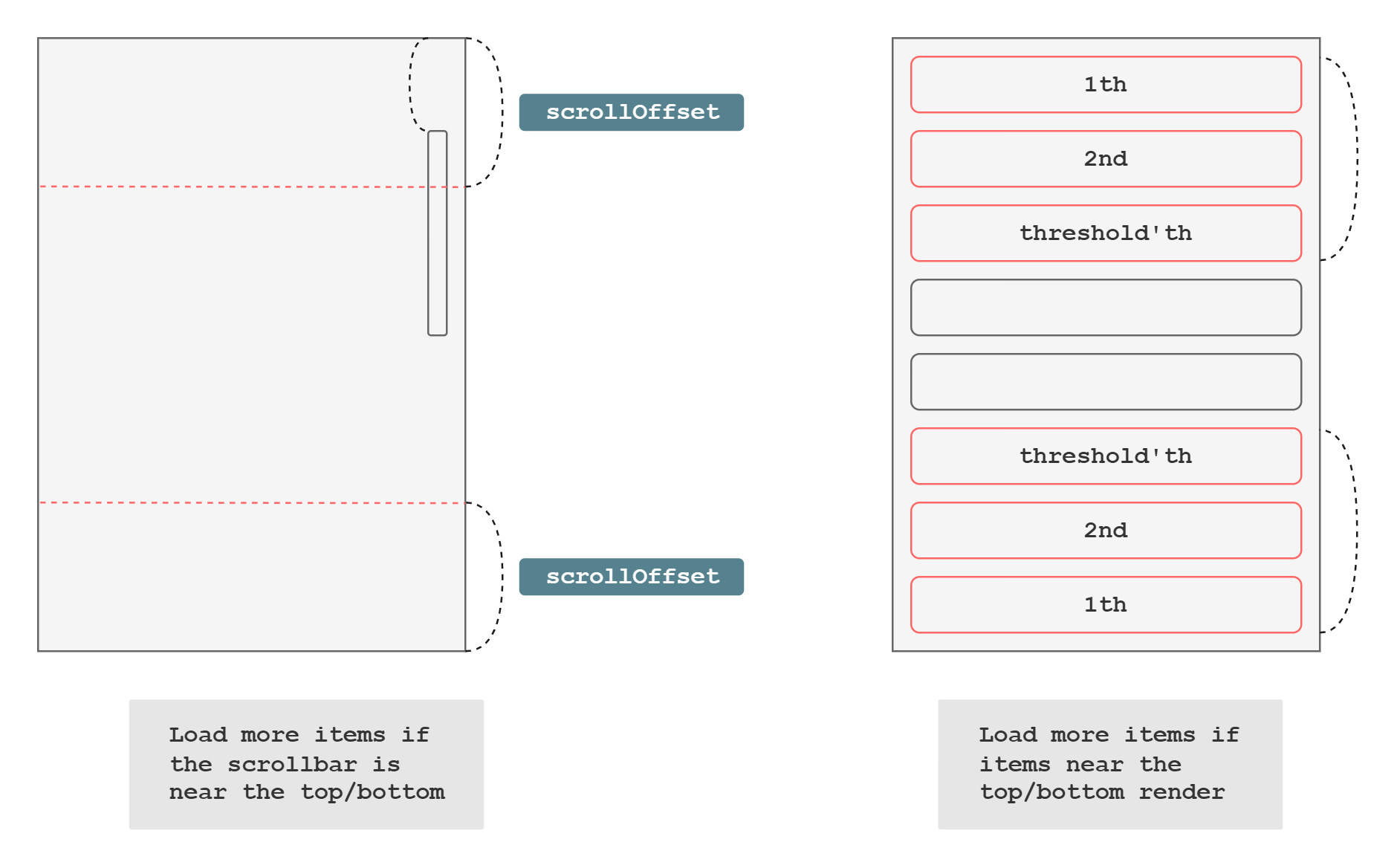
Props (Properties)
type Props = {
isItemLoaded: (index: number) => boolean;
loadMoreItems: (direction: Direction) => Promise<unknown> | unknown;
onItemsRendered?: OnItemsRendered;
itemCount: number;
threshold: number;
scrollOffset: number;
children: ({onItemsRendered}: {onItemsRendered: OnItemsRendered}) => ReactNode;
outerRef: React.RefObject<HTMLElement> | HTMLElement;
data: unknown[];
layout?: 'vertical' | 'horizontal';
}
How to Use
Here is a simple example where you can do infinite scroll with react-window-infinite-scroll.
<InfiniteScroll
  data={data}
  loadMoreItems={loadMoreItems}
  isItemLoaded={isItemsLoaded}
  itemCount={itemCount}
  threshold={1}
  outerRef={outerRef}
  scrollOffset={30}
>
  {({onItemsRendered}) => <FixedSizeList
    height={300}
    itemCount={itemCount}
    width='100%'
    onItemsRendered={onItemsRendered}
    itemSize={30}
    outerRef={outerRef}
    className='Outer'
  >
    {Row}
  </FixedSizeList>}
</InfiniteScroll>
FAQ
What is the required version of react?
You need to have react 17 or higher because we utilize new JSX transform.
In which cases loadMoreitems might cancel loading more items?
In some cases, where loadMoreItems API author does not like it to be called too frequently,
he/she might add a conditional statement.
The reasons for this may vary, from improving browser performance to preventing server overload.
The following is an example code where loadMoreItems might cancel fetching more items.
const loadMoreItems = () => {
  if (isFetchingAlready) {
    return;
  }
  isFetchingAlready = true;
  fetchItems();
  isFetchingAlready = false;
}
In this case, some infinite scrolling packages do not work due to the blocking.
However, react-window-infinite-scroll tries its best to mitigate the problem,
by subscribing to both data changes and item rendered events.
When fetching is complete, the conditional value will be reset,
and then the data changes or item render events will be fired afterwards.
Why scrollOffset prop is not optional?
scrollOffset shall not be optional since it is crucial to load more items.
With it being optional, infinite scroll could have not loaded more items
when the outer element's height and the inner element's height are almost equal.
thus onItemsRendered is not likely to be called,
and also scrollOffset is too small to call loadMoreItems.
That is why we recommend you set the value as big as the minimum height of items being rendered.
Why subscribe to both data change events and onItemsRendered?
This is to load more items reliably.
When many rows are loaded at once,
data change events would most likely not to load more items
since the scrollbar is not near the bottom or the top.
Later on, when you scroll the component, onItemsRendered will fire and load more items in that case.
In another case, where you have as many rows as the infinite scrolling component is barely filled,
onItemsRendered would most likely not to be called,
(Especially when you have big overscanCount prop value of react-window.)
even though you have tiny (too tiny!) scrollable height.
Data change event will help load more items in that case.
loadMoreItems is getting called too many/few times.
This is probably because several bugs and issues with the package.
Some possible issues with the component are that it may call loadMoreItems too many times,
or that it may not call loadMoreItems.
One feasible reason why it calls loadMoreItems too many times is that
loadMoreItems does not await until data changes and return.
This is because react-window-infinite-scroll tries to prevent excessive loadMoreItems calls for performance,
by waiting for loadMoreItems to finish one at a time.
Even if loadMoreItems finishes earlier than data changes,
the package might not notice it and call loadMoreItems and recall once more when data changes.
If loadMoreItems has something to do with promises,
wait for the responses and update the data. Please do not exit right after making API calls
since it can lead to undefined behaviors.
const loadMoreItems = () => {
fetchFromRemote().then((response) => {
setData(data => [...data, response]);
});
};
const loadMoreItems = () => {
fetchFromRemote((response) => {
setData(data => [...data, response]);
});
};
const loadMoreItems = async () => {
const response = await fetchFromRemote();
setData(data => [...data, response]);
};
Changelog
v0.1.1
- Lock react-window version to v1. The package is not compatible with the v2.
v0.1.0
- Fix jumping scroll position when loading more items at the start.
- Fix props documentation.
v0.0.9
- Update dependencies.
- Support horizontal layout.
v0.0.8
- Update dependencies
- Fix infinite loading not work on 'start' direction when
threshold is 0.
v0.0.7
v0.0.6
- Revert deleted force rerendering code (Refer to v0.0.5).
- Force rerender only if the data has been changed.
v0.0.5
- Remove force rerendering code as it may fall into an infinite rerendering loop.
v0.0.4
- Improve
loadMoreItems may not execute properly.
- Fix
loadMoreItems may not work when it loads items synchronously.
- Fix
loadMoreItems may not work if rerendering runs before the returned promise resolves.
- Fix items may not be loaded.
- Add playwright test codes
v0.0.3
- Fix an error where
outerRef has null or undefined value.
v0.0.2
- Allow
outerRef prop to have HTMLElement type
- Improve README
Development
Deploy
npm version -w package x.x.x
npm run deploy
Be aware that you shouldn't run npm version command on root workspace,
the version that should be concerned is from package workspace.
Do not run npm publish in root directory or it might publish monorepo project.
We have private:true in root package.json to prevent the situation.
Test
test.Dockerfile builds an docker image for test.
The Dockerfile will run the test cases while building the image. You don't need the output image.
The recommended shell command to test with docker is the following:
docker build --output type=tar,dest=/dev/null -f ./package/test.Dockerfile --network host .





