New Research: Supply Chain Attack on Axios Pulls Malicious Dependency from npm.Details
Socket
Book a DemoSign in
Socket

single-require

Package Overview
Dependencies
Maintainers
1
Versions
2
Alerts
File Explorer

Advanced tools

Socket logo

Install Socket

Detect and block malicious and high-risk dependencies

Install

single-require

A tool to include files from webservers

latest
Source
npmnpm
Version
1.0.1
Version published
Maintainers
1
Created
Source

Concept

Include single files from web recourses like github.com. Makes it easy to reuse your code without the need to create special packages.

Installation

npm install -g single-require

Usage

  • Create a file with the name of the file you want to include.
  • Add the .req file extension to it.
  • Write the url of the file you want to include into your file.
  • run the "req" command in your console.
Example
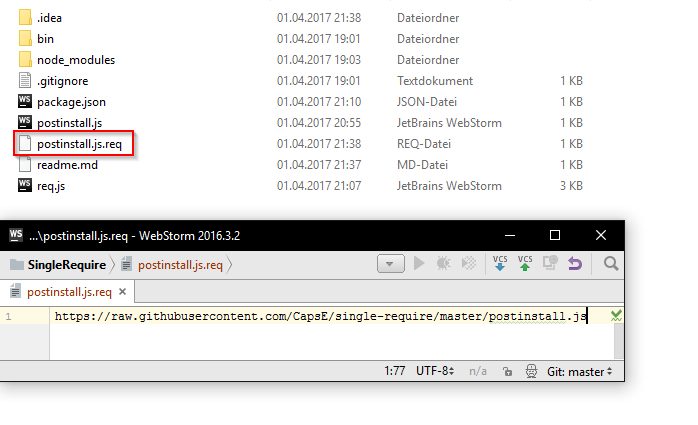
A folder showing how to setup the file

Keep in mind the "req" command will check the current folder with all it's subfolders for files with the ".req" file extension. This tool also doesn't check versions but instead just downloads the given files.

Private Repositories

Currently only public sources and private GitLab repositories can be accessed. To access files from you GitLab account add your private GitLab API Token to the config.json located at "%APPDATA%/single-require/"

Keywords

require, web, url

FAQs

Package last updated on 01 Apr 2017

Did you know?

Socket

Socket for GitHub automatically highlights issues in each pull request and monitors the health of all your open source dependencies. Discover the contents of your packages and block harmful activity before you install or update your dependencies.

Install

Related posts



