New Research: Supply Chain Attack on Axios Pulls Malicious Dependency from npm.Details →
Socket
Book a DemoSign in
Socket

slice-upload-utils

Package Overview
Dependencies
Maintainers
1
Versions
44
Alerts
File Explorer

Advanced tools

Socket logo

Install Socket

Detect and block malicious and high-risk dependencies

Install

slice-upload-utils

A library for slice upload file and download.

latest
Source
npmnpm
Version
0.0.29
Version published
Weekly downloads
5
25%
Maintainers
1
Weekly downloads
 
Created
Source

slice-upload-utils

NPM version

介绍

  • 本工具包含上传和下载功能。vite + vue的实现。

    上传

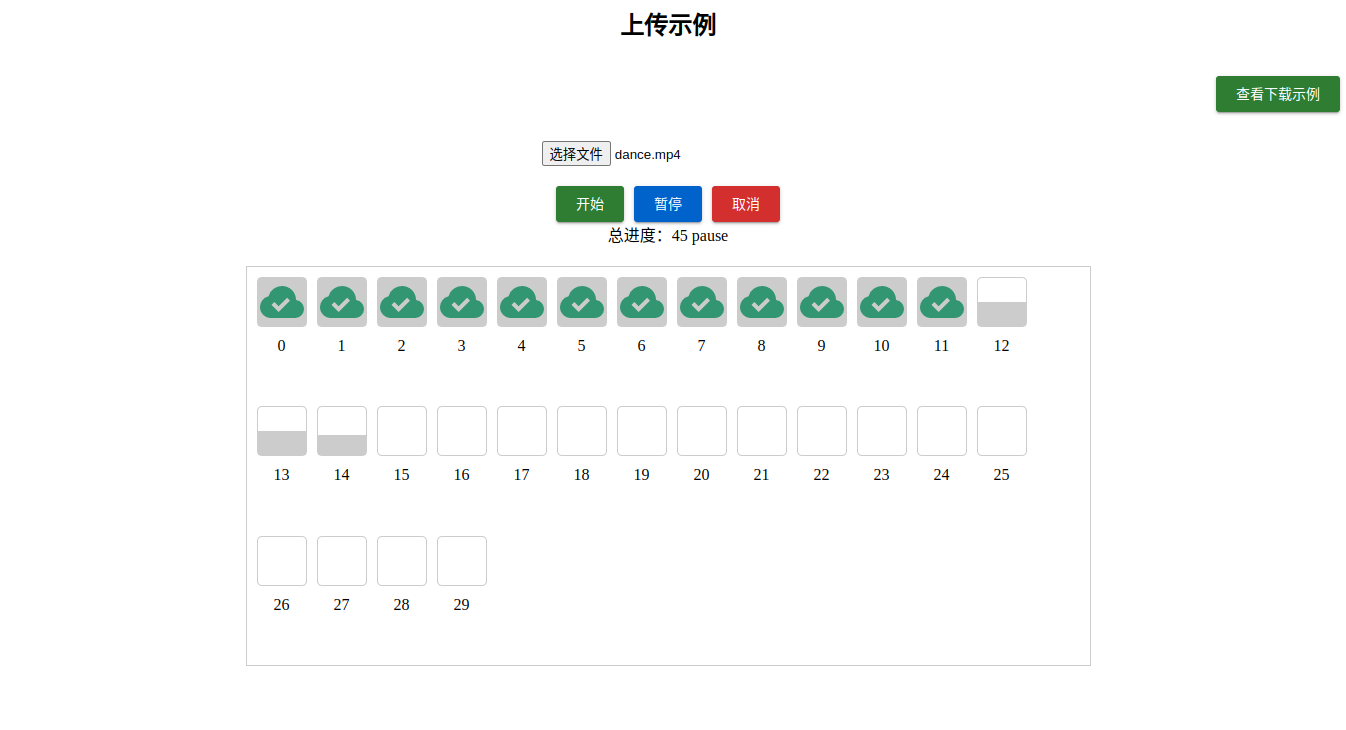
    • 包括切片上传,秒传,断点续传,暂停、取消。

    下载

    • 切片下载,合并,暂停、取消。

    上传hash计算

    • 为了优化计算hash时间,hash值计算分两种,一直是计算文件的真实MD5,一种是计算自定义hash值。

      自定义hash值:

      :: preHash,采用抽样hash算法,截取file前段、中间和末段合成一个新的文件,和file.size一起计算的一个新的hash值。

      :: chunkHash,采用preHash结合chunkSize和该切片的index计算hash值。

      真实hash值:

      :: preHash, file文件的hash值,file的真实MD5值计算,在file.size大于chunkSize时,通过计算chunkweb worker线程里面同时计算。

      :: chunkHash, file.size 小于chunkSize时,file等于chunkchunkHash等于preHashfile.size大于chunkSize时在web worker(vite 打包后,npm i 安装使用路径会出问题,故改成直接使用promise)里面计算。

    • 可以根据实例中的isPreHashisChunkHash的值来判断当前是否计算的真实hash。

快速开始

  • 使用 pnpm 安装
pnpm add file-slice-upload

示例代码

上传

/playground/vue/src/example/Upload.vue

下载

/playground/vue/src/example/Download.vue

下载文件后端代码

koa-download-demo

  • 具体效果可以把代码仓库clone下来,pnpm dev一下。

调用说明

上传

export interface UseSliceUploadOptions {
  /**
   * 上传文件
   */
  file: Ref<File | null | undefined>
  /**
   * 上传请求函数
   */
  request: UploadRequest
  /**
   * 报错处理函数
   */
  onError?: UploadEventType['error']
  /**
   * 上传完成函数
   */
  onFinish?: UploadEventType['finish']
  /**
   * 预检函数
   */
  preVerifyRequest?: PreVerifyUploadRequest
  /**
   * 分片大小
   * @default 1024 * 1024 * 2
   */
  chunkSize?: number
  /**
   * 并发上传数
   * @default 3
   */
  poolCount?: number
  /**
   * 请求失败后,重试次数
   * @default 3
   */
  retryCount?: number
  /**
   * 请求失败后,重试间隔时间
   * @default 300
   */
  retryDelay?: number
  /**
   * 请求超时时间(15s)
   * @default 15000
   */
  timeout?: number
  /**
   * 计算整个文件的hash,开启后比较耗时间
   * @default false
   */
  realPreHash?: boolean
  /**
   * 计算分片文件的hash,开启后比较耗时间
   * @default false
   */
  realChunkHash?: boolean
}

下载

export interface UseSliceDownloadOptions {
  fileSize?: number
  filename?: string
  /**
   * 文件MIME类型
   * @default application/octet-stream
   * @see https://developer.mozilla.org/zh-CN/docs/Web/HTTP/Basics_of_HTTP/MIME_types/Common_types
   */
  fileType?: string
  /**
   * 是否自动保存
   * @default true
   */
  autoSave?: boolean
  /**
   * 分片大小
   * @default 1024 * 1024 * 2
   */
  chunkSize?: number
  /**
   * 并发上传数
   * @default 3
   */
  poolCount?: number
  /**
     * 请求失败后,重试次数
     * @default 3
     */
  retryCount?: number
  /**
     * 请求失败后,重试间隔时间
     * @default 300
     */
  retryDelay?: number
  /**
     * 请求超时时间(15s)
     * @default 15000
     */
  timeout?: number
  /**
   * 上传请求函数
   */
  request: DownloadRequest
  /**
   * 报错处理函数
   */
  onError?: DownloadEventType['error']
  /**
   * 预检函数
   */
  onFinish?: DownloadEventType['finish']
}

License

MIT License © 2023 Ywenhao

Keywords

file

FAQs

Package last updated on 17 Aug 2023

Did you know?

Socket

Socket for GitHub automatically highlights issues in each pull request and monitors the health of all your open source dependencies. Discover the contents of your packages and block harmful activity before you install or update your dependencies.

Install

Related posts



