


Security News
CVE Volume Surges Past 48,000 in 2025 as WordPress Plugin Ecosystem Drives Growth
CVE disclosures hit a record 48,185 in 2025, driven largely by vulnerabilities in third-party WordPress plugins.
By Sarah Gooding - Jan 09, 2026
A tiny library for interactive swiping and reordering of elements in lists on touch screens. No dependencies. BSD Licensed.
Try live demo (best on a touchscreen device)
Supports iOS Safari, Firefox Mobile, Chrome Mobile, Opera Mobile (Presto and Blink).
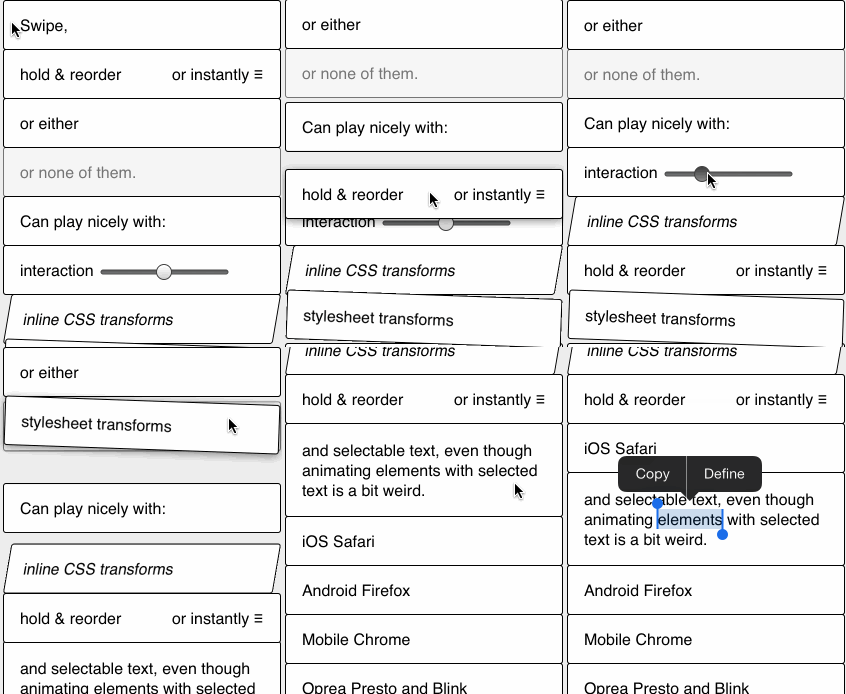
You interact with the library via custom DOM events for swipes/reordering. Call new Slip(<element>) to make element's children swipeable and add event listeners for any of the following events:
slip:swipe
When swipe has been done and user has lifted finger off the screen.
If you execute event.preventDefault() the element will be animated back to original position.
Otherwise it will be animated off the list and set to display:none.
slip:beforeswipe
Fired before first swipe movement starts.
If you execute event.preventDefault() then the element will not move at all.
Parent element will have class slip-swiping-container for duration of the animation.
slip:cancelswipe
Fired after the user has started to swipe, but lets go without actually swiping left or right.
slip:animateswipe
Fired while swiping, before the user has let go of the element.
event.detail.x contains the amount of movement in the x direction.
If you execute event.preventDefault() then the element will not move to this position.
This can be useful for saturating the amount of swipe, or preventing movement in one direction, but allowing it in the other.
slip:reorder
Element has been dropped in new location. event.detail contains the following:
insertBefore: DOM node before which element has been dropped (null is the end of the list). Use with node.insertBefore().spliceIndex: Index of element before which current element has been dropped, not counting the element iself. For use with Array.splice() if the list is reflecting objects in some array.originalIndex: The original index of the element before it was reordered.You can use it to keep an array of items in sync with their display order:
const movedItem = itemsArray[event.detail.originalIndex];
itemsArray.splice(event.detail.originalIndex, 1); // Remove item from the previous position
itemsArray.splice(event.detail.spliceIndex, 0, movedItem); // Insert item in the new position

// And update the DOM:
e.target.parentNode.insertBefore(e.target, e.detail.insertBefore);
slip:beforereorder
When reordering movement starts.
Element being reordered gets class slip-reordering.
If you execute event.preventDefault() then the element will not move at all.
slip:beforewait
If you execute event.preventDefault() then reordering will begin immediately, blocking ability to scroll the page. You can check event.target to limit that behavior to drag handles.
slip:tap
When element was tapped without being swiped/reordered.
var list = document.querySelector('ul#slippylist');
new Slip(list);

list.addEventListener('slip:beforeswipe', function(e) {
    if (shouldNotSwipe(e.target)) {
        e.preventDefault(); // won't move sideways if prevented
    }
});

list.addEventListener('slip:swipe', function(e) {
    // e.target list item swiped
    if (thatWasSwipeToRemove) {
        // list will collapse over that element
        e.target.parentNode.removeChild(e.target);
    } else {
        e.preventDefault(); // will animate back to original position
    }
});

list.addEventListener('slip:beforereorder', function(e) {
    if (shouldNotReorder(e.target)) {
        // if prevented element won't move vertically
        e.preventDefault();
    }
});

list.addEventListener('slip:beforewait', function(e) {
    if (isScrollingKnob(e.target)) {
        // if prevented element will be dragged (instead of page scrolling)
        e.preventDefault();
    }
});

list.addEventListener('slip:reorder', function(e) {
    // e.target list item reordered.
    if (reorderedOK) {
        e.target.parentNode.insertBefore(e.target, e.detail.insertBefore);
    } else {
        // element will fly back to original position
        e.preventDefault();
    }
});
The library doesn't need any special CSS, but there are some tweaks that can make it nicer.
If you don't need text selection you can disable it to make dragging easier:
li {
    user-select: none;
}
You probably don't want horizontal scrollbar when elements are swiped off the list (slip-swiping-container class is set on container element only when necessary):
.slip-swiping-container {
    overflow-x: hidden;
}
Class slip-reordering is set on list element that is being dragged:
.slip-reordering {
    box-shadow: 0 2px 10px rgba(0,0,0,0.45);
}
When an item is dragged, z-index is set to 99999 on the element, so that it floats above the other elements in the list. In order to make this effective in some browsers, you'll need to set position: relative on the list items.
li {
    position: relative;
}
iOS also tends to add highlight color to tapped areas. If that bothers you, apply -webkit-tap-highlight-color: rgba(0,0,0,0); to tappable elements.
You can also provide an options object when initialising Slip:
new Slip(element, {
    ignoredElements: '#imnothere' // Allows you to provide any valid CSS selector, elements matching it will be ignored by Slip.
        // Useful when you have invisible elements in your container but will cause bugs when used on visible items.
})
In the source code there's an accessibility object with settings for enabling ARIA roles on elements and focus when elements are used. Set focus: true in that array for potentially improved screen reader use.
Please note that Slip does not support keyboard interaction (pull requests are welcome), so you need to provide your own keyboard-accessible alternative.
--language_in ECMASCRIPT5 or switch to UglifyJS2.Function.bind polyfill.For sake of simplicity of implementation and interaction dragging works only within a single list. If you need complex drag'n'drop, consider another, more generic library.
If you only need sorting between two lists (positioned one under another), then you can cheat a little by adding a non-draggable item to the list and styling it to look like a gap between the two lists.
FAQs
UI library for manipulating lists via swipe and drag gestures
The npm package slipjs receives a total of 86 weekly downloads. As such, slipjs popularity was classified as not popular.
We found that slipjs demonstrated a not healthy version release cadence and project activity because the last version was released a year ago. It has 1 open source maintainer collaborating on the project.
Did you know?

Socket for GitHub automatically highlights issues in each pull request and monitors the health of all your open source dependencies. Discover the contents of your packages and block harmful activity before you install or update your dependencies.
Security News
CVE disclosures hit a record 48,185 in 2025, driven largely by vulnerabilities in third-party WordPress plugins.

Security News
Socket CEO Feross Aboukhadijeh joins Insecure Agents to discuss CVE remediation and why supply chain attacks require a different security approach.

Security News
Tailwind Labs laid off 75% of its engineering team after revenue dropped 80%, as LLMs redirect traffic away from documentation where developers discover paid products.