sp-pnp-node - PnPjs's auth client factory for Node.js





Consider using pnp-auth as a successor which soaked the best of sp-pnp-node and node-pnp-sp libraries. I'm keeping sp-pnp-node not archived and update it from time to time only because of some production implementations which I'm too lazy to migrate to pnp-auth right away.
sp-pnp-node provides a simple way for using PnPjs in Node.js with support of various authentication strategies.
About PnPjs
PnPjs Client Side Libraries for Microsoft 365 was created to help developers by simplifying common operations within SharePoint and the SharePoint Framework. Currently it contains a fluent API for working with the full SharePoint REST API as well as utility and helper functions. This takes the guess work out of creating REST requests, letting developers focus on the what and less on the how.
Supported SharePoint versions
- SharePoint Online
- SharePoint On-Prem (2019, 2016, 2013)
Install
npm install sp-pnp-node @pnp/pnpjs@^1.3.11
Usage examples
Minimal setup
Can be as simple as 5 lines of code:
import { Web } from '@pnp/sp';
import { PnpNode } from 'sp-pnp-node';
new PnpNode().init().then(settings => {
const web = new Web(settings.siteUrl);
}).catch(console.log);
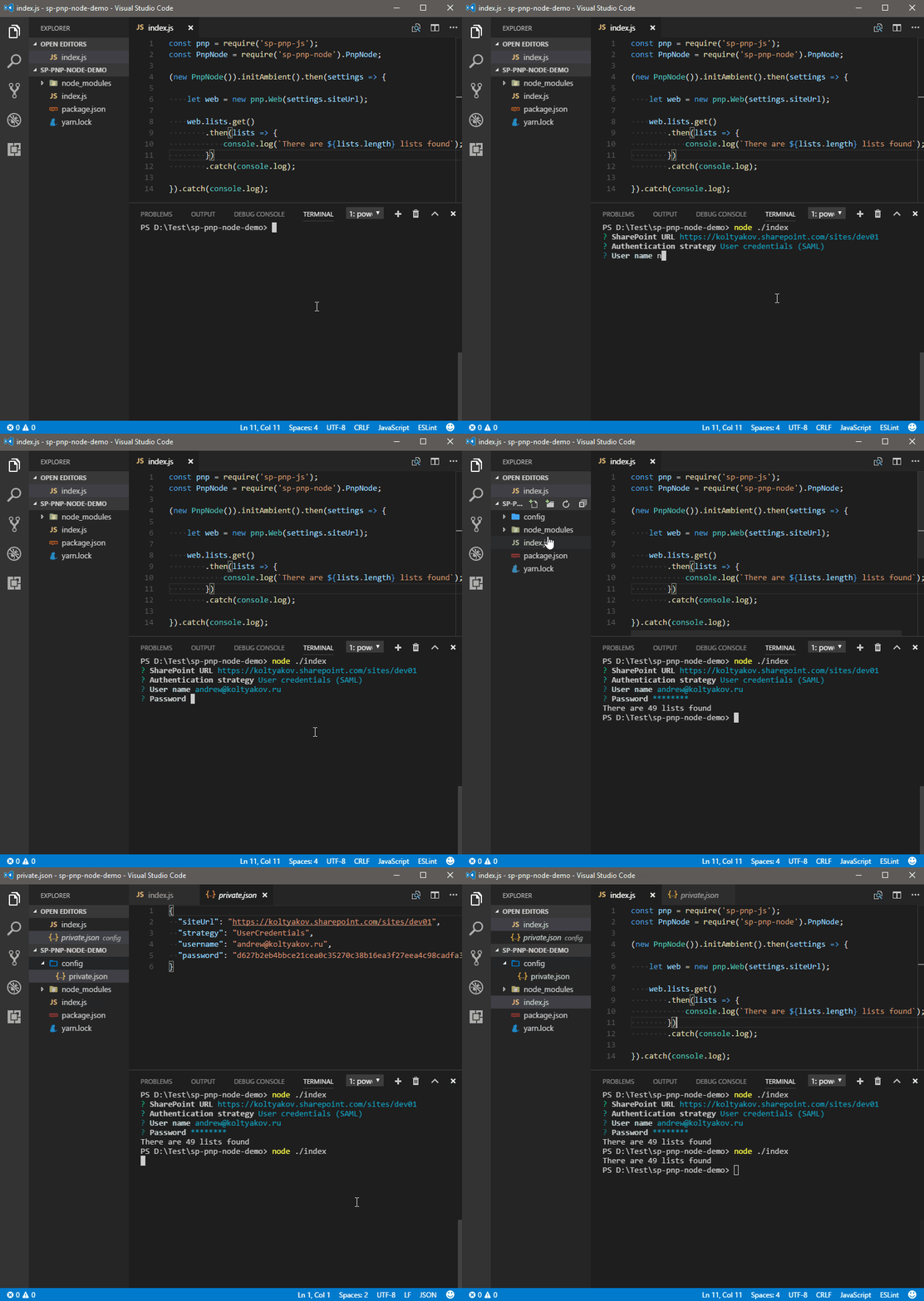
sp-pnp-node has two modes:
- ambient init - wraps
PnPjs with promise based auth wizard helper
- factory -
fetchClientFactory implementation
When to use ambient init: in scripts with user interaction involved when there is no information about authentication and target invironment before script is executed. SharePoint url and the creds are prompted in a console.
In CI/CD scenarios, factory approach is recommended over interactive console as it can lead to a task stuck.
TypeScript
Ambient init example
import { Web } from '@pnp/sp';
import { PnpNode, IPnpNodeSettings } from 'sp-pnp-node';
const optionalInitSettings: IPnpNodeSettings = {
};
new PnpNode(optionalInitSettings).init().then((settings: IPnpNodeSettings) => {
const web = new Web(settings.siteUrl);
web.lists.get()
.then(lists => {
console.log(lists.map(list => list.Title));
})
.catch(console.log);
}).catch(console.log);
Factory example
import * as pnp from '@pnp/sp';
import { PnpNode, IPnpNodeSettings } from 'sp-pnp-node';
const config = require('../config/private.json');
const pnpNodeSettings: IPnpNodeSettings = {
siteUrl: config.siteUrl,
authOptions: config
};
pnp.sp.setup({
sp: {
fetchClientFactory: () => new PnpNode(pnpNodeSettings),
baseUrl: config.siteUrl
}
});
pnp.sp.web.get()
.then(console.log)
.catch(console.log);
JavaScript
const { Web } = require('@pnp/sp');
const { PnpNode } = require('sp-pnp-node');
new PnpNode().init().then(settings => {
const web = new Web(settings.siteUrl);
web.contentTypes.get()
.then(cts => {
console.log(cts.map(ct => {
return {
name: ct.Name,
description: ct.Description
};
}));
})
.catch(console.log);
}).catch(console.log);
OData Metadata modes
import { sp } from '@pnp/sp';
import { PnpNode, IPnpNodeSettings } from 'sp-pnp-node';
new PnpNode().init().then((settings: IPnpNodeSettings) => {
sp.setup({
sp: {
headers: {
'Accept': 'application/json;odata=minimalmetadata'
}
}
});
}).catch(console.log);
Initiation settings
import { PnpNode } from 'sp-pnp-node';
const pnpNodeSettings: IPnpNodeSettings = {
};
new PnpNode(pnpNodeSettings).init().then(settings => {
}).catch(console.log);
Raw Fetch client usage
import { PnpNode } from 'sp-pnp-node';
declare const global: any;
new PnpNode().init().then(settings => {
global.fetch(`${settings.siteUrl}/_api/web`, {
method: 'GET',
headers: {
accept: 'application/json;odata=minimalmetadata'
}
})
.then(response => response.json())
.then(console.log)
.catch(console.log);
});
PnP Node Settings options
- siteUrl?: string; // Optional SPWeb url
- authOptions?: IAuthOptions;
node-sp-auth credentials options
- config?: IAuthConf;
node-sp-auth-config options
- configPath?: string; // Path to auth config .json | Default is './config/private.json'
- encryptPassword?: boolean; // Encrypts password to a machine-bind hash | Default is 'true'
- saveConfigOnDisk?: boolean; // Saves config .json to disk | Default is 'true'
Settings can be left blank. Auth options in such a case will be asked by node-sp-auth-config options in a wizard like approach.
Settings scenarios
- No initial settings (defaults): wizard approach, covers console applications cases with user interaction
- With explicitly defined
authOptions:
- external tools is in charge for preparing auth credentials in
node-sp-auth format
- credentials should not be dumped on disc
- Config file with prepopulated credentials: schedule, job automation, continues integration
Supported authentication scenarios
Inspiration and references
This project was inspired by Sergei Sergeev and Patrick Rodgers. Main ideas were taken from node-pnpjs-sample and Using PnP JS Core and node-sp-auth. The result project implements the same concepts with a goal of reusability and maintenance simplification.





