


Security News
Feross on TBPN: How North Korea Hijacked Axios
Socket CEO Feross Aboukhadijeh breaks down how North Korea hijacked Axios and what it means for the future of software supply chain security.
By Sarah Gooding - Apr 08, 2026
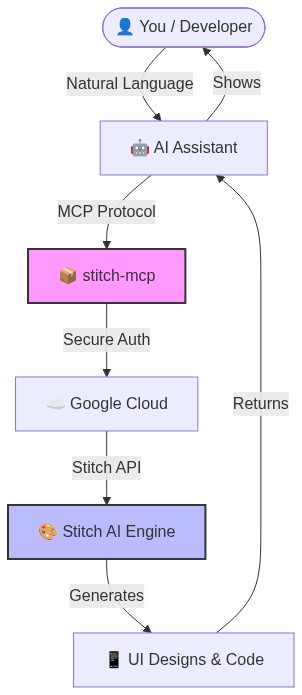
Universal MCP server for Google Stitch - AI-powered UI/UX design tool. Works with Claude, Cursor, Antigravity, and any MCP-compatible AI.



Universal MCP Server for Google Stitch
Build amazing UI/UX designs instantly with AI. Works seamlessly with Cursor, Claude, Antigravity, and any MCP-compatible editor.
Created by Aakash Kargathara.
You need a Google Cloud project with the Stitch API enabled.
# Login to your Google Cloud
gcloud auth login
# Set your project (replace with your actual project ID)
gcloud config set project YOUR_PROJECT_ID
gcloud auth application-default set-quota-project YOUR_PROJECT_ID
# Enable the magic
gcloud beta services mcp enable stitch.googleapis.com
This gives stitch-mcp permission to talk to Google on your behalf.
gcloud auth application-default login
Copy and paste this into your MCP config file:
For Claude Desktop:
~/Library/Application Support/Claude/claude_desktop_config.json
For Cursor: Settings > MCP > Add New Server
{
  "mcpServers": {
    "stitch": {
      "command": "npx",
      "args": ["-y", "stitch-mcp"],
      "env": {
         "GOOGLE_CLOUD_PROJECT": "YOUR_PROJECT_ID"
      }
    }
  }
}
| Tool Name | What it does |
|---|---|
extract_design_context | 🧠 Scans a screen to extract "Design DNA" (Fonts, Colors, Layouts). Use this to keep style consistent. |
fetch_screen_code | 💾 Downloads the raw HTML/Frontend code of a screen. |
fetch_screen_image | 🖼️ Downloads the high-res screenshot of a screen. |
generate_screen_from_text | ✨ Generates a NEW screen based on your prompt (and context). |
create_project | 📁 Creates a new workspace/project folder. |
list_projects | 📋 Lists all your available Stitch projects. |
list_screens | 📱 Lists all screens within a specific project. |
get_project | 🔍 Retrieves details of a specific project. |
get_screen | ℹ️ Gets metadata for a specific screen. |
To generate consistent UI, use this 2-step flow:
This ensures your new screen matches your existing design system perfectly.
Apache 2.0 - Open source and free to use.
Built with ❤️ by Aakash Kargathara
FAQs
Universal MCP server for Google Stitch - AI-powered UI/UX design tool. Works with Claude, Cursor, Antigravity, and any MCP-compatible AI.
The npm package stitch-mcp receives a total of 1,938 weekly downloads. As such, stitch-mcp popularity was classified as popular.
We found that stitch-mcp demonstrated a healthy version release cadence and project activity because the last version was released less than a year ago. It has 1 open source maintainer collaborating on the project.
Did you know?

Socket for GitHub automatically highlights issues in each pull request and monitors the health of all your open source dependencies. Discover the contents of your packages and block harmful activity before you install or update your dependencies.
Security News
Socket CEO Feross Aboukhadijeh breaks down how North Korea hijacked Axios and what it means for the future of software supply chain security.

Security News
OpenSSF has issued a high-severity advisory warning open source developers of an active Slack-based campaign using impersonation to deliver malware.

Research
/Security News
Malicious packages published to npm, PyPI, Go Modules, crates.io, and Packagist impersonate developer tooling to fetch staged malware, steal credentials and wallets, and enable remote access.