


Security News
The Hidden Blast Radius of the Axios Compromise
The Axios compromise shows how time-dependent dependency resolution makes exposure harder to detect and contain.
By Ahmad Nassri - Apr 01, 2026
stream-linker
Advanced tools
StreamLinker: Effortlessly integrate continuous live streaming with dynamic file appending for uninterrupted broadcasts.
Read this in other languages: English | Tiếng Việt
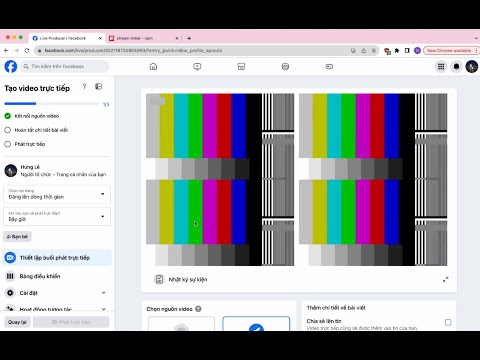
StreamLinker is a library that allows you to connect and livestream video data from an input source to an RTMP path. This library utilizes ffmpeg, bullmq and hls-maker technologies for video processing.
npm install stream-linker
const { StreamLinker, StreamLinkerConfig } = require('stream-linker');

const options: StreamLinkerConfig = {
    rtmpOuputPath: 'rtmp://example.com/live/streamkey',
    startInputFilePath: '/path/to/your/source/file',
    // ... other options as needed
};

const linker = new StreamLinker(options);

// Start livestreaming video
linker.start();
new StreamLinker(options: StreamLinkerConfig);
Creates a new instance of StreamLinker.
linker.start(): Promise<void>
Initiates the video livestream. This method will begin the video conversion process and stream it to the provided RTMP path.
StreamLinker.append(sourceFilePath: string, rtmpOuputPath: string, redisConfig?: ConnectionConfig): Promise<void>
Appends video to the live stream. This method allows you to add additional segments to the ongoing stream.
StreamLinker.insert(sourceFilePath: string, rtmpOuputPath: string, redisConfig?: ConnectionConfig): Promise<void>
Insert video to the live stream. This method allows you to insert additional segments to the ongoing stream.
StreamLinker.stop(rtmpOuputPath: string, redisConfig?: ConnectionConfig): Promise<boolean>
Stops the livestream for the specified RTMP output path.
Interface: StreamLinkerConfig
interface StreamLinkerConfig {
    rtmpOuputPath: string;
    standbyInputFilePath?: string;
    startInputFilePath: string;
    isAppendDefault?: boolean;
    workerConnection?: ConnectionConfig,
    queueConnection?: ConnectionConfig,
    ffmpegHLSOptions?: ffmpegOptions,
    ffmpegStreamOptions?: ffmpegOptions
}
rtmpOuputPath (string): Destination RTMP stream.
startInputFilePath (string): Path to the source video file.
standbyInputFilePath (optional, string): Path to a backup video file. Activated if the source video ends. If not provided, the source video is looped.
isAppendDefault (optional, boolean): Default is true. If it is false stream will be stopped when video source ends (no loop)
workerConnection (optional, ConnectionConfig): Redis connection for the worker.
queueConnection (optional, ConnectionConfig): Redis connection for the queue.
ffmpegHLSOptions (optional) Ffmpeg options for conversion input video to HLS
ffmpegStreamOptions (optional) Ffmpeg options for live streaming
Configuration for StreamLinker. Includes necessary information for initializing and configuring the livestream.
const { StreamLinker, StreamLinkerConfig } = require('stream-linker');

const redisConfig = {
    host: '127.0.0.1',
    port: 6379,
    username: 'default',
    password: 'passWord',
    db: 0
}

const options: StreamLinkerConfig = {
    rtmpOuputPath: 'rtmp://example.com/live/streamkey',
    startInputFilePath: '/path/to/source/video.mp4',
    standbyInputFilePath: '/path/to/standby/video.mp4', // Optional
    workerConnection: redisConfig, // Optional
    queueConnection: redisConfig, // Optional
    ffmpegStreamOptions: {
        input: [
            '-re',
            '-live_start_index', '50'
        ],
        output: [
            '-c', 'copy',
            '-preset', 'veryfast',
            '-f', 'flv',
            '-flvflags', 'no_duration_filesize'
        ]
    }, // Optional
    ffmpegHLSOptions: {
        input: ['...'],
        output: ['...']
    }, // Optional

};

const linker = new StreamLinker(options);

// Start livestreaming video
linker.start();

// Append additional video to the live stream
// redisConfig param is optional
StreamLinker.append('/path/to/another/source/file', 'rtmp://example.com/live/streamkey', redisConfig);

// Insert additional video to the live stream
// redisConfig param is optional
StreamLinker.insert('/path/to/another/source/file', 'rtmp://example.com/live/streamkey', redisConfig);

// Stop the livestream
// redisConfig param is optional
StreamLinker.stop('rtmp://example.com/live/streamkey', redisConfig);

// Events tracking
stream.on('startStream', function (ffmpegCommand) {
    console.log("onStartStream", ffmpegCommand)
});

stream.on('progressStream', function (totalFrames, progressFrames) {
    console.log("onProgressStream", totalFrames, progressFrames);
});

stream.on('endStream', function (streamOutput) {
    console.log("onEndStream", streamOutput);
});

stream.on('errorStream', function (err, stdout, stderr) {
    console.log("err", err, "stdout", stdout, "stderr", stderr);
});

stream.on('completed', function (value) {
    console.log("onCompleted", value);
});
StreamLinker provides a CLI for seamless streaming. Below are the available commands and their usage:
Install StreamLinker globally using npm:
npm install -g stream-linker
You can use -h or --help to see the available options.
stream-linker -h
Launch your stream with StreamLinker:
stream-linker start -i <inputPath> -o <outputUrl> [-s <standbyPath>]
-i, --input <inputPath>: Path to the input video file. Must be specified.-o, --output <outputUrl>: RTMP output URL for live streaming. Must be specified.-s, --standby <standbyPath> (optional): Path to the standby video for no signal.stream-linker start -h to see the available options.Example:
stream-linker start -i /path/to/input/video.mp4 -o rtmp://example.com/live/streamkey -s /path/to/standby/video.mp4
Append a video to your live stream:
stream-linker append -i <inputPath> -o <outputUrl>
-i, --input <inputPath>: Path to the input video file. Must be specified.-o, --output <outputUrl>: RTMP output URL for live streaming. Must be specified.stream-linker append -h to see the available options.Example:
stream-linker append -i /path/to/another/video.mp4 -o rtmp://example.com/live/streamkey
Insert a video to your live stream:
stream-linker insert -i <inputPath> -o <outputUrl>
-i, --input <inputPath>: Path to the input video file. Must be specified.-o, --output <outputUrl>: RTMP output URL for live streaming. Must be specified.stream-linker insert -h to see the available options.Example:
stream-linker insert -i /path/to/another/video.mp4 -o rtmp://example.com/live/streamkey
Stop a livestream for a specific output URL:
stream-linker stop <outputUrl>
<outputUrl>: RTMP output URL for live streaming. Must be specified.stream-linker stop -h to see the available options.Example:
stream-linker stop rtmp://example.com/live/streamkey
Note:
Contact the author: hunglsxx@gmail.com
This library is released under the MIT License.
FAQs
StreamLinker: Effortlessly integrate continuous live streaming with dynamic file appending for uninterrupted broadcasts.
We found that stream-linker demonstrated a not healthy version release cadence and project activity because the last version was released a year ago. It has 1 open source maintainer collaborating on the project.
Did you know?

Socket for GitHub automatically highlights issues in each pull request and monitors the health of all your open source dependencies. Discover the contents of your packages and block harmful activity before you install or update your dependencies.
Security News
The Axios compromise shows how time-dependent dependency resolution makes exposure harder to detect and contain.

Research
A supply chain attack on Axios introduced a malicious dependency, plain-crypto-js@4.2.1, published minutes earlier and absent from the project’s GitHub releases.

Research
Malicious versions of the Telnyx Python SDK on PyPI delivered credential-stealing malware via a multi-stage supply chain attack.