Surf: A Build Server for GitHub

Surf is a multi-platform, language-agnostic, GitHub oriented server for building your apps continuously that is easy to set up, works on every operating system, and is way less of a pain in the ass than anything else out there. Since Surf is built around Git and GitHub, its configuration is vastly simpler than other build servers and since it's built on node.js, installing it is really easy.
Philosophically, Surf tries to be really simple - it gives you the reusable pieces you need to easily create simple build systems, and have the ability to make more complicated ones if you need to. Architecturally, Surf's design is similar to BuildBot, but Git / GitHub focused. Some design inspiration, from BuildBot's website:
Many CI tools, such as CruiseControl or Jenkins, are structured as ready-to-use applications. Users fill in specific details, such as version control information and build process, but the fundamental design is fixed and options are limited to those envisioned by the authors. This arrangement suits the common cases quite well: there are cookie-cutter tools to automatically build and test Java applications, Ruby gems, and so on. Such tools embody assumptions about the structure of the project and its processes. They are not well-suited to more complex cases, such as mixed-language applications or complex release tasks, where those assumptions are violated.
Buildbot's design allows your installation to grow with your requirements, beginning with simple processes and growing to meet your unique needs.
The Quickest of Quick Starts
npm install -g surf-build
export GITHUB_TOKEN='0123456789abcdef'
surf-run
Why would I use this over $ALTERNATIVE?
- Surf works on every platform, really easily
- Surf works even if you can't set up a WebHook (either because of GitHub privileges, firewall issues, whatever).
- Surf works inside your company firewall, without needing to carve out exceptions. As long as you can make outgoing HTTP requests, it'll work.
Why should I use $ALTERNATIVE instead?
- Surf only works with Git and GitHub - if you use Subversion or Bitbucket, you're out of luck
- Surf doesn't have any of its own UI, so if you like lots of knobs and buttons to click, you might be happier with Jenkins
- Surf is very early and doesn't have a huge plugin community (or, plugins!) Language-specific build servers might be easier to set up.
Try it out by building Surf itself:
First, install Surf:
npm install -g surf-build
Now, try running surf-build, which is a command-line app that knows how to build different kinds of projects.
surf-build --repo https://github.com/surf-build/surf -s 6dadf3bd5744861300eff3b640146c1cb473970f
Tada! You made a build. Note a few things:
- Surf doesn't need to have the cloned repo anywhere, only the URL. Surf automatically creates a clean checkout for every build.
- Even though you probably don't have write access to the repo, you can still build it locally. Because this command didn't have the
-n parameter, it won't post the result to GitHub.
Testing out Surf in your own project
Surf knows how to build many kinds of projects without any kind of configuration:
- Autotools-based projects
- CMake
- .NET Projects via MSBuild / XBuild on non-Windows
- Node.js projects (runs
npm install && npm test)
- Rust projects, via Cargo
- XCode projects via xcodebuild
Surf will instead use any of the following files as the build command if they are present - you can use this for custom build setups, or for languages / platforms that Surf doesn't support automatically:
build.shbuild.ps1build.cmdscript/ci.ps1script/ci.cmdscript/ci
Now, let's test it out. First, we need to get a GitHub token:
- Go to https://github.com/settings/tokens to get a token (The user generating the token needs write/push privileges on the repo so surf-build can update statuses.)
- Make sure to check
repo and gist.
- Generate the token and save it off
export GITHUB_TOKEN='<< your token >>'
surf-build
Now, let's make this build on every push:
export GITHUB_TOKEN='<< your token >>'
surf-run
Giving your multi-platform builds separate names
Surf is great at running builds to verify your PRs, which show up here on the GitHub UI:
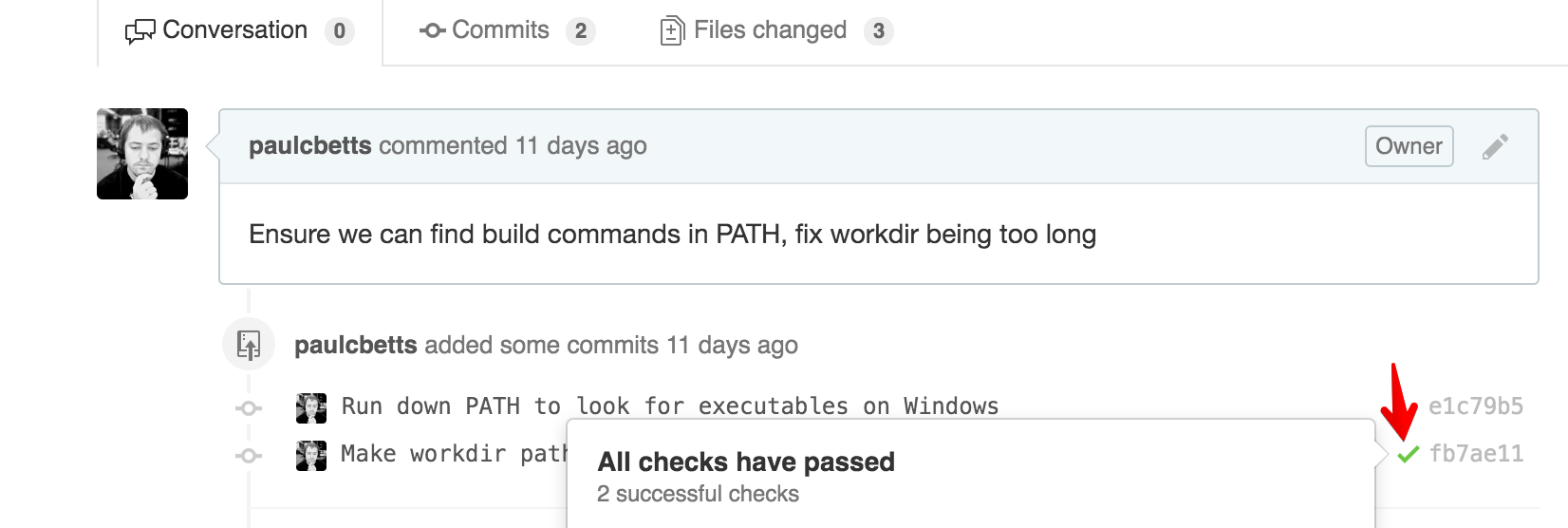
To set this up, all we need to do is pass -n to surf-build - here's an example with PowerShell in Windows:
$env:GITHUB_TOKEN="<< your token >>"

surf-run -r https://github.com/surf-build/example-csharp -- surf-build -n 'surf-win32-x64'
Pass a descriptive name as your parameter to -n, usually the platform / architecture that you're building on. The build output will be a link on the checkmark, and posted to your account as a GitHub Gist. Check out an example: https://gist.github.com/paulcbetts/b6ab52eeb43d0c551516.
Ugh! It doesn't work!
Surf uses the really great debug module for all of its diagnostics. To enable it, set the DEBUG environment variable to *,-babel (since Babel is very noisy):
export GITHUB_TOKEN='<< your token >>'
export DEBUG='*,-babel'

surf-run -r https://github.com/surf-build/example-csharp -- surf-build -n 'surf-debian-ia32'
Available Commands
surf-run
Monitors a GitHub repo and runs a command on every changed ref, constrained to a certain number of processes in parallel.
Usage: surf-run -r https://github.com/some/repo -- command arg1 arg2 arg3...
Monitors a GitHub repo and runs a command for each changed branch / PR.

Options:
  -h, --help     Show help                                             [boolean]
  -r, --repo     The URL of the repository to monitor. Defaults to the repo in
                 the current directory
  -j, --jobs     The number of concurrent jobs to run. Defaults to 2
  -v, --version  Print the current version number and exit


Some useful environment variables:

GITHUB_ENTERPRISE_URL - the GitHub Enterprise URL to use instead of .com.
GITHUB_TOKEN - the GitHub (.com or Enterprise) API token to use. Must be
provided.
surf-run will set a few useful environment variables to the command that it runs for every changed branch:
SURF_REPO - the repository URL to useSURF_SHA1 - the commit to build
surf-build
Clones a repo from GitHub, checks out the specified commit, and builds the project. If -n is specified, a status will be posted back to GitHub. If omitted, the build is only run locally.
Usage: surf-build -r http://github.com/some/repo -s SHA1
Clones a repo from GitHub and builds the given SHA1

Options:
  -r, --repo     The repository to clone
  -s, --sha      The sha to build
  -n, --name     The name to give this build on GitHub
  -v, --version  Print the current version number and exit


Some useful environment variables:

GITHUB_ENTERPRISE_URL - the GitHub Enterprise URL to (optionally) post status
to.
GITHUB_TOKEN - the GitHub (.com or Enterprise) API token to use. Must be
provided.
GIST_ENTERPRISE_URL - the GitHub Enterprise URL to (optionally) post Gists to.
GIST_TOKEN - the GitHub (.com or Enterprise) API token to use to create the
build output Gist.

SURF_SHA1 - an alternate way to specify the --sha parameter, provided
            automatically by surf-client.
SURF_REPO - an alternate way to specify the --repo parameter, provided
            automatically by surf-client.
surf-install
Sets up a command to be run on startup (usually surf-run). This will capture your current environment and encode that into a job appropriate for your operating system (i.e. either launchd, systemd, or Task Scheduler). surf-install can also create Docker containers that will build your project.
surf-install -n surf -c "surf-run -r https://github.com/surf-build/surf"
surf-install -t docker --dry-run -n surf -c "surf-run -r https://github.com/surf-build/surf"
Usage: surf-install -n my-cool-job -c "surf-client ..."
Creates a system service with the given command (probably surf-run) as its
executable. Run using sudo.

Surf-specific environment variables (e.g. GITHUB_TOKEN) will be captured
automatically, but others can be explicitly specified at the command line

Options:
  --dry-run          Instead of creating a service, display the configuration
                     file and exit
  -n, --name         The name given to the OS of the service to create
  -c, --command      The command to run, usually surf-run
  -t, --type         Explicitly choose the type of service to create, usually
                     "-t docker" for Docker
  -e, --environment  A comma-separated list of custom environment variables to
                     capture
  -v, --version      Print the current version number and exit


Some useful environment variables:

GITHUB_TOKEN - the GitHub (.com or Enterprise) API token to use.
GITHUB_ENTERPRISE_URL - the GitHub Enterprise URL to (optionally) post status
to.
GIST_ENTERPRISE_URL - the GitHub Enterprise URL to (optionally) post Gists to.
GIST_TOKEN - the GitHub (.com or Enterprise) API token to use to create the
build output Gist.
surf-publish
Create a tag for a given commit that you've run surf-build on, and this will create a release with those binaries.
surf-build -n "my-cool-build"
git tag -a -m "My Cool Build 0.1" 0.1 HEAD
git push --tags
surf-publish -r https://github.com/myname/myrepo -t 0.1
Usage: surf-publish -r http://github.com/some/repo -t some-tag
Creates a release for the given tag by downloading all of the build
artifacts and reuploading them

Options:
  -r, --repo     The repository to clone
  -t, --tag      The tag to download releases for
  -v, --version  Print the current version number and exit


Some useful environment variables:

GITHUB_TOKEN - the GitHub (.com or Enterprise) API token to use. Must be
provided.
GIST_TOKEN - the GitHub (.com or Enterprise) API token to use to clone the build
Gists.
surf-download
Downloads all of the assets from a Release on GitHub.
Usage: surf-download -r http://github.com/some/repo -t some-tag
Download all of the artifacts for a given Release

Options:
  --target       The directory to download files to
  -r, --repo     The repository to clone
  -t, --tag      The tag to download releases for
  -v, --version  Print the current version number and exit


Some useful environment variables:

GITHUB_TOKEN - the GitHub (.com or Enterprise) API token to use. Must be
provided.
surf-status
Displays the current commit statuses for every open PR on GitHub (whether they were created by GitHub or not)
Usage: surf-status --repo https://github.com/owner/repo
Returns the GitHub Status for all the branches in a repo

Options:
  -r, --repo     The URL of the repository to fetch status for. Defaults to the
                 repo in the current directory
  -j, --json     Dump the commit status in JSON format for machine parsing
                 instead of human-readable format                      [boolean]
  -v, --version  Print the current version number and exit


Some useful environment variables:

GITHUB_ENTERPRISE_URL - the GitHub Enterprise URL to use.
GITHUB_TOKEN - the GitHub API token to use. Must be provided.

SURF_REPO - an alternate way to specify the --repo parameter, provided
            automatically by surf.
surf-clean
Surf will leave lots of temporary directories around for work directories by-default. surf-clean will mop up ones that are no longer mapped to current branches.
Usage: surf-clean -r https://github.com/owner/repo
Cleans builds that no longer correspond to any active ref

Options:
  -h, --help     Show help                                             [boolean]
  --dry-run      If set, report the directories we would delete        [boolean]
  -r, --repo     The repository URL to remove old builds for
  -v, --version  Print the current version number and exit





