


Research
2025 Report: Destructive Malware in Open Source Packages
Destructive malware is rising across open source registries, using delays and kill switches to wipe code, break builds, and disrupt CI/CD.
By Kush Pandya - Dec 24, 2025
svelte-pivottable
Advanced tools
This is a Svelte component implementation of react-pivottable-grouping that is itself a fork of react-pivottable with added capacity of grouping and displaying subtotals.
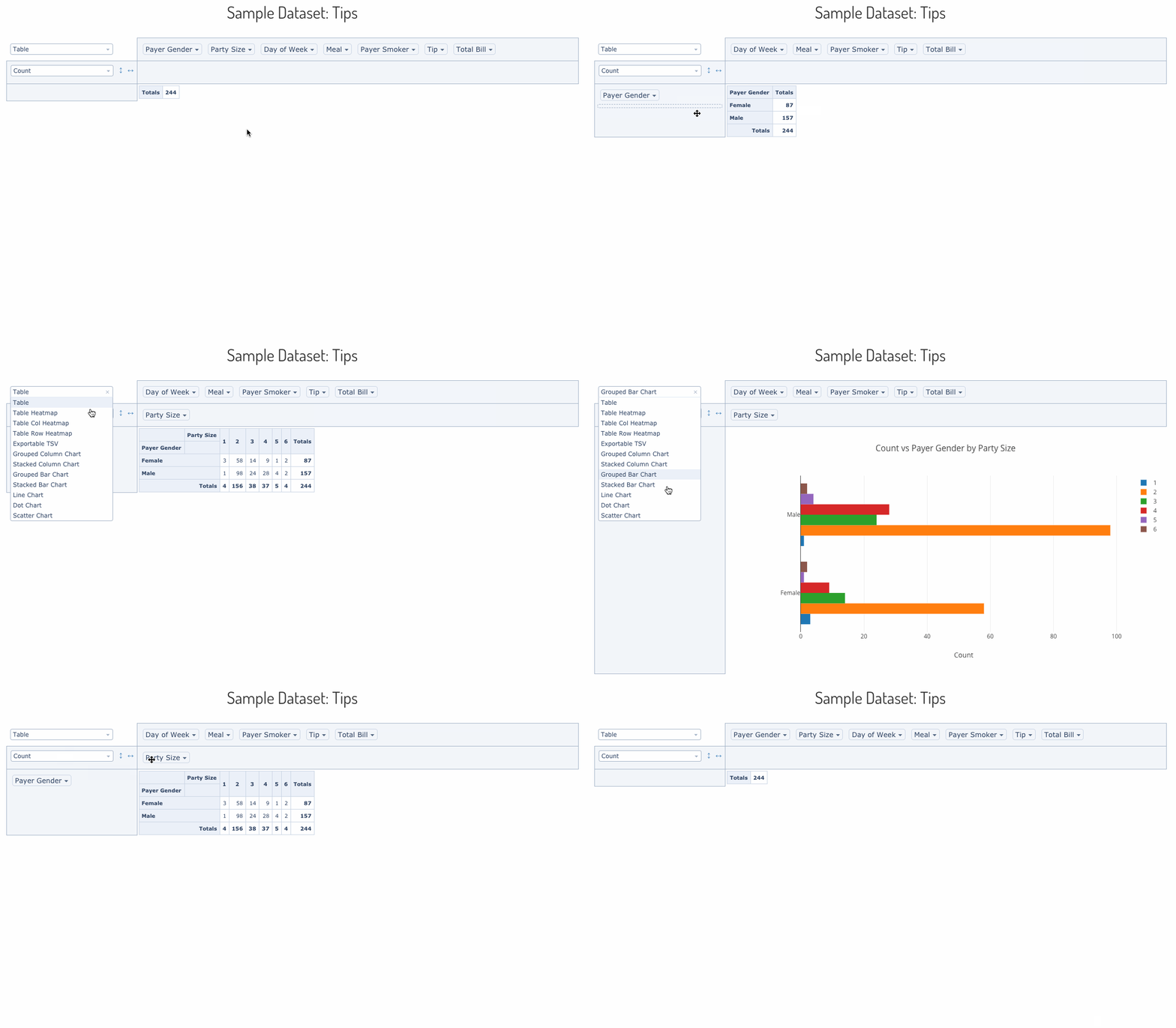
svelte-pivottable is a Svelte-based pivot table library with drag'n'drop functionality.
It is based on the original work of Nicolas Kruchten author of react-pivottable a React port of the jQuery-based PivotTable.js by the same author.
svelte-pivottable's function is to enable data exploration and analysis by
summarizing a data set into table or Plotly.js
chart with a true 2-d drag'n'drop UI, very similar to the one found in older
versions of Microsoft Excel.
A live demo can be found here.
Installation is via NPM or Yarn:
npm install --save svelte-pivottable

yarn add svelte-pivottable
Basic usage is as follows. Note that PivotTableUI is a "dumb component" that
maintains essentially no state of its own.
<script>
    import { PivotTableUI } from "svelte-pivottable/PivotTableUI";

    const options = {
        // see documenation for supported options
        };

    // see documentation for supported input formats
    const data = [
        ["attribute", "attribute2"],
        ["value1", "value2"],
    ];
</script>

<PivotTableUI {...options} {data}>
The Plotly plotly.js component can be passed in via dependency injection.
Important: If you build your project using webpack, you'll have to follow
these instructions
in order to successfully bundle plotly.js. See below for how to avoid having
to bundle plotly.js.
npm install --save plotly.js
To add the Plotly renderers to your app, you can use the following pattern:
<script>
    import { PivotTableUI } from "svelte-pivottable/PivotTableUI";
    import TableRenderers from "svelte-pivottable/TableRenderers";
    import Plotly from "plotly.js";
    import PlotlyRenderers from "svelte-pivottable/PlotlyRenderers";

    // create Plotly renderers via dependency injection
    const plotlyRenderers = PlotlyRenderers(Plotly);

    // see documentation for supported input formats
    const data = [
        ["attribute", "attribute2"],
        ["value1", "value2"],
    ];
</script>

<PivotTableUI
    data={data}
    renderers={Object.assign({}, TableRenderers, plotlyRenderers)}
/>
plotly.jsIf you would rather not install and bundle plotly.js but rather get it into
your app via something like <script> tag, you can handle the dependency injection like this:
<script>
    import { PivotTableUI } from "svelte-pivottable/PivotTableUI";
    import TableRenderers from "svelte-pivottable/TableRenderers";
    import PlotlyRenderers from "svelte-pivottable/PlotlyRenderers";

    // create Plotly renderers via dependency injection
    const plotlyRenderers = PlotlyRenderers(window.Plotly);

    // see documentation for supported input formats
    const data = [
        ["attribute", "attribute2"],
        ["value1", "value2"],
    ];
</script>

<PivotTableUI
    data={data}
    renderers={...TableRenderers, ...plotlyRenderers)}
/>
<PivotTableUI {...props} />
<PivotTable {...props} />
<Renderer {...props} />
PivotData(props)The interactive component provided by svelte-pivottable is PivotTableUI, but
output rendering is delegated to the non-interactive PivotTable component,
which accepts a subset of its properties. PivotTable can be invoked directly
and is useful for outputting non-interactive saved snapshots of PivotTableUI
configurations. PivotTable in turn delegates to a specific renderer component,
such as the default TableRenderer, which accepts a subset of the same
properties. Finally, most renderers will create PivotData object to
handle the actual computations, which also accepts a subset of the same props as
the rest of the stack.
Here is a table of the properties accepted by this stack, including an indication of which layer consumes each, from the bottom up:
| Layer | Key & Type | Default Value | Description |
|---|---|---|---|
PivotData | data see below for formats | (none, required) | data to be summarized |
PivotData | rows array of strings | [] | attribute names to prepopulate in row area |
PivotData | cols array of strings | [] | attribute names to prepopulate in cols area |
PivotData | vals array of strings | [] | attribute names used as arguments to aggregator (gets passed to aggregator generating function) |
PivotData | aggregators object of functions | aggregators from Utilites | dictionary of generators for aggregation functions in dropdown (see original PivotTable.js documentation) |
PivotData | aggregatorName string | first key in aggregators | key to aggregators object specifying the aggregator to use for computations |
PivotData | valueFilter object of arrays of strings | {} | object whose keys are attribute names and values are objects of attribute value-boolean pairs which denote records to include or exclude from computation and rendering; used to prepopulate the filter menus that appear on double-click |
PivotData | sorters object or function | {} | accessed or called with an attribute name and can return a function which can be used as an argument to array.sort for output purposes. If no function is returned, the default sorting mechanism is a built-in "natural sort" implementation. Useful for sorting attributes like month names, see original PivotTable.js example 1 and original PivotTable.js example 2. |
PivotData | rowOrder string | "key_a_to_z" | the order in which row data is provided to the renderer, must be one of "key_a_to_z", "value_a_to_z", "value_z_to_a", ordering by value orders by row total |
PivotData | colOrder string | "key_a_to_z" | the order in which column data is provided to the renderer, must be one of "key_a_to_z", "value_a_to_z", "value_z_to_a", ordering by value orders by column total |
PivotData | derivedAttributes object of functions | {} | defines derived attributes (see original PivotTable.js documentation) |
Renderer | <any> | (none, optional) | Renderers may accept any additional properties |
PivotTable | renderers object of functions | TableRenderers | dictionary of renderer components |
PivotTable | rendererName string | first key in renderers | key to renderers object specifying the renderer to use |
PivotTableUI | onChange function | (none, required) | function called every time anything changes in the UI, with the new value of the properties needed to render the new state. This function must be hooked into a state-management system in order for the "dumb" PivotTableUI component to work. |
PivotTableUI | hiddenAttributes array of strings | [] | contains attribute names to omit from the UI |
PivotTableUI | hiddenFromAggregators array of strings | [] | contains attribute names to omit from the aggregator arguments dropdowns |
PivotTableUI | hiddenFromDragDrop array of strings | [] | contains attribute names to omit from the drag'n'drop portion of the UI |
PivotTableUI | menuLimit integer | 500 | maximum number of values to list in the double-click menu |
PivotTableUI | unusedOrientationCutoff integer | 85 | If the attributes' names' combined length in characters exceeds this value then the unused attributes area will be shown vertically to the left of the UI instead of horizontally above it. 0 therefore means 'always vertical', and Infinity means 'always horizontal'. |
dataOne object per record, the object's keys are the attribute names.
Note: missing attributes or attributes with a value of null are treated as
if the value was the string "null".
const data = [
    {
        attr1: "value1_attr1",
        attr2: "value1_attr2",
        //...
    },
    {
        attr1: "value2_attr1",
        attr2: "value2_attr2",
        //...
    },
    //...
];
One sub-array per record, the first sub-array contains the attribute names. If
subsequent sub-arrays are shorter than the first one, the trailing values are
treated as if they contained the string value "null". If subsequent sub-arrays
are longer than the first one, excess values are ignored. This format is
compatible with the output of CSV parsing libraries like PapaParse.
const data = [
    ["attr1", "attr2"],
    ["value1_attr1", "value1_attr2"],
    ["value2_attr1", "value2_attr2"],
    //...
];
The function will be called with a callback that takes an object as a parameter.
Note: missing attributes or attributes with a value of null are treated as
if the value was the string "null".
const data = function(callback) {
    callback({
        "attr1": "value1_attr1",
        "attr2": "value1_attr2",
        //...
    });
    callback({
        "attr1": "value2_attr1",
        "attr2": "value2_attr2",
        //...
    };
    //...
};
FAQs
A Svelte-based pivot table with grouping
The npm package svelte-pivottable receives a total of 7 weekly downloads. As such, svelte-pivottable popularity was classified as not popular.
We found that svelte-pivottable demonstrated a healthy version release cadence and project activity because the last version was released less than a year ago. It has 1 open source maintainer collaborating on the project.
Did you know?

Socket for GitHub automatically highlights issues in each pull request and monitors the health of all your open source dependencies. Discover the contents of your packages and block harmful activity before you install or update your dependencies.
Research
Destructive malware is rising across open source registries, using delays and kill switches to wipe code, break builds, and disrupt CI/CD.

Security News
Socket CTO Ahmad Nassri shares practical AI coding techniques, tools, and team workflows, plus what still feels noisy and why shipping remains human-led.

Research
/Security News
A five-month operation turned 27 npm packages into durable hosting for browser-run lures that mimic document-sharing portals and Microsoft sign-in, targeting 25 organizations across manufacturing, industrial automation, plastics, and healthcare for credential theft.