Text Search Engine
A text search engine that supports mixed Chinese and English fuzzy search
Overview
中文 README
A dynamic programming-based text search engine that supports mixed Chinese and English fuzzy search, returning the highest-weight matching results.
Who use it?
Online Demo
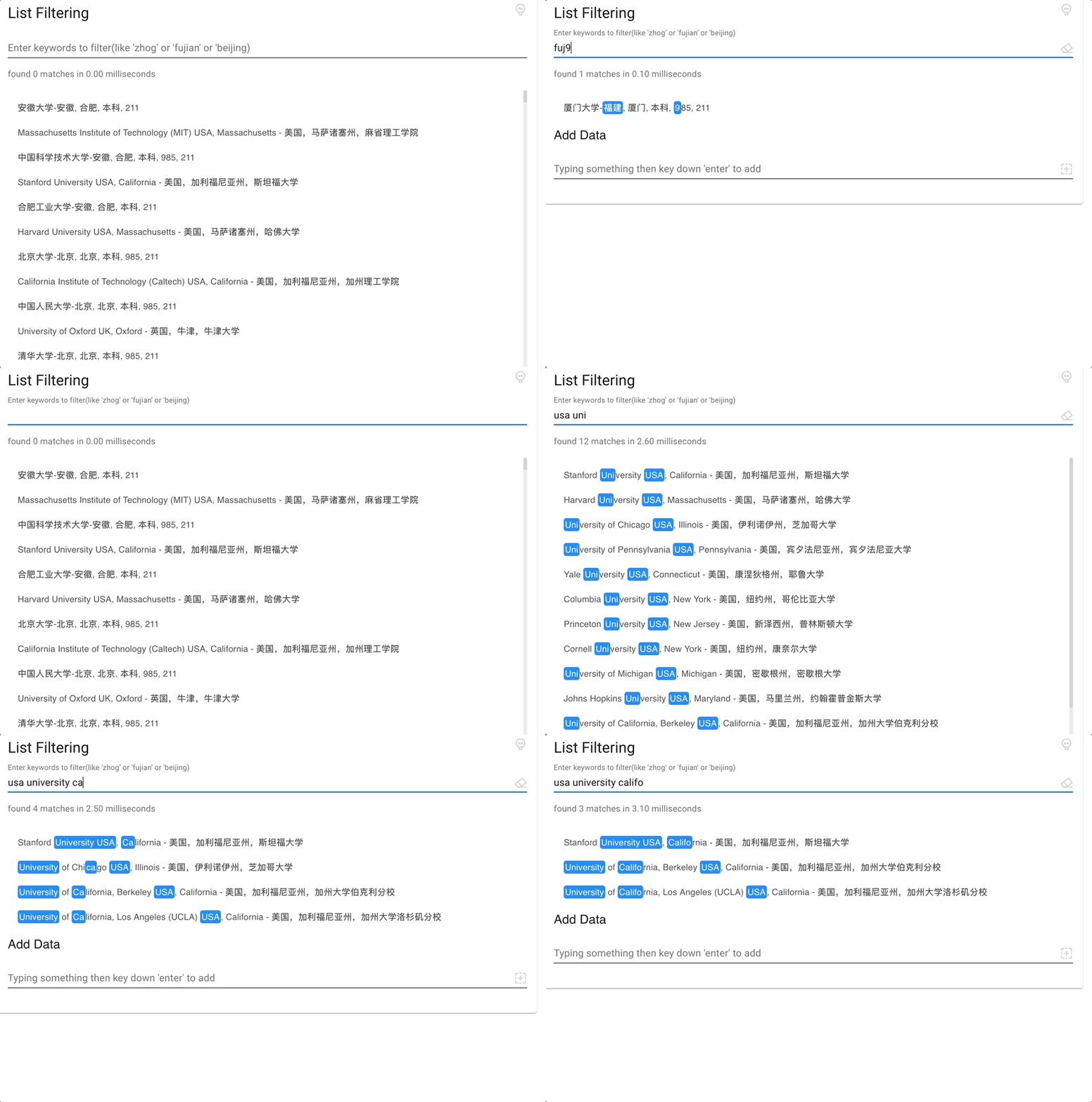
Check out this online demo if you are interested.
Algorithm Visualization
The search engine uses dynamic programming algorithm to find the optimal matching path. Here's a visualization of how the algorithm works:
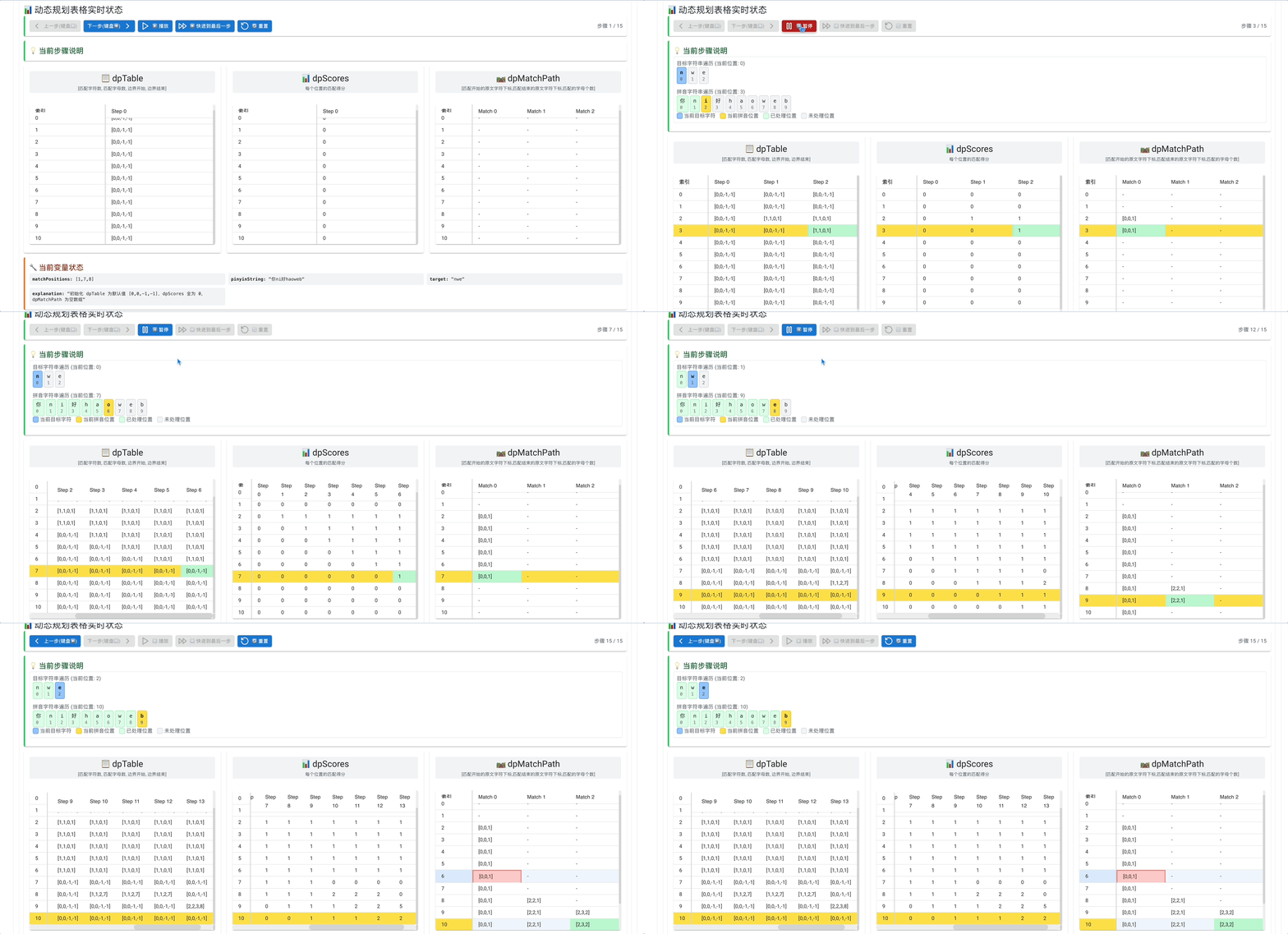
You can also visit the online visualization demo to interactively experience how the algorithm works.
Installation
npm i text-search-engine
Supported Environments
Supports both Node.js and Web environments.
Usage
search
Pure English Search
import { search } from 'text-search-engine'
const source = 'nonode'
search(source, 'no')
search(source, 'nod')
search(source, 'noe')
search(source, 'oo')
search('nonode', 'noe') Match result: nonode
Pure Chinese Search
import { search } from 'text-search-engine'
const source = '地表最强前端监控平台'
search(source, 'jk')
search(source, 'qianduapt')
search('地表最强前端监控平台', 'qianduapt') Match result: 地表最强前端监控平台
Mixed Chinese and English Search
import { search } from 'text-search-engine'
search('Node.js 最强监控平台 V9', 'nodejk')
const source_2 = 'a_nd你你的就是我的'
search(source_2, 'nd')
search(source_2, 'nnd')
search(source_2, 'nshwode')
search('Node.js 最强监控平台 V9', 'nodejk') Match result: Node.js 最强监控平台 V9
Space-separated Search
Adding spaces makes each term independent. Each term starts matching from the beginning, and matched terms will be removed, so the next term starts matching from the beginning and ignores previously matched terms.
const source_1 = 'Node.js 最强监控平台 V9'
search(source_1, 'jknode')
search(source_1, 'jk node')
search('Node.js 最强监控平台 V9', 'jk node') Match result: Node.js 最强监控平台 V9
Sort of Backtracking
const source_1 = 'zxhxo zhx'
search(source_1, 'zh')
search(source_1, 'zho')
highlightMatches
This API is used for quickly validating text match highlights. It returns ANSI escape codes that can be output using console.log in both Web and Node.js environments to see the highlighted text.
import { highlightMatches } from 'text-search-engine'
console.log(highlightMatches('Node.js 最强监控平台 V9', 'nodev9'))
The console will output: Node.js 最强监控平台 V9
options
mergeSpaces | true | Whether to merge spaces between matched items. When set to true, it will merge spaces in the middle of matched results into consecutive index ranges.
search('chrome 应用商店', 'meyinyon',{ mergeSpaces: false }) returns [[4, 5], [7, 8]]
search('chrome 应用商店', 'meyinyon', { mergeSpaces: true }) returns [[4, 8]] |
strictnessCoefficient | undefined | Strictness coefficient to control the strictness of matching. When a numeric value is set, if the number of matched characters is less than or equal to Math.ceil(query length * coefficient), it returns the result, otherwise returns undefined.
search('Node.js 最强监控平台 V8', 'nozjk') returns [[0, 1], [8, 8], [10, 11]]
search('Node.js 最强监控平台 V8', 'nozjk', { strictnessCoefficient: 0.5 }) returns [[0, 1], [8, 8], [10, 11]]
search('Node.js 最强监控平台 V8', 'nozjk', { strictnessCoefficient: 0.4 }) returns undefined |
isCharConsecutive | false | Controls whether matched characters need to be consecutive in the source string. When set to true, it requires matched characters to be consecutive in the source string (Chinese and English do not need to be consecutive).
search('Chinese@中国 People-人', 'chie') returns [[0, 2], [4, 4]]
search('Chinese@中国 People-人', 'chie', { isCharConsecutive: true }) returns undefined
search('Chinese@中国 People-人', '中ple', { isCharConsecutive: true }) returns [[8, 8], [14, 16]] |
strictCase | false | Controls case-sensitive matching. When set to true, the search will match exact case. When set to false, the search will be case-insensitive.
search('Hello World', 'hello') returns [[0, 4]]
search('Hello World', 'hello', { strictCase: true }) returns undefined
search('Hello World', 'hello', { strictCase: false }) returns [[0, 4]] |
React Component
Take a look at CodeSandbox Online Demo
HighlightWithTarget
import { HighlightWithTarget } from 'text-search-engine/react'

function Test() {
    return <HighlightWithTarget source='Node.js 最强监控平台 V9' target='nodejk' />
}
HighlightWithRange
import { HighlightWithRanges } from 'text-search-engine/react'
import { search } from 'text-search-engine'

export default function DemoForHighlightWithTarget() {
	const ranges = search('Node.js 最强监控平台 V9', 'nodejk')
	return <HighlightWithRanges source='Node.js 最强监控平台 V9' hitRanges={ranges}  />
}
Performance
| Best | O(M(source)) | O(M(source)) |
| Worst | O(M(source) * N(target)) | O(M(source) * N(target)) |
📞 contact
welcome to raise issue, you can contact me on wx or email if you have some good suggestion(notes: text-search-engine)





