
Time tracker manager in terminal.





Install
npm install -g timet
Using
Timet is only focused on helping you to record your work time on certain tasks via the terminal. The first time you run the timet, or try to register a new note, it will prompt you for some initial setup confirmations.
Its functionality is simple because schedules are stored in text files separated by date, you can store these files anywhere, or if you prefer, use a storage system in the cloud.
New register
To register you need to send two parameters, first the time spent and then a description of the time spent:
timet 8h Created a new resource to do deploy referring to project task #34 ppline
timet 35m Checked infra of deploy
timet 4:45 Weekly planning meeting
Or you can enter the date you want to make the point:
timet 4/7/2017 8h Created a new resource to do deploy referring to project task #34 ppline
Note: The format of the date you are going to inform will depend on the first setup you performed and configured, if you want to change the default settings, edit the timet.json file.
For each record you can use tags. Use at the end of the description @text.
timet 35m Meeting about git @project1 @teaching @test
List registers
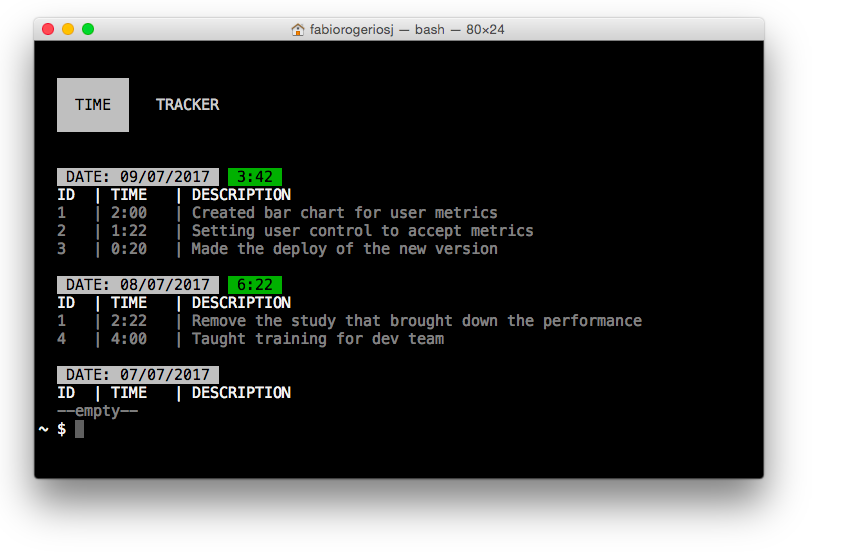
By default the timet lists the last 3 days of registration:
timet
You can list more days by entering the number of days to be listed:
timet 7
Or you can filter the result by passing two parameters with the start date and fnial date:
timet 2/20/2017 3/20/2017
Note: The format of the date you are going to inform will depend on the first setup you performed and configured, if you want to change the default settings, edit the timet.json file.
You can generate an output in the txt file by passing the --report parameter:
timet 2/20/2017 3/20/2017 --report
Remove register
To remove a register you need to enter the date and the register id:
timet remove 4/7/2017 7
Integrations
Integrations are ideas for when you are recording a new note Time Tracker makes a launch in your management and project tool.
See the implemented tools and the configuration parameters:
| Jira: | timet --jira-login username:password --jira-host myjira.atlassian.net |
| For each record that has been entered the ticket ID will be registered in Jira as WorkLog:
timet 1h Created a new action #PROJ-1021 |
| Trello: | timet --trello-key c478221b668 --trello-token 6a436593335320b048d2 |
| For each record that has been entered the ID of the card will be recorded in Trello as a WorkLog comment:
timet 1h Created a new action #Rp08U2wO
For use integration with Trello you need generate a token and get your key for your user in: https://trello.com/app-key |
Do you have suggestions for improvements?
We can not lose the focus that is to have a super simple and functional tool to record working hours in the terminal, if you have any idea of improvements that is in accordance with this directive open an issue and we will discuss about :)
License
MIT





