Translate 

Helps you to translate text from messages object. Allows you to format numbers, dates,
interpolate text to string templates, default text as key, scoping translations,
putting it to React Redux application with Provider and decorator (same pattern as Redux is using).
Also it supports connection to translation server
with possibility to download translation on both server and browser side.
Freeze translations with releases created in translation server.
Also there is possibility of live updates of translations via Server Side Events.
yarn add ts-translate
Vanilla JS usage
import { fromJS } from 'immutable';
import { Translator } from 'ts-translate';
const translator = new Translator({
messages: fromJS({
en: {
foo: 'bar',
bar: {
foo: 'FooBar'
'Some Headline': 'Super Headline'
}
}
}),
locale: 'en'
});
translator.text('foo')
translator.msg('foo')
translator.msg('foo', { scope: 'bar' })
translator.msg('Some headline')
translator.msg('Some headline', { scope: 'bar' })
translator.hasMsg('foo')
translator.hasMsg('Some headline')
translator.msg('Not found text', { disableDefault: true })
translator.formatNumber(123456.78)
translator.formatNumber(123456.78, {precision: 1})
translator.formatNumber(123456.78, {precision: 0})
translator.formatNumber(123456.78, {delimiter: '.', separator: ','})
translator.formatNumber(123456.78, {template: '%n %u', unit: '%'})
translator.formatNumber(123456.78, {template: '%n $'})
translator.formatCurrency(123456.78, {unit: '€'})
translator.formatPercentage(123456.78)
translator.formatDate(new Date, 'M.D. YYYY')
translator.formatDate(new Date, 'short')
Msg & Cnt
msg() is returning by default React component which has set toString() set to return translated result so msg() will work correctly in <input placeholder={msg('placeholder')} />. cnt() is alias for msg() (deprecated).
if you need to return only translated result use text().
Interpolation
You can easily interpolate your translations with variables that will be evaluated during the execution of code and inserted into resulting strings.
{
  messages: fromJS({
    'This is value of %{key}: %{value}': 'Este es el valor de %{key}: %{value}',
    noninterpolatedKey: 'You have %{count} unread messages',
    deeper: {
      scopedKey: 'This is scoped and shows %{foo}',
    }
  })
}
Usage:
msg('This is value of %{key}: %{value}', { key: 'foo', value: 'bar' })
msg('noninterpolatedKey', { count: 42 })
msg('No need for translation to %{action} %{what}', { action: 'show', what: 'that' })
msg('scopedKey', { scope: 'deeper', foo: 'BAR!' })
Formats Spefication
you can modify default formatting options by specifying:
{
messages fromJS({
en: {
formats: {
date: {
default: {
format: 'D.M.YYYY',
},
shortTime: {
format: 'H:m'
},
long: {
format: 'D.M.YY H:m:s'
}
},
number: {
default: {
precision: 2
},
currency: {
unit: '€'
},
percentage: {
template: '%n %'
},
custom: {
precision: 3
}
}
}
}
})
}
this will enable you to use:
translator.formatNumber(123456.78)
translator.formatNumber(123456.78, 'currency')
translator.formatCurrency(123456.78)
translator.formatPercentage(123456.78)
translator.formatDate(new Date, 'shortTime')
translator.formatDate(new Date, 'long')
translator.formatNumber(123456.78, { precision: 1, separator: ',', delimiter: '' })
All number formatting options:
{
precision: 10,
delimiter: ',',
format: defaultDateFormat,
separator: '.',
template: '%n %u',
unit: '',
trimTrailingZeros: true,
}
React + Redux
import { Provider as TranslateProvider, translate, reducer, changeLocale } from 'ts-translate';
import { fromJS } from 'immutable'
import { createStore, combineReducers } from 'redux';
import { Provider as ReduxProvider } from 'react-redux';
const initial = {
messages: fromJS({
cs: { home: { description: 'Foo', fallback: 'Fallback' } },
en: { home: { description: 'enFoo', about: 'Bar' } }
}),
locale: 'cs',
fallbackLocale: 'en'
};
const store = createStore(combineReducers({ translate: reducer }), { translate: initial});
class MyComponent extends React.Component {
render() {
const { msg } = this.props;
return (<div>{msg('Something nice')}</div>);
}
}
const TranslatedMyComponent = translate()(MyComponent);
const TranslatedScopedMyComponent = translate('home')(MyComponent);
store.dispatch(changeLocale('en'));
<ReduxProvider store={store} >
<TranslateProvider>
<TranslatedMyComponent /> // will look for key 'Something nice' in root of locale messages
<TranslatedScopedMyComponent /> // will look for key 'Something nice' in `home` scope of locale messages
</TranslateProvider>
</ReduxProvider>
Translation server
Enable application to send and receive translations from Translation server.
- apiUrl - url to translation server
- apiToken - project token is needed for enabling synchronization
- sync - enable synchronization of translations (remembers translations, sends them to server and receives translations back)
- liveSync - enable Server Side Events for instant refresh of translations directly after update in translation server
- releasesDir - directory to store releases (needed for releases workflow)
Task for communicating with Translation server
Enables you to list and download releases to your project.
yarn translate-list // List all created releases
yarn translate-fetch // Download one specified release (for locale) to specified folder
yarn translate-fetch-latest-releases // Download all latest releases for all locales
Both commands supports taking apiToken and apiUrl from ENV variables (TRANSLATE_API_TOKEN, TRANSLATE_API_URL) or command line (--apiToken, --apiUrl) arguments.
Fetch commands also needs --releasesDir option for specifiyng where to save downloaded releases.
Passing config to Provider
import { Provider as TranslateProvider } from 'ts-translate';
const config = {
apiUrl: 'https://translations.blueberry.io',
apiToken: 'XYZ',
sync: true,
liveSync: true
}
<TranslateProvider config={config}>
</TranslateProvider>
How to locate translations on different pages
You need to pass pathname or history object to TranslateProvider
<TranslateProvider config={config} pathname="/some/path">
</TranslateProvider>
import createHistory from 'history/createBrowserHistory';
const history = createHistory();

<TranslateProvider config={config} history={history}>
  // ...
</TranslateProvider>
In App editor
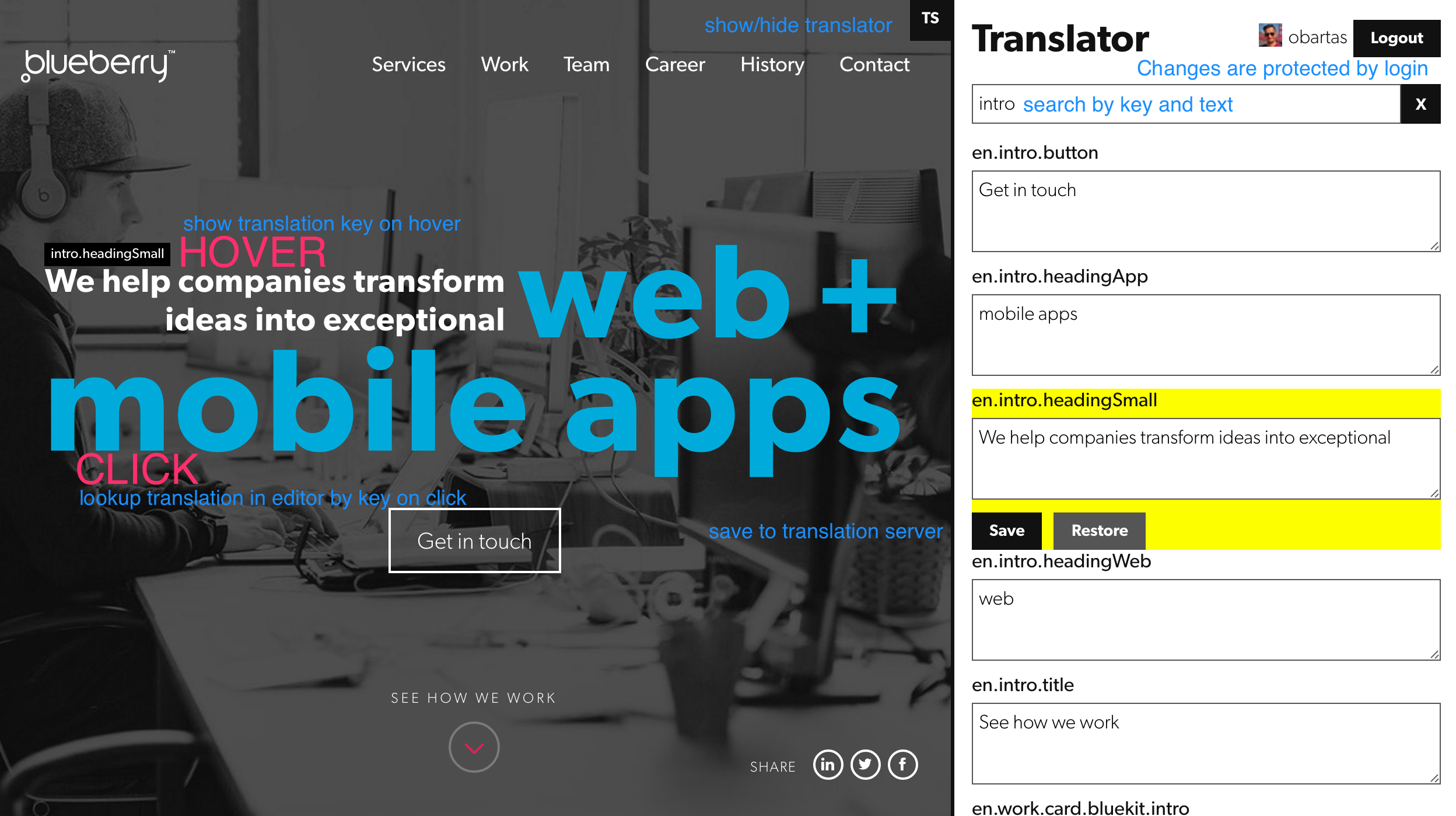
Just add new wrapper TranslateEditor around your code. This Editor must be under TranslateProvider context
import TranslateEditor from 'ts-translate/lib/editor';

<TranslateProvider config={config} pathname="/some/path">
  <TranslateEditor pathname="/some/path">
    // ...
  </TranslateEditor>
</TranslateProvider>
same rule for pathname and history as for TranslateProvider applies for TranslateEditor.
for disabling whole editor functionality (for example in production) set ENV variable TRANSLATE_DISABLE_EDITOR=t.
When you are using webpack don't forget to add this to DefinePlugin
as new webpack.DefinePlugin({ 'process.env.TRANSLATE_DISABLE_EDITOR': true }).
Also if you are using minifier the whole code gets removed by death code removal.
So it is pretty easy to use this editor in development and stage,
but it will not increase size in production build.
On server side preload latest translations from TS
import { fetchTranslations } from 'ts-translates';

fetchTranslations(config)(dispatch);
Made with love by






