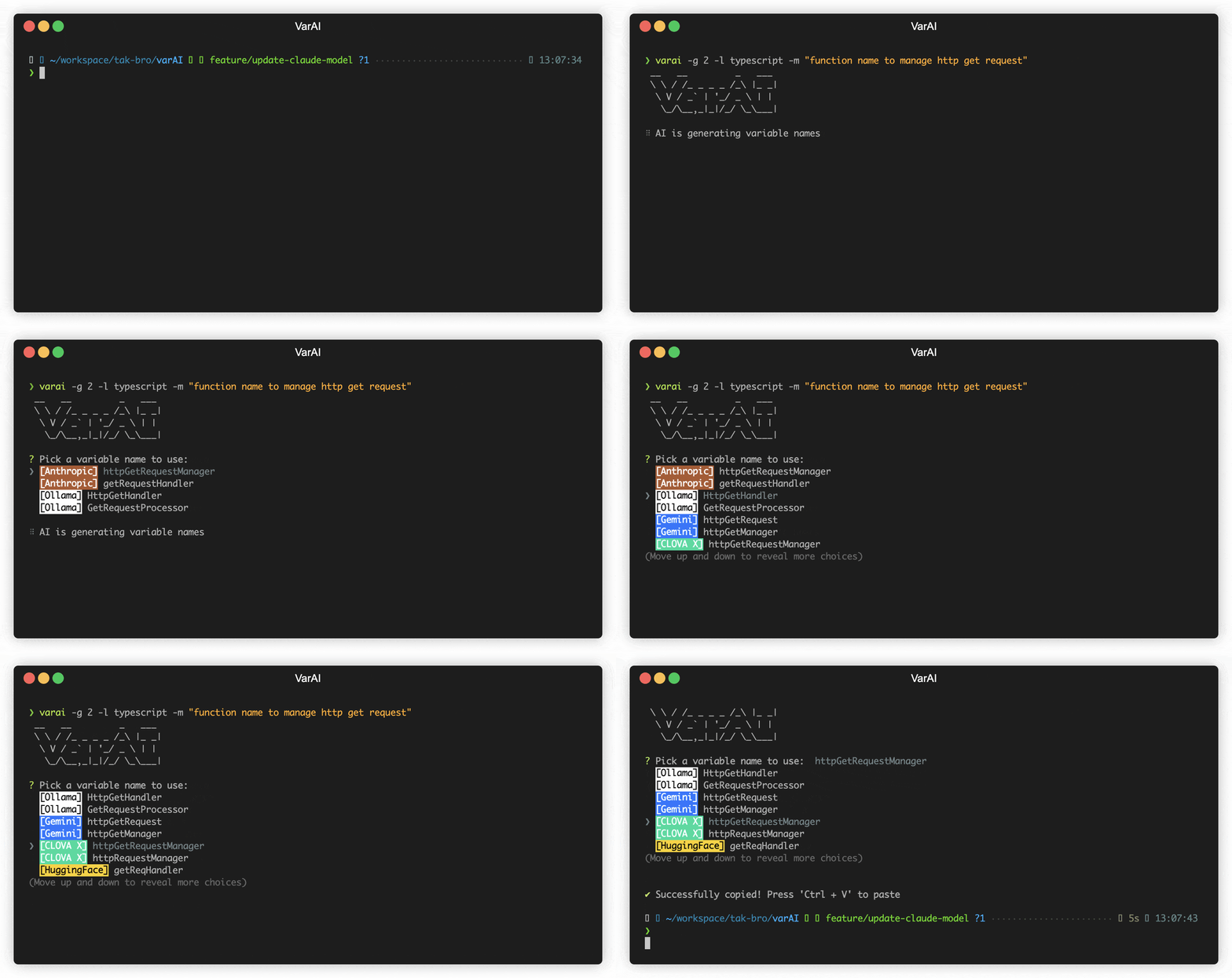
VarAI
An AI-powered tool that recommends variable names with Ollama, ChatGPT, Gemini, Claude, Mistral and other AI
Introduction
VarAI is a cutting-edge command-line tool that leverages diverse AI techniques to provide tailored recommendations for variable names in your projects.
Unlock the power of AI to streamline your coding process and effortlessly craft meaningful variable names, tailored to your needs.
Supported Providers
Remote
Local
Setup
The minimum supported version of Node.js is the v18. Check your Node.js version with node --version.
npm install -g varai
- Retrieve and set API keys or Cookie you intend to use:
It is not necessary to set all keys. But at least one key must be set up.
You may need to create an account and set up billing.
varai config set OPENAI_KEY=<your key>
varai config set ANTHROPIC_KEY=<your key>
varai config set GEMINI_KEY=<your key>
varai config set MISTRAL_KEY=<your key>
# Please be cautious of Escape characters(\", \') in browser cookie string
varai config set HUGGING_COOKIE="<your browser cookie>"
# Please be cautious of Escape characters(\", \') in browser cookie string
varai config set CLOVAX_COOKIE="<your browser cookie>"
This will create a .varai file in your home directory.
- Run VarAI with your staged in git repository:
varai -m "this class is for generating variable names"
Using Locally
You can also use your model for free with Ollama and is available to use both Ollama and remote providers simultaneously.
ollama run llama3 # model you want use. ex) codellama, deepseek-coder
varai config set OLLAMA_MODEL=<your model>
varai config set OLLAMA_HOST=<host>
varai config set OLLAMA_TIMEOUT=<timout>
If you want to use ollama, you must set OLLAMA_MODEL.
- Run VarAI with your staged in git repository
varai -m "this class is managing session"
Usage
CLI mode
You can call varai directly to generate a variable name for your message:
varai -m "class names for managing session"
CLI Options
--message or -m
- Message that represents the user's request or instruction to your AI (Required)
varai --message "Please generate some class names for managing session"
--language or -l
- Code Language to use for the generated variables
varai --language <s>
--generate or -g
- Number of messages to generate (Warning: generating multiple costs more) (default: 3)
varai --generate <i>
Warning: this uses more tokens, meaning it costs more.
--prompt or -p
- Additional prompt to let users fine-tune provided prompt
varai --prompt <s>
--clipboard or -c
- Copy the selected variable name to the clipboard (default: true)
varai --clipboard=false
Configuration
Reading a configuration value
To retrieve a configuration option, use the command:
varai config get <key>
For example, to retrieve the API key, you can use:
varai config get OPENAI_KEY
You can also retrieve multiple configuration options at once by separating them with spaces:
varai config get OPENAI_KEY OPENAI_MODEL GEMINI_KEY
Setting a configuration value
To set a configuration option, use the command:
varai config set <key>=<value>
For example, to set the API key, you can use:
varai config set OPENAI_KEY=<your-api-key>
You can also set multiple configuration options at once by separating them with spaces, like
varai config set OPENAI_KEY=<your-api-key> generate=3 language=C++
Options
OPENAI_KEY | N/A | The OpenAI API key |
OPENAI_MODEL | gpt-3.5-turbo | The OpenAI Model to use |
OPENAI_URL | https://api.openai.com | The OpenAI URL |
OPENAI_PATH | /v1/chat/completions | The OpenAI request pathname |
ANTHROPIC_KEY | N/A | The Anthropic API key |
ANTHROPIC_MODEL | claude-3-haiku-20240307 | The Anthropic Model to use |
GEMINI_KEY | N/A | The Gemini API key |
GEMINI_MODEL | gemini-1.5-flash-latest | The Gemini Model |
MISTRAL_KEY | N/A | The Mistral API key |
MISTRAL_MODEL | mistral-tiny | The Mistral Model to use |
HUGGING_COOKIE | N/A | The HuggingFace Cookie string |
HUGGING_MODEL | mistralai/Mixtral-8x7B-Instruct-v0.1 | The HuggingFace Model to use |
CLOVAX_COOKIE | N/A | The Clova X Cookie string |
OLLAMA_MODEL | N/A | The Ollama Model. It should be downloaded your local |
OLLAMA_HOST | http://localhost:11434 | The Ollama Host |
OLLAMA_TIMEOUT | 100000 ms | Request timeout for the Ollama |
OLLAMA_STREAM | N/A | Whether to make stream requests (experimental feature) |
language | N/A | Code Language to use for the generated variables |
generate | 3 | Number of variable names to generate |
proxy | N/A | Set a HTTP/HTTPS proxy to use for requests(only OpenAI) |
timeout | 10000 ms | Network request timeout |
max-length | 15 | Maximum character length of the generated variable names |
max-tokens | 200 | The maximum number of tokens that the AI models can generate (for Open AI, Anthropic, Gemini, Mistral) |
temperature | 0.7 | The temperature (0.0-2.0) is used to control the randomness of the output (for Open AI, Anthropic, Gemini, Mistral) |
prompt | N/A | Additional prompt to let users fine-tune provided prompt |
logging | false | Whether to log AI reponses for debugging (true or false) |
Currently, options are set universally. However, there are plans to develop the ability to set individual options in the future.
Available Options by Model
| OpenAI | ✓ | ✓ | ✓ | ✓ | ✓ | ✓ | ✓ | ✓ |
| Anthropic Claude | ✓ | ✓ | | | ✓ | ✓ | ✓ | ✓ |
| Gemini | ✓ | ✓ | | | ✓ | ✓ | ✓ | ✓ |
| Mistral AI | ✓ | ✓ | | ✓ | ✓ | ✓ | ✓ | ✓ |
| Huggingface | ✓ | ✓ | | ✓ | ✓ | | | ✓ |
| Clova X | ✓ | ✓ | | ✓ | ✓ | | | ✓ |
| Ollama | ✓ | ✓ | | ⚠
(OLLAMA_TIMEOUT) | ✓ | | ✓ | ✓ |
Common Options
language
Code Language to use for the generated variables. (ex. typescript, c++)
generate
Default: 3
The number of variable names to generate to pick from.
Note, this will use more tokens as it generates more results.
proxy
Set a HTTP/HTTPS proxy to use for requests.
To clear the proxy option, you can use the command (note the empty value after the equals sign):
Only supported within the OpenAI
varai config set proxy=
timeout
The timeout for network requests to the OpenAI API in milliseconds.
Default: 10000 (10 seconds)
varai config set timeout=20000
max-length
The maximum character length of the generated variable names.
Default: 15
varai config set max-length=30
max-tokens
The maximum number of tokens that the AI models can generate.
Default: 200
varai config set max-tokens=1000
temperature
The temperature (0.0-2.0) is used to control the randomness of the output
Default: 0.7
varai config set temperature=0
prompt
Additional prompt to let users fine-tune provided prompt. Users provide extra instructions to AI and can guide how variable names should look like.
varai config set prompt="Do not mention config changes"
logging
Default: false
Option that allows users to decide whether to generate a log file capturing the responses.
The log files will be stored in the ~/.varai_log directory(user's home).

OPEN AI
OPENAI_KEY
The OpenAI API key. You can retrieve it from OpenAI API Keys page.
OPENAI_MODEL
Default: gpt-3.5-turbo
The Chat Completions (/v1/chat/completions) model to use. Consult the list of models available in the OpenAI Documentation.
Tip: If you have access, try upgrading to gpt-4 for next-level code analysis. It can handle double the input size, but comes at a higher cost. Check out OpenAI's website to learn more.
varai config set OPENAI_MODEL=gpt-4
OPENAI_URL
Default: https://api.openai.com
The OpenAI URL. Both https and http protocols supported. It allows to run local OpenAI-compatible server.
OPENAI_PATH
Default: /v1/chat/completions
The OpenAI Path.
Anthropic Claude
ANTHROPIC_KEY
The Anthropic API key. To get started with Anthropic Claude, request access to their API at anthropic.com/earlyaccess.
ANTHROPIC_MODEL
Default: claude-3-haiku-20240307
Supported:
claude-3-haiku-20240307claude-3-sonnet-20240229claude-3-opus-20240229claude-2.1claude-2.0claude-instant-1.2
varai config set ANTHROPIC_MODEL=claude-instant-1.2
GEMINI
GEMINI_KEY
The Gemini API key. If you don't have one, create a key in Google AI Studio.
GEMINI_MODEL
Default: gemini-1.5-flash-latest
Supported:
gemini-1.5-flash-latestgemini-pro
The models mentioned above are subject to change.
MISTRAL
MISTRAL_KEY
The Mistral API key. If you don't have one, please sign up and subscribe in Mistral Console.
MISTRAL_MODEL
Default: mistral-tiny
Supported:
open-mistral-7bmistral-tiny-2312mistral-tinyopen-mixtral-8x7bmistral-small-2312mistral-smallmistral-small-2402mistral-small-latestmistral-medium-latestmistral-medium-2312mistral-mediummistral-large-latestmistral-large-2402mistral-embed
The models mentioned above are subject to change.
HuggingFace Chat
HUGGING_COOKIE
The Huggingface Chat Cookie. Please check how to get cookie
HUGGING_MODEL
Default: mistralai/Mixtral-8x7B-Instruct-v0.1
Supported:
CohereForAI/c4ai-command-r-plusmeta-llama/Meta-Llama-3-70B-InstructHuggingFaceH4/zephyr-orpo-141b-A35b-v0.1mistralai/Mixtral-8x7B-Instruct-v0.1NousResearch/Nous-Hermes-2-Mixtral-8x7B-DPOgoogle/gemma-1.1-7b-itmistralai/Mistral-7B-Instruct-v0.2microsoft/Phi-3-mini-4k-instruct
The models mentioned above are subject to change.
Clova X
CLOVAX_COOKIE
The Clova X Cookie. Please check how to get cookie
Ollama
OLLAMA_MODEL
The Ollama Model. Please see a list of models available
OLLAMA_HOST
Default: http://localhost:11434
The Ollama host
OLLAMA_TIMEOUT
Default: 100000 (100 seconds)
Request timeout for the Ollama. Default OLLAMA_TIMEOUT is 100 seconds because it can take a long time to run locally.
OLLAMA_STREAM
Default: false
Determines whether the application will make stream requests to Ollama. This feature is experimental and may not be fully stable.
Upgrading
Check the installed version with:
varai --version
If it's not the latest version, run:
npm update -g varai
How to get Cookie(Unofficial API)
- Login to the site you want
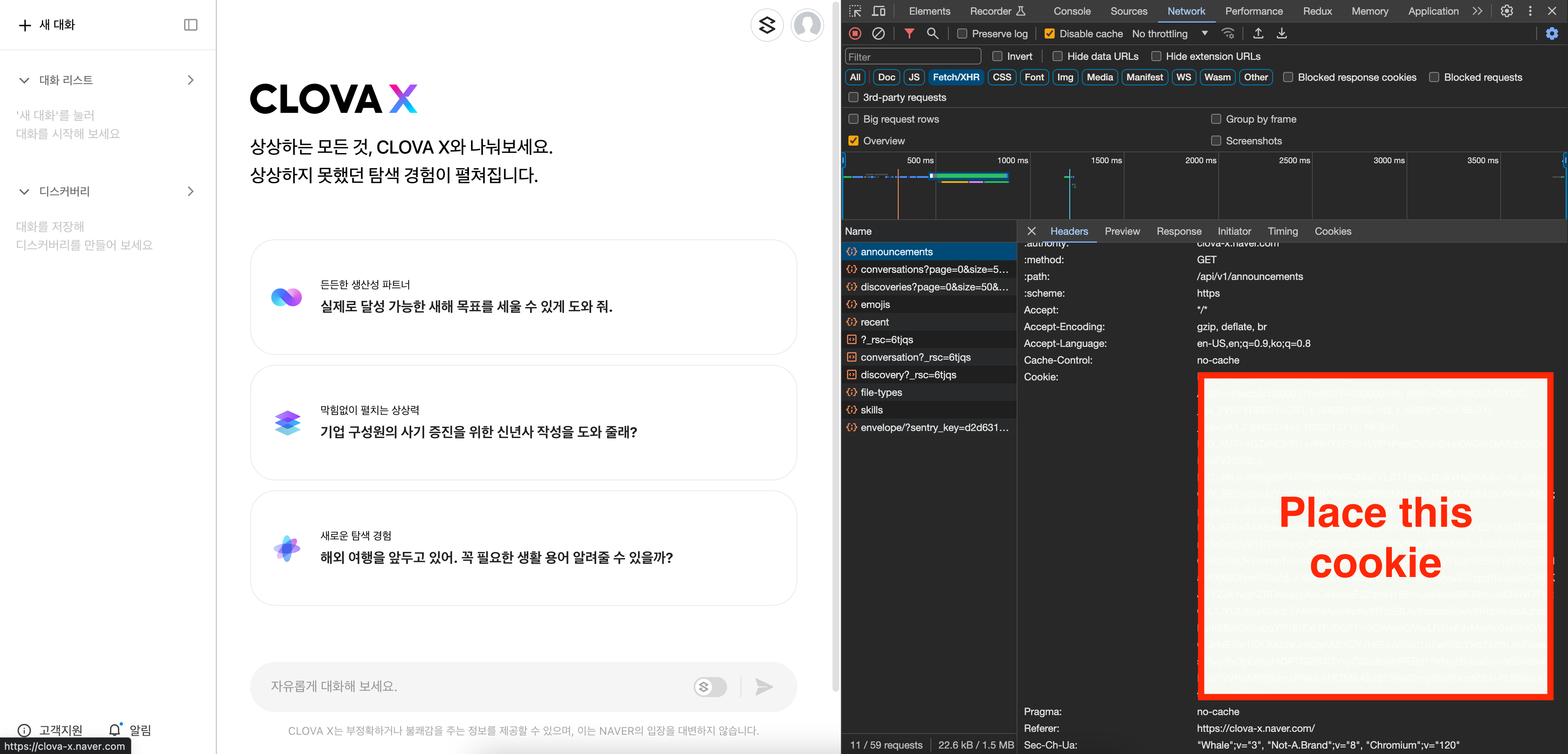
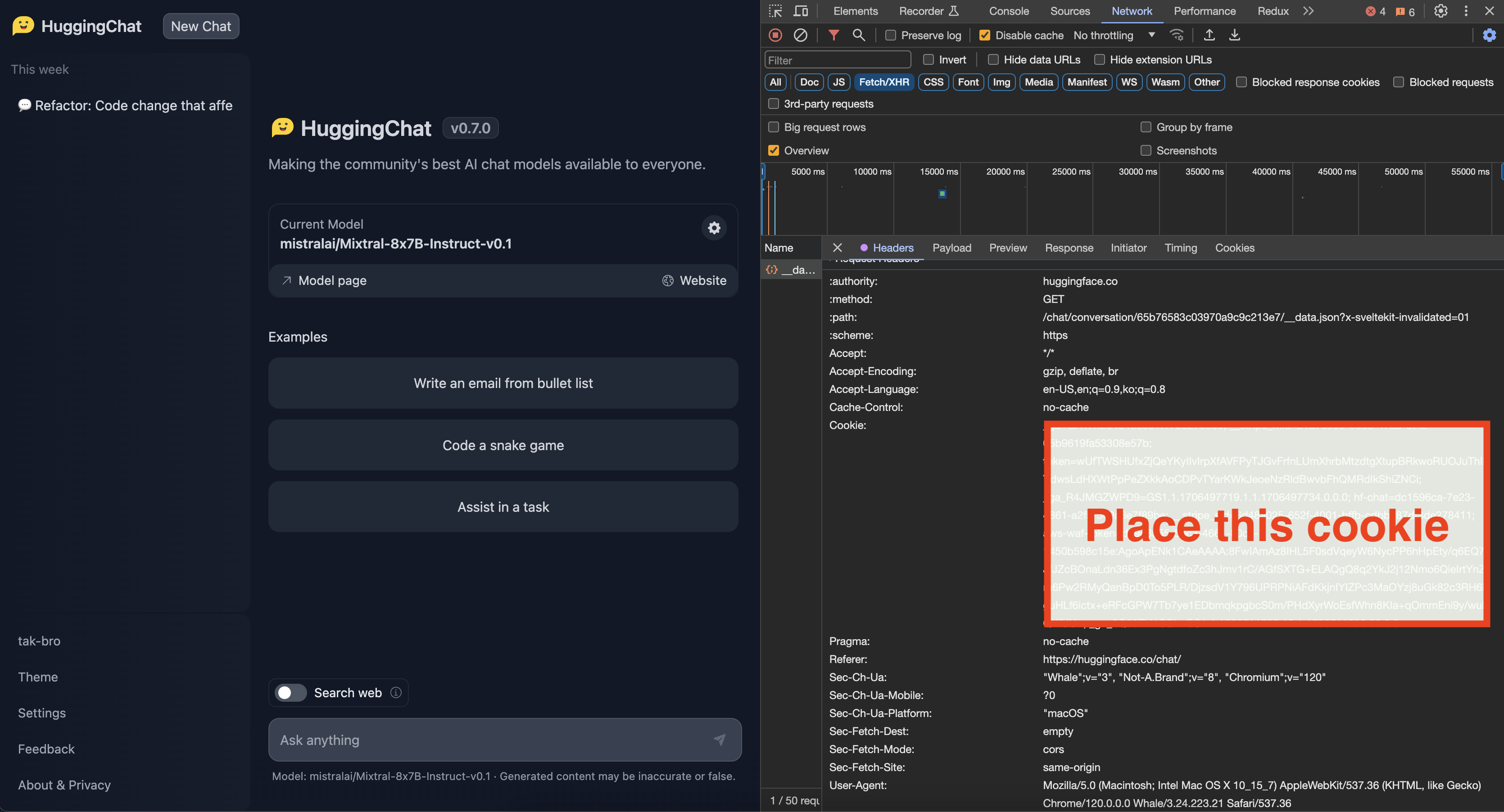
- You can get cookie from the browser's developer tools network tab
- See for any requests check out the Cookie, Copy whole value
- Check below image for the format of cookie
When setting cookies with long string values, ensure to escape characters like ", ', and others properly.
- For double quotes ("), use \"
- For single quotes ('), use \'
Disclaimer
This project utilizes certain functionalities or data from external APIs, but it is important to note that it is not officially affiliated with or endorsed by the providers of those APIs. The use of external APIs is at the sole discretion and risk of the user.
Risk Acknowledgment
Users are responsible for understanding and abiding by the terms of use, rate limits, and policies set forth by the respective API providers. The project maintainers cannot be held responsible for any misuse, downtime, or issues arising from the use of the external APIs.
It is recommended that users thoroughly review the API documentation and adhere to best practices to ensure a positive and compliant experience.
Please Star ⭐️
If this project has been helpful to you, I would greatly appreciate it if you could click the Star⭐️ button on this repository!
Maintainers
Contributing
If you want to help fix a bug or implement a feature in Issues, checkout the Contribution Guide to learn how to setup and test the project.






