
VueDraggableResizable 2



前言
- 说明:组件基于[vue-draggable-resizable] 进行二次开发
- 想要做的修改
起初最先开始,是希望用html5 draggable 属性,配合其相应的drag 事件,进行拖动缩放。避免在document监听mousemove 事件。
但是,实际上,drag 拖动中,实际去改变元素位置, 停止拖放后,浏览器默认有个复位操作,没有找到好的办法解决。用个透明图片取代,还是感觉贼难受
元素选中,
取消选中,用tab-index ,配合事件blur
对齐,需要增加对齐线,和中心对齐…
- 把position:x y z ,dimension:w h,组件状态status:active draggable resizable 作为一个对象传递,对象被引用的数组想一起改变。
- dimension 大小限制:minWidth maxWidth minHeight maxHeight ,默认0,不限制
- scaleRatio 缩放比例,默认为0
- lockAspectRatio宽高比锁定, 默认为false ,
- axis 限制拖动方向, 默认'',取值为:['x', 'y', ''].
- grid 网格,默认[0, 0]
具体查看下props.js
原有代码一千多行,还刚开始看,就有了动手撸一把的冲动,也就重新造了一遍轮子。
代码保留了多个版本,基础拖动版本,增加缩放版本,增加网格对齐版本,用draggable 实现的版本,任君选择
代码更新较慢,未完之处,敬请等待
————————————————————————————
gorkys 版本保留部分 https://github.com/gorkys/vue-draggable-resizable-gorkys.git
距离上1.7版本版本的修改已经过去快一年的时间了,原版组件在之前已经更新到了2.0版本。
虽然之前适配过旧版组件,但是因为2.0版本原作者对代码进行了重构,原来修改的代码照搬是不可能的了。
所以也就一直没有将冲突检测以及吸附对齐功能适配到2.0版本,最近正好有时间就适配一下。
新增特征
功能预览
英文版演示地址 | 中文版演示地址
注意:英文版为官方原版,没有新增功能的演示。中文版为google翻译版本,新增功能在**高级**目录下可查看
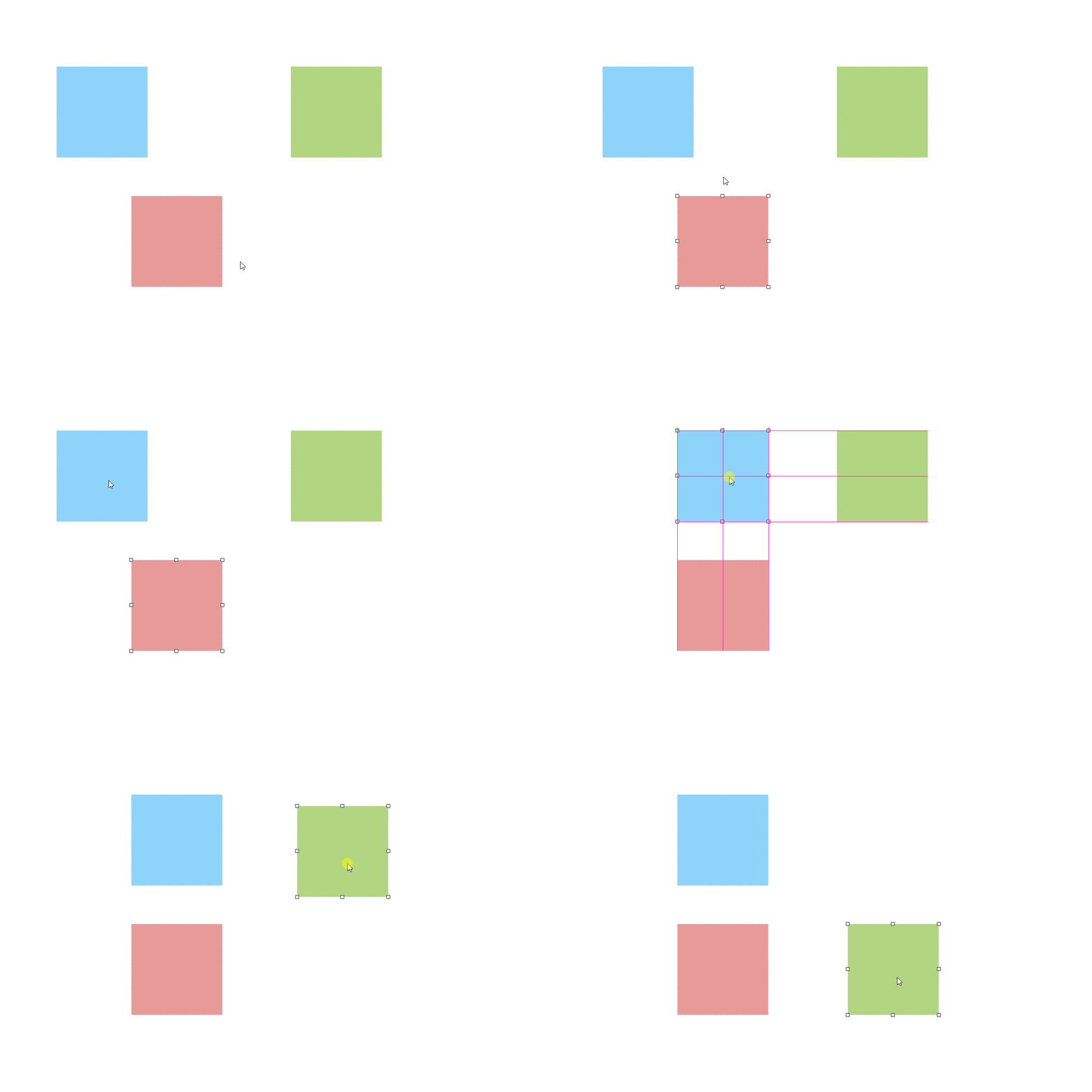
新增Props
scaleRatio
类型: Number
必需: false
默认: 1
当使用transform:scale()进行缩放操作后,用来修复操作组件时鼠标指针与移动缩放位置有所偏移的情况
详见:Issues
<vue-draggable-resizable :scale-ratio="0.6">
isConflictCheck
类型: Boolean
必需: false
默认: false
定义组件是否开启冲突检测。
<vue-draggable-resizable :is-conflict-check="true">
snap
类型: Boolean
必需: false
默认: false
定义组件是否开启元素对齐。
<vue-draggable-resizable :snap="true">
snapTolerance
类型: Number
必需: false
默认: 5
当调用snap时,定义组件与元素之间的对齐距离,以像素(px)为单位。
<vue-draggable-resizable :snap="true" :snap-tolerance="20">
其它属性
英文版 | 中文版
注意:英文版为官方原版,中文版为google翻译版本
安装使用
$ npm install --save vue-draggable-resizable-gorkys
全局注册组件
import Vue from 'vue'
import vdr from 'vue-draggable-resizable-gorkys'
import 'vue-draggable-resizable-gorkys/dist/VueDraggableResizable.css'
Vue.component('vdr', vdr)
局部注册组件
<template>
  <div style="height: 500px; width: 500px; border: 1px solid red; position: relative;">
    <vdr :w="100" :h="100" v-on:dragging="onDrag" v-on:resizing="onResize" :parent="true">
      <p>Hello! I'm a flexible component. You can drag me around and you can resize me.<br>
      X: {{ x }} / Y: {{ y }} - Width: {{ width }} / Height: {{ height }}</p>
    </vdr>
    <vdr
      :w="200"
      :h="200"
      :parent="true"
      :debug="false"
      :min-width="200"
      :min-height="200"
      :isConflictCheck="true"
      :snap="true"
      :snapTolerance="20"
    >
    </vdr>
  </div>
</template>

<script>
import vdr from 'vue-draggable-resizable-gorkys'
import 'vue-draggable-resizable-gorkys/dist/VueDraggableResizable.css'
export default {
  components: {vdr},
  data: function () {
    return {
      width: 0,
      height: 0,
      x: 0,
      y: 0
    }
  },
  methods: {
    onResize: function (x, y, width, height) {
      this.x = x
      this.y = y
      this.width = width
      this.height = height
    },
    onDrag: function (x, y) {
      this.x = x
      this.y = y
    }
  }
}
</script>
License
The MIT License (MIT). Please see License File for more information.





