WarpField



Portal-casting field-of-view algorithm
See the demo
This is an extension to the simpler WallyFOV shadow-casting algorithm.
Installation
npm install warp-field
Usage
Create a map:
const WarpField = require('warp-field');

const width = 5;
const height = 5;
const map1 = new WarpField.FieldOfViewMap('map1', width, height);
Add some walls and bodies:
map1.addWall(3, 2, WarpField.CardinalDirection.NORTH);
map1.addWall(3, 1, WarpField.CardinalDirection.WEST);
map1.addWall(3, 2, WarpField.CardinalDirection.SOUTH);
map1.addBody(4, 2);
Create another map:
const width = 5;
const height = 5;
const map2 = new WarpField.FieldOfViewMap('map2', width, height);
map2.addWall(3, 2, WarpField.CardinalDirection.SOUTH);
map2.addBody(2, 4);
Add a warp from one map to the other:
map1.addWarp(3, 2, WarpField.CardinalDirection.EAST, map2, 1, 2);
Compute the field of view:
const playerX = 2;
const playerY = 2;
const visionRadius = 2;
const fov = WarpField.computeFieldOfView(fovMap, playerX, playerY, visionRadius);
See which tiles are visible:
fov.getVisible(2, 0);
fov.getVisible(1, -1);
Locate each visible tile:
fov.getTargetMap(1, 0);
fov.getTargetOffset(1, 0);
fov.getTargetMap(2, 0);
fov.getTargetOffset(2, 0);
Upgrading to version 2
Some API changes were made for version 2, here's what you need to do to upgrade:
- The
Direction enumeration has been renamed to CardinalDirection
- Instead of calling
fovMap.getFieldOfView(x, y, radius), call WarpField.computeFieldOfView(fovMap, x, y, radius)
- Instead of calling
fov.get(x, y), call fov.getVisible(dx, dy)
- IMPORTANT:
getVisible() takes coordinates relative to the player's position - not absolute map coordinates!
If you're using TypeScript, some of the type names have changed. For instance, the type for the field of view is now FieldOfView instead of MaskRectangle.
Details
WarpField works by scanning the four quadrants around the player, tracking the angles visible from the center of the player tile. A tile is considered visible if there exists an uninterrupted ray from the player center to any point in the tile. Bodies almost (but don't quite) fill the tile, to cover some conspicuous "corner" cases.
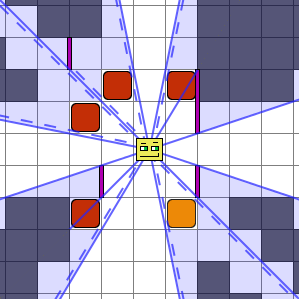
In this example image, the shaded tiles are not seen. Blue lines represent edges of the shadows at various stages of the algorithm. Dashed lines indicate where a shadow edge is very slightly shifted because it was created by a body.
WarpField also supports warps (a.k.a. portals) from one map to another:
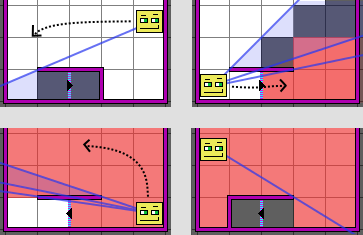
This is an example of a "staircase" portal scenario. The red shared areas indicate the "second floor". There is a portal leading from the first floor to the second. The player walks around the wall enclosing the staircase, and can see the second floor through the portal. Passing through the portal, the player looks around the wall again to find a different map.
For more information, see the Algorithm Overview.





