


Security News
The Hidden Blast Radius of the Axios Compromise
The Axios compromise shows how time-dependent dependency resolution makes exposure harder to detect and contain.
By Ahmad Nassri - Apr 01, 2026
webappengine
Advanced tools
A web application server that can host multiple web apps running with Node.js.



A web application server that can host multiple web apps running with Node.js.
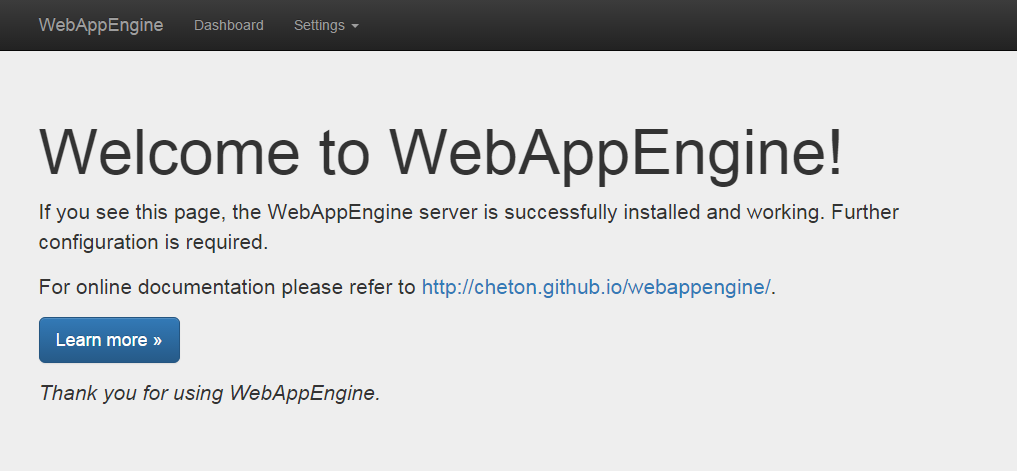 Note. The administration UI is currently under construction.
For the API usage:
$ npm install --save webappengine
For the command line usage:
$ npm install -g webappengine
A Yeoman generator for developing WebAppEngine app is available at https://github.com/cheton/generator-webappengine. You can use the generator to kickstart your project. It includes Gulp, Browserify, Babelify, Stylus, Handlebars, i18next, and React.
Follow the steps to run the generator:
$ npm install -g yo
$ npm install -g generator-webappengine
$ yo webappengine
Once completed, you have to install NPM packages and Bower components, and run the gulp command to build your project.
$ npm install
$ bower install
$ gulp
Now you can run node app/main.js to launch your web app, or use webappengine to load app.js. For example:
var path = require('path');
var webappengine = require('webappengine');

webappengine({
    port: 80,
    routes: [
        {
            type: 'server',
            route: '/',
            server: function(options) {
                options = options || {};

                var app = express();
                var serveStatic = require('serve-static');
                var assetPath = path.resolve(__dirname, 'web');

                app.use(options.route, serveStatic(assetPath));

                return app;
            }
        }
    ]
});
var path = require('path');
var webappengine = require('webappengine');
var options = {
    port: 80, // [optional] The listen port (default: 8000)
    //host: '', // [optional] The listen address or hostname (default: 0.0.0.0)
    //backlog: 511, // [optional] The listen backlog (default: 511)
    routes: [
        {
            type: 'static', // [static|server]
            route: '/',
            directory: path.resolve(__dirname, 'web') // for the static type
        }
    ]
};

webappengine(options)
    .on('ready', function(server) {
        var address = server.address();
        console.log('Server is listening on %s:%d', address.address, address.port);

        var io = require('socket.io')(server); // using socket.io
    })
    .on('error', function(err) {
        console.error('Error:', err);
    });
Run webappengine to start the app, and visit http://yourhostname:8000/ to check if it works:
$ webappengine
To check what port the app is running on, find the message Server is listening on 0.0.0.0:8000 from console output.
By default the app listens on port 8000, you can run webappengine with -p (or --port) to determine which port your application should listen on. For example:
$ webappengine -p 80
Set the environment variable NODE_ENV to production if you are running in production mode:
$ NODE_ENV=production webappengine
Run webappengine with -h for detailed usage:
$ webappengine -h

  Usage: webappengine [options]

  Options:

    -h, --help               output usage information
    -V, --version            output the version number
    -p, --port               set listen port (default: 8000)
    -H, --host <host>        set listen address or hostname (default: 0.0.0.0)
    -b, --backlog            set listen backlog (default: 511)
    -c, --config <filename>  set multihost configuration file
    -v, --verbose            increase the verbosity level
The following configuration will serve static assets from the directory:
static-config.json:
[
    {
        "type": "static",
        "route": "/",
        "directory": "/path/to/your/project/web/"
    }
]
Run webappengine with --config to set multihost configuration file:
$ webappengine --config "/path/to/your/project/static-config.json"
or use the API:
var webappengine = require('webappengine');
var routes = require('./static-config.json');

webappengine({
    routes: routes
});
Visits http://yourhostname:8000/ will serve index.html file as below:
<h1>WebAppEngine Test Page</h1>
(See also: examples/static/index.html)
First, checkout examples/simple/app.js and examples/multihost.json, and copy examples to your project folder to kickstart a web application.
simple/app.js:
var path = require('path'),
    express = require('express');

module.exports = function(options) {
    options = options || {};

    var app = express();
    var serveStatic = require('serve-static');
    var assetPath = path.resolve(__dirname, 'web');

    // Enable case sensitivity routing: "/Foo" is not equal to "/foo"
    app.enable('case sensitive routing');
    // Disable strict routing: "/foo" and "/foo/" are treated the same
    app.disable('strict routing');

    app.use(options.route, serveStatic(assetPath));

    return app;
};
server-config.json:
[
    {
        "type": "server",
        "route": "/simple",
        "server": "/path/to/your/project/simple/app"
    }
]
Run webappengine with --config to set multihost configuration file:
$ webappengine --config "/path/to/your/project/server-config.json"
or use the API:
var webappengine = require('webappengine');
var routes = require('./server-config.json');

webappengine({
    routes: routes
});
Visits http://yourhostname:8000/simple will serve index.html file as below:
<h1>WebAppEngine Test Page</h1>
(See also: examples/simple/web/index.html)
The administration UI is currently under construction.
TBD
You can change the display language from the Settings menu, it will set the lang query string parameter: ?lang={locale}
Here is a list of currently supported locales:
| Locale | Language |
|---|---|
| de | Deutsch |
| en | English (US) |
| es | Español |
| fr | Français |
| it | Italiano |
| ja | 日本語 |
| zh-cn | 中文 (简体) |
| zh-tw | 中文 (繁體) |
Copyright (c) 2015-2016 Cheton Wu
Licensed under the MIT License.
FAQs
A web application server that can host multiple web apps running with Node.js.
The npm package webappengine receives a total of 370 weekly downloads. As such, webappengine popularity was classified as not popular.
We found that webappengine demonstrated a not healthy version release cadence and project activity because the last version was released a year ago. It has 1 open source maintainer collaborating on the project.
Did you know?

Socket for GitHub automatically highlights issues in each pull request and monitors the health of all your open source dependencies. Discover the contents of your packages and block harmful activity before you install or update your dependencies.
Security News
The Axios compromise shows how time-dependent dependency resolution makes exposure harder to detect and contain.

Research
A supply chain attack on Axios introduced a malicious dependency, plain-crypto-js@4.2.1, published minutes earlier and absent from the project’s GitHub releases.

Research
Malicious versions of the Telnyx Python SDK on PyPI delivered credential-stealing malware via a multi-stage supply chain attack.