webflowAdapter
This adapter allows Webflow projects to use Statsig Feature Gates to control the user experience and run A/B tests.
https://github.com/statsig-io/webflowAdapter/assets/111380336/7332f46c-8591-417c-ada7-8a3fc6e48d36
Instructions
- Open Project Settings from the "W"/Hamburger menu on the top left of the designer.

- Choose Custom Code Tab and paste the following in there. Make sure to replace [CLIENT-SDK-KEY] with the right key that's available from your Statsig project settings.
<script src="https://cdn.jsdelivr.net/npm/webflow-statsig/dist/statsigWebflow.min.js?key=[CLIENT-SDK-KEY]"></script>
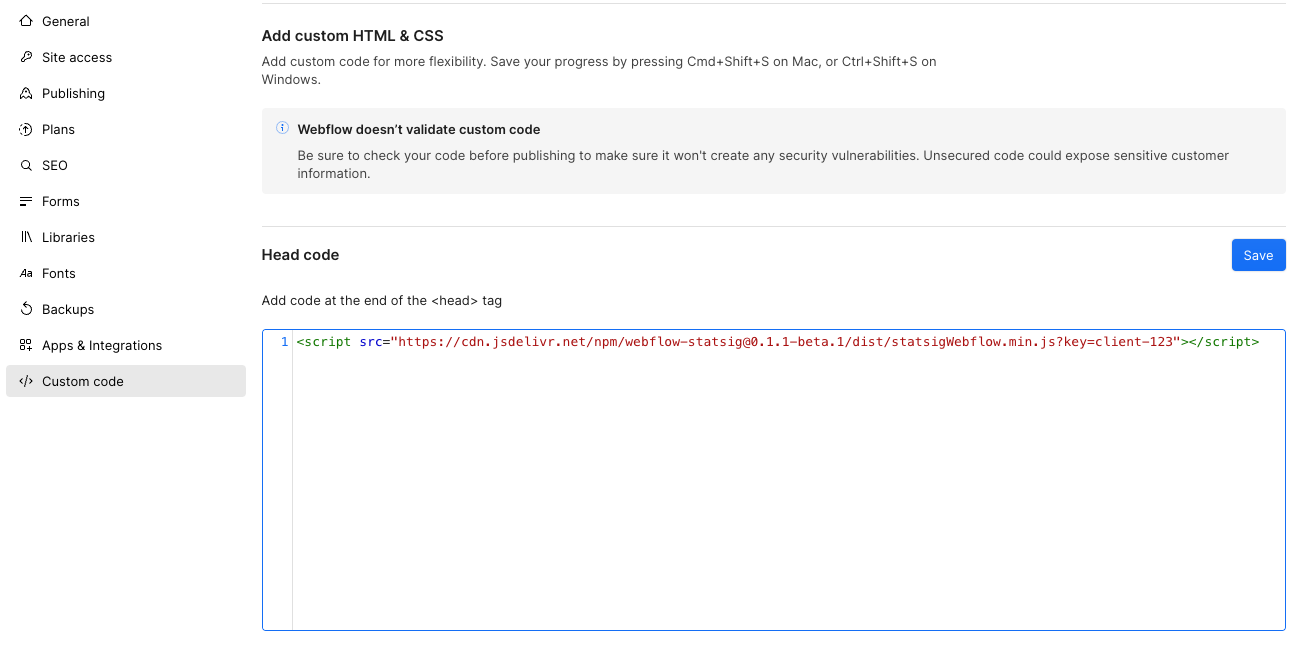
- In the designer where you want to test two different user experiences, insert a
Tabs component

- Select the newly inserted
Tabs component and in the Settings pane, add a Custom Attribute data-gateid and set the value to be the Feature Gate Id.
NOTE: Make sure you select the Tabs component, NOT the Tabs Menu or Tabs Content

- Hide the
Tabs Menu so it's not visible to the user
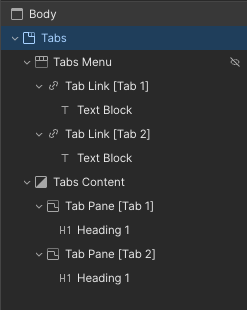
-
Now, add the controls in Tab 1 for the default experience (fails gate), and Tab 2 for the new experience (passes gate).
-
Publish and test the page! Changing the gate's targeting should be reflected in the experience when you refresh the page.
TIP: To properly run split assignments, make sure your Feature Gate uses Stable ID in order to treat your page visitors as unique users.






