wiscroll
Scroll based animation JavaScript library. Vanilla js, 0 dependencies. Lightweight: 2.37KB transpiled ES5 UMD version [CDN] (or 1.43KB ES6 Module version [CDN]) minified & gzipped. IntersectionObserver based. Performance driven. The library does not handle CSS, but examples with CSS will be put in the documentation. More documentation and demo are coming.
Installation
NPM install:
npm install wiscroll
Then, import the ES6 module:
import Wiscroll from 'wiscroll';
Another way to "install": <script>
OR, add the script file directly in your HTML file:
<script src="https://unpkg.com/wiscroll"></script>
Instantiation
new Wiscroll(target, root)
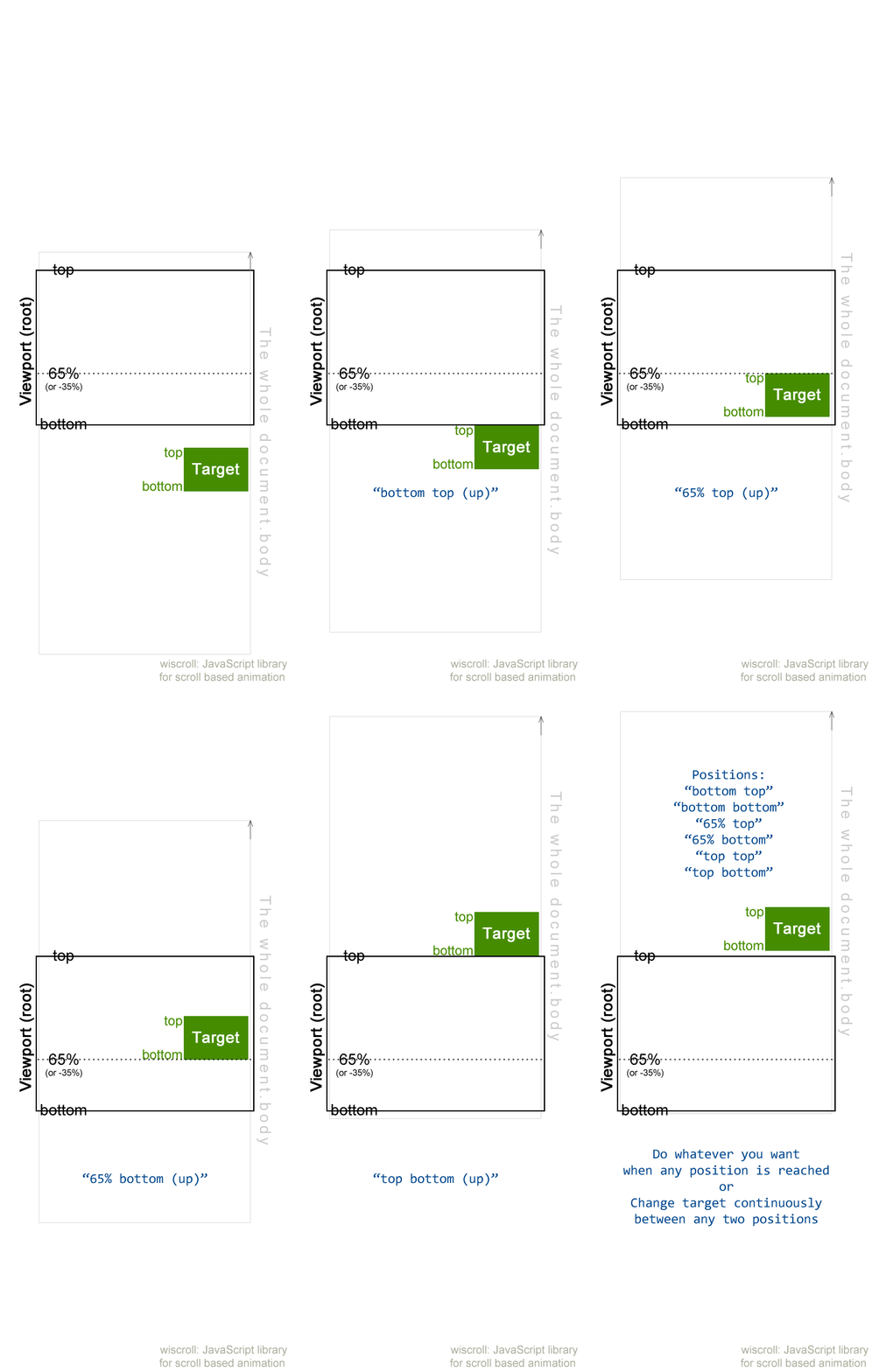
.on() : toggle class when one of target's borders passes one of root's borders/lines
If target's top border passes root's 90% (from top) line, add class name "active" to the target, remove the class when scrolling back:
const target = document.querySelector('.wiscroll');
new Wiscroll(target).on('90% top', 'active');
Syntax
.on('rootBorderPosition targetBorderPosition', 'classes', targetBorderIsHigher)
rootBorderPosition: specify a root border (or line), could be top, bottom, percentage number (e.g. 90%), pixel number (e.g. 40px), must be followed by % or px even if it's 0 (e.g. 0%), positive number is position from top, negative number is position from bottom (e.g. -10% : 10% from bottom)targetBorderPosition: specify a target border, could be top, bottomclasses: class name to toggle, could be one class or space-separated classestargetBorderIsHigher [optional]: add class(es) when the specified target border is (true: higher; false: lower) than the specified root border, otherwise remove class(es), default: true
.on() : do whatever you want when one of target's borders passes (or doesn't pass) one of root's borders/lines
If target's top border is higher than root's 90% (from top) line, show "Target border is higher" in console, otherwise show "Target border is lower":
new Wiscroll(target).on('90% top',
    function(entry) {
        console.log('Target border is higher');
    },
    function(entry) {
        console.log('Target border is lower');
    }
);
Syntax
.on('rootBorderPosition targetBorderPosition', functionWhenTargetHigher, functionWhenTargetLower)
rootBorderPosition: see abovetargetBorderPosition: see abovefunctionWhenTargetHigher: function to be executed when the specified target border is higher than the specified root border/linefunctionWhenTargetLower: function to be executed when the specified target border is lower than the specified root border/line
.on() : do whatever you want when target is entering (or leaving) one of root's borders/lines
When target's bottom border is touching (target is going into) root's 50% line, show "Target border is higher" in console:
new Wiscroll(target).on(
    '50% bottom in',
    function(entry) {
        console.log('Target border is passed');
    }
);
By the way, you might want to deal with initial states (when the page has just loaded and script has just been executed). Let's add a function to do something when my target border is higher (and lower) than my root's line:
new Wiscroll(target).on(
    '50% bottom in',
    function(entry) {
        console.log('Target border is passed');
    },
    function(targetBIsHigher, entry) {
        if (targetBIsHigher) {
            console.log('Init: target border is higher');
        } else {
            console.log('Init: target border is lower');
        }
    }
);
Syntax
.on('rootBorderPosition targetBorderPosition motionDirection', function, initFunction)
rootBorderPosition: see abovetargetBorderPosition: see abovemotionDirection: target's border's motion direction, could be:
in (target's border is touching (target is going into) root's line)out (target's border is touching (target is leaving/going out of) root's line)down (target's border is touching root's line, target is going down)up (target's border is touching root's line, target is going up)
function [optional]: function to be executed when the above position is reached, it receives a parameter entry which is an IntersectionObserverEntry objectinitFunction [optional]: function to be executed during the initial state (when the script has just been executed), it receives two parameters: targetBIsHigher boolean value and entry object
.init() : initialization
The initFunction mentioned above can be put into .init() method:
new Wiscroll(target).init(
    '50% bottom',
    function(targetBIsHigher, entry) {
        if (targetBIsHigher) {
            console.log('Init: target border is higher');
        } else {
            console.log('Init: target border is lower');
        }
    }
)
.on( ... );
Syntax
.init('rootBorderPosition targetBorderPosition', initFunction)
However, it is recommanded you use initFunction in .on() instead of .init() to have fewer observers.
.fromto() : change target dynamically depending on scroll position
You can change the target progressively and continuously, or do whatever you want dynamically depending on target's scroll position (a percentage) between the two positions you have specified:
new Wiscroll(target).fromto(
'-10% top',
'20% bottom',
function(position, entry) {
console.log(position);
},
{
init: function(position, entry) {
console.log('Init:' + position);
},
in: function(position, entry) {
console.log('In:' + position);
},
out: function(position, entry) {
console.log('Out:' + position);
},
delay: 150,
fromIsBelowTo: true
}
);
Syntax
.fromto(
    'rootBorderPositionFrom targetBorderPositionFrom',
    'rootBorderPositionTo targetBorderPositionTo',
    function,
    options
)
Basically, the target changes (scroll event is listened) only between position 0 (from) and position 1 (to).
rootBorderPositionFrom: specify a root border (or line) for position 0targetBorderPositionFrom: specify a target border for position 0rootBorderPositionTo: specify a root border (or line) for position 1targetBorderPositionTo: specify a target border for position 1function: function to be executed continuously when scrolling between position 0 and 1, it receives two parameters: position (from 0 to 1, it could be negative or greater than 1 if it's out of boundary) and entry objectoptions [optional]: object of options:
init: initial functionin: function to be executed when target is going into the area between position 0 and 1out: function to be executed when target is going out of the area between position 0 and 1 (note that because of throttling, out function could be executed before the last scroll function call)delay: throttling delay in milliseconds, the throttling is trailing and not leading, default: 150fromIsBelowTo: boolean, true means the target border in position 0 (from) is below position 1 (to), default: true
.cancel() : cancel all observers and listeners
new Wiscroll(target).cancel();
CSS transition and animation
The library does not handle CSS styles and animations due to separation of concerns, however, examples with CSS will be put in the documentation in the future.
If you have basic knowledge of CSS and its transition and animation modules, it's very easy to use this library to create awesome scroll based animations and effects, including but definitely not limited to parallax effect, sticky menu, lazy load, etc., with or without CSS frameworks such as Animate.css.
Others
License
MIT
Technical details
IntersectionObserver has good performance and can handle every scenario our method .on() deals with. Unfortunately, it can't handle some situations related to our .fromto() method, having a scroll event listener that only listens inside the specified area with some throttling added up there might be a good choice.
To do





