Worley Noise Generator.





A simple to use Worley noise generator written fully in JavaScript. The module is both embeddable and customizable. The module works both in the browser, web workers and node. The module can be instanced via CommonJS, AMD or script tags. Module uses ES6 promises. This module has ZER0 dependencies whatsoever.
Quick Links.
Installation
CDN.
Deliver the package via cdn:
NPM.
To install with NPM run:
npm install worleyjs
Embedded.
Include the file worley.min.js in your project directory. Then:
ES6 Module.
In the build directory is an es6 module implementation of the library. The main|default import of the module id the Worley class itself:
import Worley from "worley.min.mjs";
RequireJS.
requirejs(["path/to/worley.min.mjs"], function(Worley) {
});
Validate installation.
To validate installation. Run:
npm run test
Usage
The module exposes a Worley class. The Worley instance contains all the methods and properties needed for the generation of Worley noise.
Basic.
-
The crests property defines how many "spots" there are in the texture.
-
The threshold argument dictates how far the slope of a crest extends. It is optional and when not passed a value is calculated using the width, height and crests values.
-

-
# Threshold as it changes from 120 to 30
-
The seed argument is an array of 4 numbers which are seed to the RNG of the Texture.
let noise = new Worley({
width: 512,
height: 512,
threshold: 258,
crests: 15,
seed: [12345, 45678, 67890, 12345]
});
noise.Texture.ImageData().then((imgData) => {
console.log(imgData);
})

A basic 256x256 monochrome Worley noise texture.
Advanced.
-
Colour: To add colour to the texture simply pass a colorparameter with an array containing colour data for the first and second colour.
{ colors: [[94, 6, 0], [230, 176, 20]] }
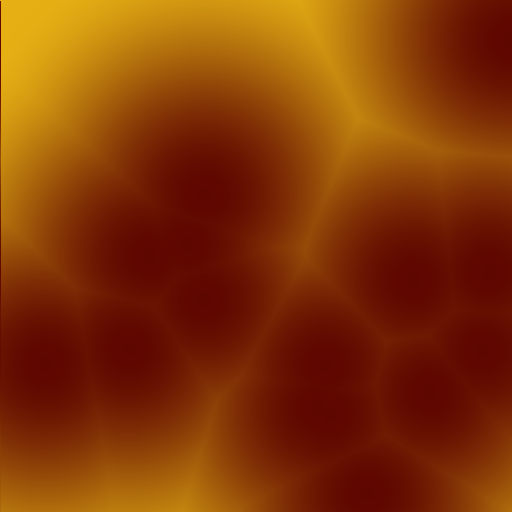
Custom Colours.
-
Transparency: To include the transparency to your texture. For more detailed transparency, pass a number to the alpha property where 0 is for no alpha influence and 1 is for full alpha influence. A number above 1 will overshoot the alpha and a value of 255 turns the texture fully transparent.
{ alpha: true}

Alpha On.
-
Interpolation: You can "turn off" interpolation for a little (mostly insignificant) speed boost. This doesn't actually turn off interpolation but rather uses bilinear interpolation ( simple distance from a point ) to calculate values. 😁. It also disables custom interpolation functions.
{ interpolate: false }

Interpolation Off, Compare with above texture.
-
Custom Interpolation Functions: To pass a custom interpolation function, simply pass a compatible function to the interpolant property in the config object of the noise instance. The interpolate property needs to be set to true for this to work. The interpolant function takes three numbers. A lower value, an upper value and a slider value( which ranges from 1 to 0 ). With this function crazy effects can be achieved like belts, spots and cat fur patterns. Expected behaviour is that the slider defines a point on an interpolation curve, thus the closer the slider is to 0 the closer it is to the lower end of the graph, what the function does is simply define the shape of the curve. This is expected behaviour, you can obviously do whatever you want in the interpolant value, as long as it abides to the following rules:
- Always returns a number.
- Returned values are always clamped between the lower and upper values.
{
interpolant: function(lower, upper, slider){
if( slider >= 0.2 ){
return upper
} else {
return lower
}
}
}
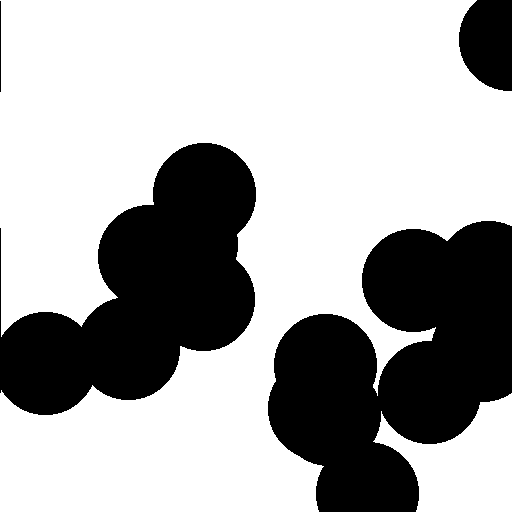
# A simple cut-off interpolant function.
-
Toggle various distance metrics: Manhattan, Euclidean and Minkowski distance metrics are supported.
{ metric: {type: "euclidean"} };
{ metric: {type: "manhattan"} };
{ metric: {type: "minkowski", p: 2} };
-
Manually add a crest: To add a crest manually to a point in the texture, use relative coordinates from 0 - 1:
noise.addCrest(0.5, 0.5);
noise.addCrest(120, 100, false);
-
Value Of A Given Pixel: To get the value of a single pixel. Given the x and y co-ordinates.
noise.pixel(50, 50, true, 2).then((value) => {
console.log(value);
})
-
Raw Data: To access the raw noise values and not the RGBA texture.
noise.Texture.generate().then((raw) => {
console.log(raw);
})
-
Nearby Crest: If you want to find the closest "crest" given a set of co-ordinates.
noise.nearestCrest(x, y, 0).then((crest) => {
console.log(crest);
})
Building.
git clone https://github.com/sokorototo/worleyjs.git
cd worleyjs
npm install
npm run build
worley.min.**js files in the build folder.
Future Updates.
- Repo is fully open for branching.
- Feedback would be much appreciated.
- Bug reports and fixes.
- All code is fully accessible and is FREE for all use.
- Created a demo Web App, located in extras/web-worker
- This is my first GitHub project, leave a star or something, tell me what I could have done wrong.
- For any complaints or suggestions go here.





