


Tiny terminal spinner
Features
- Tiny and fast
- Customizable text and color options
- Customizable spinner animations
- Only one tiny dependency
- Supports both Unicode and non-Unicode environments
- Gracefully handles process signals (e.g.,
SIGINT, SIGTERM)
- Can display different status symbols (info, success, warning, error)
- Works well in CI environments
Check out ora for more features.

Install
npm install yocto-spinner
Usage
import yoctoSpinner from 'yocto-spinner';

const spinner = yoctoSpinner({text: 'Loading…'}).start();

setTimeout(() => {
	spinner.success('Success!');
}, 2000);
API
yoctoSpinner(options?)
Creates a new spinner instance.
options
Type: object
text
Type: string
Default: ''
The text to display next to the spinner.
spinner
Type: object
Default: 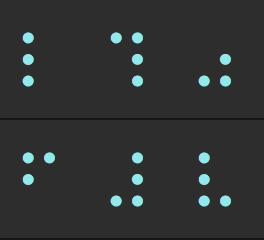
Customize the spinner animation with a custom set of frames and interval.
{
	frames: ['-', '\\', '|', '/'],
	interval: 100,
}
Pass in any spinner from cli-spinners.
color
Type: string
Default: 'cyan'
Values: 'black' | 'red' | 'green' | 'yellow' | 'blue' | 'magenta' | 'cyan' | 'white' | 'gray'
The color of the spinner.
stream
Type: stream.Writable
Default: process.stderr
The stream to which the spinner is written.
Instance methods
.start(text?)
Starts the spinner.
Returns the instance.
Optionally, updates the text:
spinner.start('Loading…');
.stop(finalText?)
Stops the spinner.
Returns the instance.
Optionally displays a final message.
spinner.stop('Stopped.');
.success(text?)
Stops the spinner and displays a success symbol with the message.
Returns the instance.
spinner.success('Success!');
.error(text?)
Stops the spinner and displays an error symbol with the message.
Returns the instance.
spinner.error('Error!');
.warning(text?)
Stops the spinner and displays a warning symbol with the message.
Returns the instance.
spinner.warning('Warning!');
.clear()
Clears the spinner.
Returns the instance.
.info(text?)
Stops the spinner and displays an info symbol with the message.
Returns the instance.
spinner.info('Info.');
.text get/set
Change the text displayed next to the spinner.
spinner.text = 'New text';
.color get/set
Change the spinner color.
.isSpinning get
Returns whether the spinner is currently spinning.
FAQ
How do I change the color of the text?
Use yoctocolors:
import yoctoSpinner from 'yocto-spinner';
import {red} from 'yoctocolors';

const spinner = yoctoSpinner({text: `Loading ${red('unicorns')}`}).start();
Can I log messages while the spinner is running?
Yes. The spinner clears itself, writes your message, and re-renders below. This works with console.log() and console.error() while the spinner is running:
const spinner = yoctoSpinner({text: 'Processing…'}).start();

console.log('Step 1 complete');
console.error('Step 2 complete');

spinner.success('Done!');
[!NOTE]
Avoid running multiple spinners concurrently.
Why does the spinner freeze?
JavaScript is single-threaded, so any synchronous operations will block the spinner's animation. To avoid this, prefer using asynchronous operations.
Comparison with ora
Ora offers more options, greater customizability, promise handling, and better Unicode detection. It’s a more mature and feature-rich package that handles more edge cases but comes with additional dependencies and a larger size. In contrast, this package is smaller, simpler, and optimized for minimal overhead, making it ideal for lightweight projects where dependency size is important. However, Ora is generally the better choice for most use cases.
Related
- ora - Comprehensive terminal spinner
- yoctocolors - Tiny terminal coloring
- nano-spawn - Tiny process execution for humans





