




Not is the minimal and blazingly fast "implement-and-forget" runtime type-checking library written in TypeScript for instant API payload checking and sanitisation, with ready-to-use error response messages to your API requestors -- all in a small and neat pack.
import Not from 'you-are-not'
const Not = require('you-are-not')
let schema = { id: "number" }
let malicious = { id: 1, role: "admin" }
let sanitised = Not.scrub(
"objectName",
schema
payload
)
console.log(sanitised)
role: "admin" is removed. Payload sanitised.
Why Not?
Not gives actionable error messages, so you know exactly what has gone wrong with your inputs/arguments/API. Use the messages directly as API replies. Build friendly APIs. Meet project deadlines.
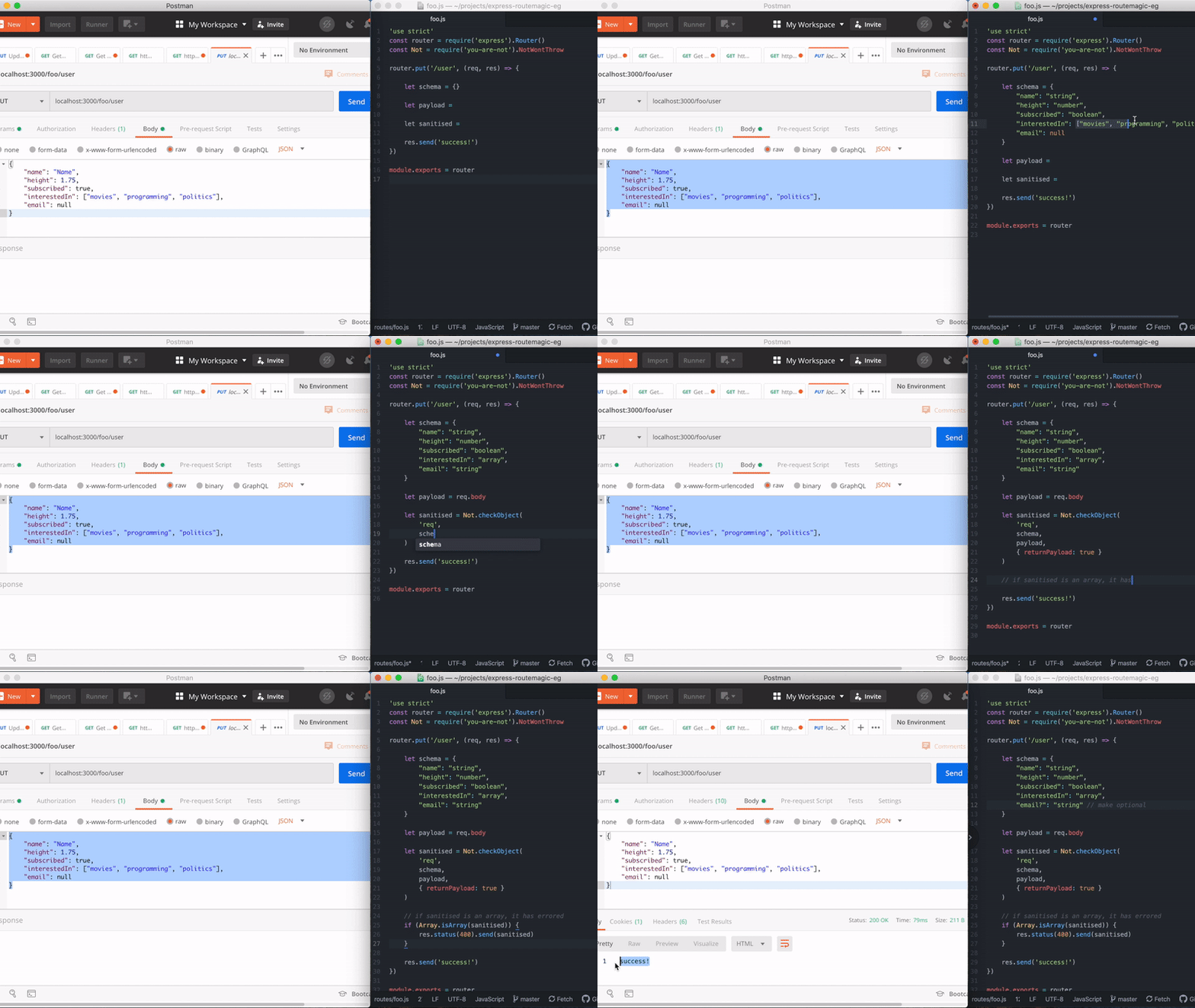
This module has no dependencies.
Installation
npm install --save you-are-not
import Not from 'you-are-not'
Simple Usage
1. For API input type-checking, validation, sanitisation and error messaging:
User makes a request with the following payload:
const payload = {
id: 1,
name: 2
}
API receiving payload defines a schema, followed by scrubbing the payload:
const schema = {
id: 'number',
name: 'string'
}
let sanitised = Not.scrub(
'payloadWithTypeError',
schema,
payload,
{ exact: true }
)
Not throws an actionable error message ready for sending back to the requestor:
TypeError (NotTS): Wrong types provided. See `trace`.
    ... stack trace ...
{
  statusCode: 400,
  trace: [
    'Wrong Type (payloadWithTypeError.id): Expecting type `number` but got `string` with value of `1`.'
  ]
}
If you are using express or fastify, thrown errors can be seamlessly used for production:
res.status(sanitised.statusCode)
res.send({
message: `You have provided erroneous inputs. \n\nMore info:\n${sanitised.trace.join('\n')}`
})
reply.code(sanitised.statusCode)
reply.send({
message: `You have provided erroneous inputs. \n\nMore info:\n${sanitised.trace.join('\n')}`
})
This will produce a 400 error with the following message property in response body:
You have provided erroneous inputs.

More info:
Wrong Type (payloadWithTypeError.id): Expecting type `number` but got `string` with value of `1`.
Suppose additional properties are provided in possibly malicious payloads, they can be sanitised:
let payloadWithMaliciousPayload = {
id: 1,
name: "foo",
role: "admin"
}
var sanitised = Not.scrub(
'payloadWithMaliciousPayload',
schema,
payloadWithTypeError
)
console.log(sanitised)
role: "admin" is removed. Payload sanitised.
2. Lightweight type-checking
Besides being a payload sanitiser, Not is a type-checker under-the-hood.
import NotProto from 'you-are-not'
const Not = Not.create()
const not = Not.createNot()
const is = Not.createIs()
const notNerfed = Not.create({ throw: false })
Use Not to cut down runtime type-checking verbiage. Instead of:
if (typeof foo !== 'string' ||
    typeof foo !== 'number' ||
    (typeof foo === 'number' && !isNaN(foo)) ||
    !Array.isArray(foo)
) {  throw Error("Not valid, but I don't know why.") }
You write:
not(['string', 'number', 'array'], foo)
is(['string', 'number', 'array'], foo)
startMyFunction()
When Not fails, it throws an error by default. You can pass throw: false to prevent throwing errors and handle them yourself:
const not = Not.createNot({ throw: false })
let input = ['a', 'sentence']
let result = not('string', input)
if (result) input = input.join(' ')
input.toLowerCase()
Full Usage
1. Valid types
The valid types you can check for are:
Primitives:
'string'
'number'
'array'
'object'
'function'
'boolean'
'null'
'undefined'
'symbol'
'nan'
Aggregated:
'optional'
Other custom types:
'integer'
2. #scrub/#checkObject
#checkObject is #scrub under the hood. Use #scrub for simplified usage (example above), and #checkObject when you want more control.
Not.scrub(objectName, schema, payload, options)

Not.checkObject(objectName, schema, payload, callback/options)
objectName: (string) Name of object.
schema: (object) An object depicting your schema.
payload: (object) The payload to check for.
options (#scrub): (object | optional). Define exact: true if you want to throw an error if there are additional properties.
callback/options (#checkObject): (object | optional). See example below:
Not.checkObject(objectName, schema, payload, (errors, payload) => { })
Not.checkObject(objectName, schema, payload, {
callback: (errors, payload) => { },
returnPayload: true/false,
exact: true/false
})
Defining Schema
"info?": {
gender: 'string',
"age?": 'number'
}
info__optional: {
gender: 'string',
age__optional: 'number'
}
info__optional: {
gender: 'string',
age: ['number', 'optional']
}
Check for multiple type by passing an array:
info: {
age: ['number', 'string'],
email: ['email']
}
#checkObject advanced usage
- If
callback/options is a callback function, it will run the callback:
Not.checkObject(name, schema, payload, function(errors) {
})
(Note: When callback is provided, Not assumes you want to handle things yourself, and will not throw errors regardless of the throw flag.)
- If
callback/options is { returnPayload: true }, #checkObject returns (a) the sanitised payload (object) when check passes, or (b) an array of errors if check fails:
let sanitised = Not.checkObject(
name,
schema,
payload,
{ returnPayload: true }
)
if (Array.isArray(sanitised) {
return
}
DB.find(sanitised)
- If
callback/options is { callback: function() {}, returnPayload: true }:
let callback = function(errors, payload) {
if(errors.length > 0) {
return
}
DB.find(payload)
}
Not.checkObject(
name,
schema,
payload,
{
returnPayload: true,
callback: callback
}
)
3. Not as simple type checker
You can also check for multiple types by passing an array. This is useful when you want your API to accept both string and number:
let not = Not.create()
let id = "123"
let anotherId = 123
let emailOptional = undefined
not(['string', 'number'], id)
not(['string', 'number'], anotherId)
not(['optional', 'string'], emailOptional)
4. Methods Available
The Not prototype has the following methods available:
Not.scrub(objectName, schema, payload)
Not.checkObject(objectName, schema, payload, options)
Not.not(expect, got, name, note)
Not.is(expect, got, name, note)
Not.lodge(expect, got, name, note)
Not.resolve([callback])
Not.defineType(options)
5. Methods: #not and #is
Not.not(expect, got, name, note)
Not.is(expect, got, name, note)
expect: (string or array of strings) The types to check for (see below on "3. Types to check for".)
got: (any) This is the the subject/candidate/payload you are checking.
name: (string | optional) You can define a name of the subject/candidate/payload, which will be included in the error message.
note: (string | optional) Any additional notes you wish to add to the error message.
Returns:
- If passed:
false.
- If failed: throws
TypeError (default), string (if willNotThrow: false) or POJO/JSON (if messageInPOJO: true).
6. Methods: #defineType: Define your own checks
Simple example
Not has a built-in custom type called integer, and suppose if you were to define it yourself, it will look like this:
Not.defineType({
primitive: 'number',
type: 'integer',
pass: function(candidate) {
return candidate.toFixed(0) === candidate.toString()
}
})
let schema = { age: 'integer' }
Not.scrub('name', schema, {
age: 22.4
})
Not.not('integer', 4.4)
Not.is('integer', 4.4)
Advanced example
Having trouble with empty [] or {} that sometimes is false or null or undefined?
Define a "falsey" type like this:
let is = Not.createIs({ throw: false })
Not.defineType({
primitive: ['null', 'undefined', 'boolean', 'object', 'nan', 'array' ],
type: 'falsey',
pass: function(candidate) {
if (is('object', candidate)) return Object.keys(candidate).length === 0
if (is('array', candidate)) return candidate.length === 0
if (is('boolean', candidate)) return candidate === false
return true
}
})
Not.not('falsey', {})
Not.not('falsey', [null])
Not.is('falsey', [])
Not.is('falsey', undefined)
Not.is(['falsey', 'function'], function() {})
7. Methods: #lodge and #resolve
You can also use #lodge and #resolve to bulk checking with more control:
let apiNot = Object.create(Not)
let apiNot = Not.create()
apiNot.lodge('string', request.name, 'name')
apiNot.lodge('boolean', request.subscribe, 'subscribe')
apiNot.lodge(['string', 'array'], request.friends, 'friends')
apiNot.lodge(['number', 'string'], request.age, 'age')
apiNot.resolve()
apiNot.resolve(errors => {
throw errors
})
(Note: This will not return any payload, since you intended to micro-manage.)
8. Verbose Output
verbose: true
let not = Not.create({
verbose: true,
throw: false
})
not('array', { wrong: "stuff" }, 'payload', 'I screwed up.')
{
message: 'Wrong Type (payload): Expect type `array` but got `object`: { wrong: "stuff" }. I screwed up.',
expect: 'array',
got: { wrong: "stuff" },
gotType: 'object',
name: 'payload',
note: 'I screwed up.',
timestamp: 167384950
}
Info: Not's Type-Checking Logic ("Opinions")
Native Javscript typing has a few quirks:
typeof []
typeof null
typeof NaN
Those are technically not wrong (or debatable), but often gets in the way.
By default, Not will apply the following treatment:
NaN is not a 'number', and will be 'nan'.Array and [] are of 'array' type, and not 'object'.null is 'null' and not an 'object'.
Switch Off Not's Opinions:
You can switch off opinionated type-checking:
let not = Not.createNot({ isOpinionated: false })
When false, all of the Javascript quirks will be restored, on top of Not's opinions: An Array will both be an 'array' as well as 'object', and null will both be 'null' and 'object':
not('object', [])
not('array', [])
not('object', null)
Switch Off Opinions Partially:
let NotWithPartialOpinions = Not.createIs({
opinionatedOnNaN: false,
opinionatedOnArray: false,
opinionatedOnNull: false
})
let NotWithPartialOpinions = Object.create(Not)
Object.assign(NotWithPartialOptions, {
opinionatedOnNaN: false,
opinionatedOnArray: false,
opinionatedOnNull: false
})
let not = NotWithPartialOpinions.create()
let is = NotWithPartialOpinions.createIs()
More Advanced Usage
Customise your message, by replacing the #msg method
You have to mutate the prototype:
import Not from 'you-are-not'
const CustomNot = Not.create()
CustomNot.msg = function(expect, got, gotType, name, note) {
let msg = 'Hey there! We are sorry that something broke, please try again!'
let hint = ` [Hint: (${name}) expect ${expect} got ${gotType} at ${note}.]`
return global.isDeveloperMode ? msg += hint : msg
}
let customNot = CustomNot.create()
global.isDeveloperMode = true
let sanitised = customNot.scrub('someWrongInput', {
someValue: 'string'
}, {
someValue: []
})
customNot('string', [], 'someWrongInput', 'file.js - xxx function')
Will give error:
Hey there! We are sorry that something broke, please try again! [Hint: (someWrongInput) expect string got array at file.js - xx function. ]
License
Not is MIT licensed.





