MailSlurp C# Client
Create real email addresses on demand. Send and receive emails and attachments from code and tests using CSharp (C# DotNet Core).
MailSlurp is an email API service that lets you create real email addresses in code. You can then send and receive emails and attachments in C# applications and tests.
var config = new Configuration();
config.ApiKey.Add("x-api-key", ApiKey);
var inboxControllerApi = new InboxControllerApi(config);
var inbox1 = inboxControllerApi.CreateInbox();
var inbox2 = inboxControllerApi.CreateInbox();
inboxControllerApi.SendEmail(inbox1.Id, new SendEmailOptions(
to: new List<string> { inbox2.EmailAddress },
subject: "Test CSharp",
body: "<span>Hello</span>",
isHTML: true
));
var email = new WaitForControllerApi(config).WaitForLatestEmail(inbox2.Id, 60000, true);
StringAssert.Contains(email.Body, "Hello");
var emails = inboxControllerApi.GetInboxEmailsPaginated(inbox2.Id);
Assert.AreEqual(emails.TotalElements, 1);
Video

Quick links
Tutorials
Get started
This section describes how to get up and running with the CSharp client. The client targets DotNet-Core 2.1 and greater. If you need a different target see the .NET Standard targets below or consider calling the REST API.
See the method documentation for a list of all functions
Create API Key
First you'll need an API Key. Create a free account and copy the key from your dashboard.
Install NuGet Package
MailSlurp's CSharp library is hosted on NuGet.
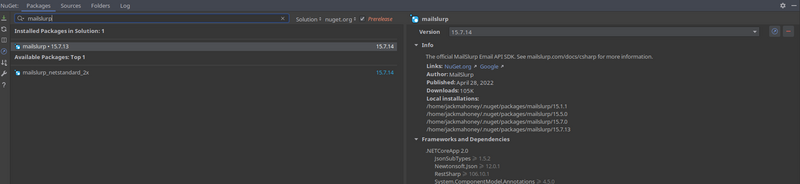
With .NET CLI
dotnet add package mailslurp
dotnet restore
Package Manager
Install-Package mailslurp
Configure client
Once your MailSlurp package is installed you can import the package like so:
using mailslurp.Api;
using mailslurp.Client;
using mailslurp.Model;
Then configure a client with using your API Key.
var configuration = new Configuration();
configuration.ApiKey.Add("x-api-key", YOUR_API_KEY);
configuration.Timeout = 120_000;
Create controllers
You can call API controllers using the corresponding ControllerApi classes.
var apiInstance = new InboxControllerApi(_configuration);
Common controllers
Email usage examples
MailSlurp has many functions. Here are some common uses:
Create an inbox
Inboxes have an ID and a real email address. You can create them using the InboxController. For more information see the creating inboxes guide.
var inboxController = new InboxControllerApi(_configuration);
var inbox = inboxController.CreateInboxWithDefaults();
Assert.That(inbox.EmailAddress, Does.Contain("@mailslurp"));
Inbox options
var options = new CreateInboxDto(
    name: "Test inbox",
    inboxType: CreateInboxDto.InboxTypeEnum.SMTPINBOX
);
var inbox = inboxController.CreateInboxWithOptions(options);
Assert.That(inbox.EmailAddress.Contains("@mailslurp"), Is.True);
Get an inbox
var inboxDto = inboxController.GetInbox(inbox.Id);
var inboxByName = inboxController.GetInboxByName(inboxDto.Name);
Assert.That(inboxByName.Exists, Is.True);
var inboxByEmailAddress = inboxController.GetInboxByEmailAddress(inboxDto.EmailAddress);
Assert.That(inboxByEmailAddress.Exists, Is.True);
Access mailbox using SMTP client
You can access inboxes via IMAP and SMTP:
var imapSmtpAccess = inboxController.GetImapSmtpAccess(inbox.Id);
Assert.Multiple(() =>
{
    Assert.That(imapSmtpAccess.SecureSmtpServerHost, Is.Not.Null);
    Assert.That(imapSmtpAccess.SecureSmtpServerPort, Is.GreaterThan(0));
    Assert.That(imapSmtpAccess.SecureSmtpUsername, Is.Not.Null);
    Assert.That(imapSmtpAccess.SecureSmtpPassword, Is.Not.Null);
});
Send with SMTP client
var smtpClient = new SmtpClient(imapSmtpAccess.SecureSmtpServerHost)
{
Port = imapSmtpAccess.SecureSmtpServerPort,
Credentials = new NetworkCredential(userName: imapSmtpAccess.SecureSmtpUsername,
password: imapSmtpAccess.SecureSmtpPassword),
EnableSsl = true
};
Can list inboxes
Inboxes are listed in paginated format:
var inboxes = inboxController.GetAllInboxes(page: 0, size: 10);
Assert.Multiple(() =>
{
Assert.That(inboxes.Pageable.PageNumber, Is.EqualTo(0));
Assert.That(inboxes.Pageable.PageSize, Is.EqualTo(10));
var inboxItem = inboxes.Content.First();
Assert.That(inboxItem.EmailAddress, Is.Not.Null);
});
See the InboxController docs for help.
Delete an inbox
inboxController.DeleteInbox(inbox.Id);
Verify email address
Validate email recipients to maintain a good sender reputation and reduce bounces.
var verificationController = new EmailVerificationControllerApi(_configuration);
var emails = new List<string>
{
    "contact@mailslurp.dev",
    "bad@mailslurp.dev"
};
var result = verificationController.ValidateEmailAddressList(new ValidateEmailAddressListOptions(emails));
Assert.Multiple(() =>
{
    Assert.That(result.InvalidEmailAddresses, Does.Contain("bad@mailslurp.dev"));
    Assert.That(result.ValidEmailAddresses, Does.Contain("contact@mailslurp.dev"));
});
Upload attachments
To send attachments first upload them. The method returns a list of attachment IDs that can be used when sending.
var attachmentController = new AttachmentControllerApi(_configuration);
var uploadOptions = new UploadAttachmentOptions(
    contentType: "text/plain",
    filename: "test.txt",
    base64Contents: Convert.ToBase64String("hello world"u8.ToArray())
);
var attachmentIds = attachmentController.UploadAttachment(uploadOptions);
Send emails
You can send an email by first creating an inbox. Then use the inbox ID to send an email from it.
var sendEmailOptions = new SendEmailOptions
{
    To = new List<string>() { recipient.EmailAddress },
    Subject = "Hello friend",
    Body = "<h1>MailSlurp supports HTML</h1>",
    Attachments = attachmentIds,
    UseInboxName = true
};
var sentEmail = inboxController.SendEmailAndConfirm(inbox.Id, sendEmailOptions);
Assert.That(sentEmail.Subject, Does.Contain("Hello"));
See the SendEmailOptions for sending options.
Receive emails
You can fetch and read emails that already exist using the EmailControllerApi. To wait for expected emails to arrive use the WaitForControllerApi to wait for conditions to be met.
You can receive emails using waitFor methods on the WaitForControllerApi class.
var inboxId = recipient.Id;
var waitForController = new WaitForControllerApi(_configuration);
var email = waitForController.WaitForLatestEmail(inboxId: inboxId, timeout: 60_000, unreadOnly: true);
Assert.That(email.Body, Does.Contain("MailSlurp supports HTML"));
You can extract content from email bodies using RegExps:
var rx = new Regex(@"Your code is: ([0-9]{3})", RegexOptions.Compiled);
var match = rx.Match(email.Body);
var code = match.Groups[1].Value;
Assert.Equal("123", code);
If you are having trouble receiving emails please see the email receiving guide or the inbox not receiving support page.
Email matching
You can wait for matching emails like so:
var matchOptions = new MatchOptions(
    conditions: new List<ConditionOption>
    {
        new(
            condition: ConditionOption.ConditionEnum.HASATTACHMENTS,
            value: ConditionOption.ValueEnum.TRUE
        )
    },
    matches: new List<MatchOption>
    {
        new(
            field: MatchOption.FieldEnum.FROM,
            should: MatchOption.ShouldEnum.EQUAL,
            value: sender
        )
    });
var matchingEmails = waitForController.WaitForMatchingEmails(inboxId: inboxId, timeout: 60_000, count: 1,
    matchOptions: matchOptions);
Assert.That(matchingEmails.First().Subject, Does.Contain("Hello"));
Fetch email by ID
var emailController = new EmailControllerApi(_configuration);
var fullEmail = emailController.GetEmail(email.Id);
Assert.That(fullEmail.Attachments, Has.Count.EqualTo(1));
Get sent emails
[TestMethod]
public void Can_Get_Sent_Emails()
{

    var sentEmailsControllerApi = new SentEmailsControllerApi(_config);
    var inboxControllerApi = new InboxControllerApi(_config);

    var inbox = inboxControllerApi.CreateInbox();
    var sentEmails = sentEmailsControllerApi.GetSentEmails(inboxId:inbox.Id, page:0, size: 20);

    Assert.IsNotNull(sentEmails.Content);
    Assert.IsNotNull(sentEmails.TotalPages);
    Assert.AreEqual(sentEmails.Pageable.PageNumber, 0);
    Assert.AreEqual(sentEmails.Pageable.PageSize, 20);
}
You can extract content using pattern matching with the WaitForController
[TestMethod]
public void Can_Extract_Codes()
{
var inboxControllerApi = new InboxControllerApi(_config);
var inbox = inboxControllerApi.CreateInbox();
var sendEmailOptions = new SendEmailOptions(
to: new List<string>() {inbox.EmailAddress},
subject: "Welcome email",
body: "Hello. Your code is X-456"
);
inboxControllerApi.SendEmail(inbox.Id, sendEmailOptions);
var waitForController = new WaitForControllerApi(_config);
var emailController = new EmailControllerApi(_config);
var email = waitForController.WaitForLatestEmail(inboxId:inbox.Id, timeout: 30000, unreadOnly: true);
StringAssert.Contains(email.Body, "Hello");
var matchOptions = new ContentMatchOptions(pattern:"Your code is ([A-Z]-[0-9]{3})");
var matchResults = emailController.GetEmailContentMatch(email.Id, matchOptions);
Assert.AreEqual(matchResults.Matches[1], "X-456");
}
SDK Documentation
See the GitHub source code for more Method Documentation.





